USE AND MAINTENANCE MANUAL
REFRIGERATED CABINETS PERFEKT | PERFEKT PLUS
29
EN
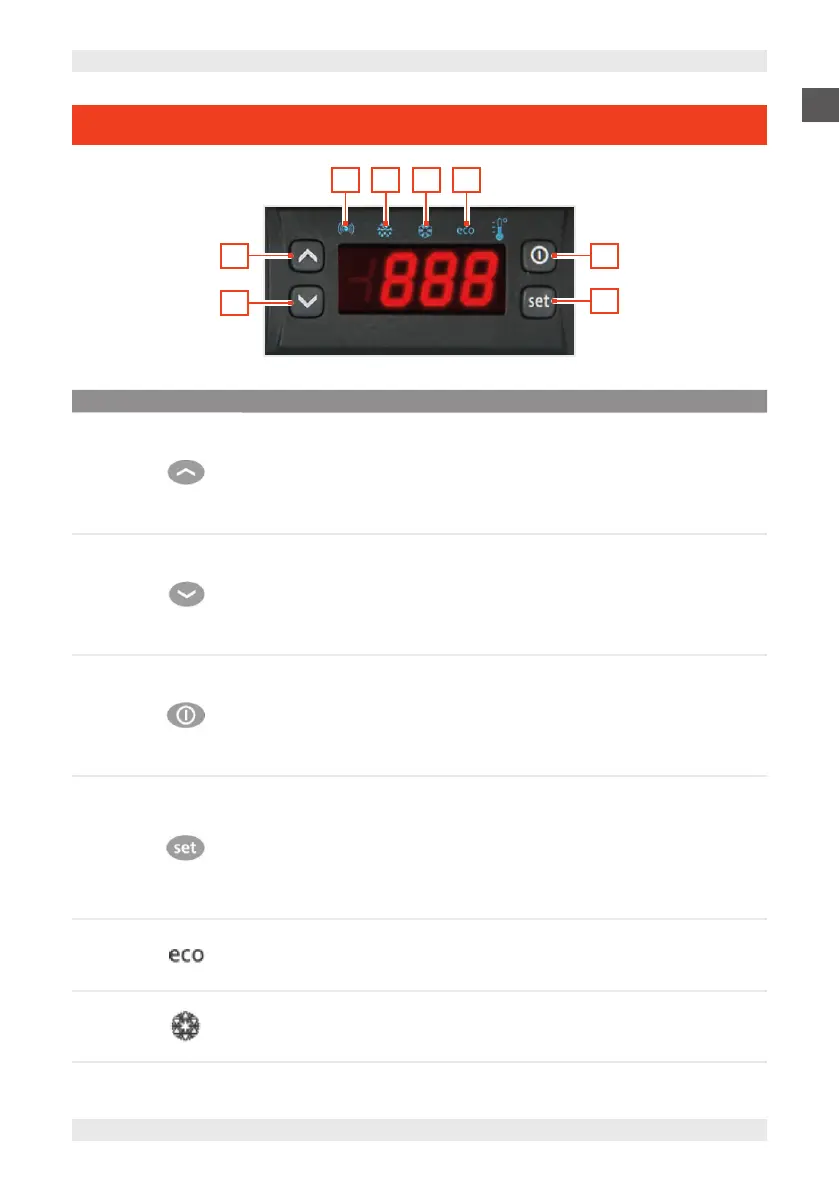
7. CONTROL PANEL (mod. EW961 - EW974)
1
2
3
4
8 7 6 5
POS. ICON ELEMENT DESCRIPTION
1
UP
Press and release
Scrolls the menu items
Increases the values
Press for at least 5 sec
Activates the Manual Defrosting function
2 DOWN
Press and release
Scrolls the menu items
Decreases the values
Press for at least 5 sec
User configurable function
3 STAND-BY (ESC)
Press and release
Returns up one level from the current menu
Confirms parameter Value
Press for at least 5 sec
Activates the Stand-by function (when not inside the menus)
4 SET (ENTER)
Press and release
Displays any alarms (if present)
Accesses the Base Controls menu
Press for at least 5 sec
Accesses the Programming menu
Confirms the controls
5 SET / SET Reduced
▪ Flashing: reduced set active
▪ Quick flash.: access to level2 parameters
▪ Off: LED off in all other cases
6 Compressor LED
▪ Fixed on: compressor on
▪ Flashing: delay, protection or activation blocked
▪ Off: LED off in all other cases


 To Next Page