Chapter 3 Components and Power Supply
The following chapter provides detailed information on the chassis of the M8-Smart router and its components. This
information includes:
• Components.
• Information on assembly.
• Power supply.
• RST button.
• Data connection.
• SIM cards installation.
• Embedded Access Point.
3.1 Components
3.1.1 Front Panel
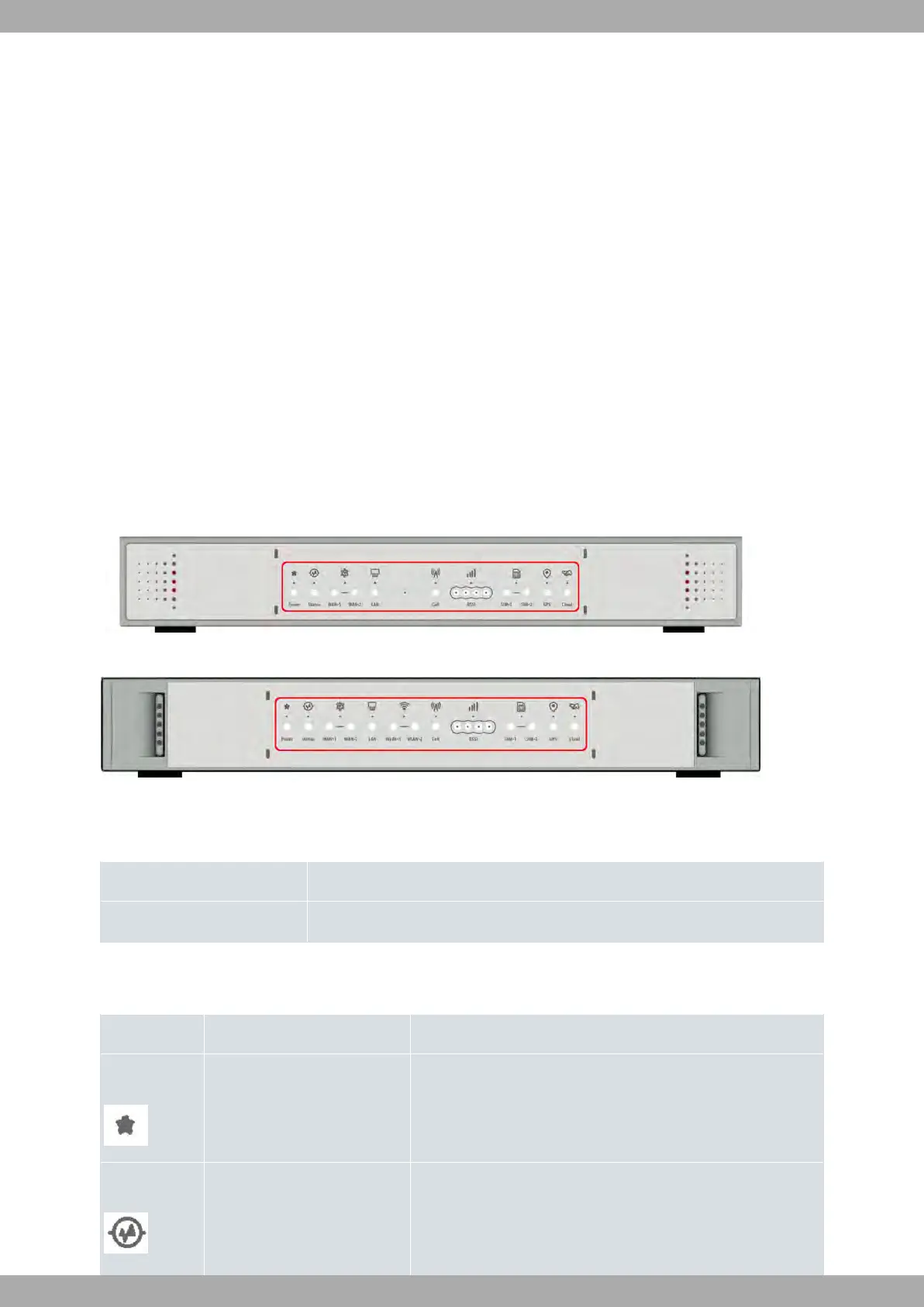
The following figure shows the front panel.
Fig. 1: Front Panel of the M8-Smart device
Fig. 2: Front Panel of the M8-Smart-WiFi device
The front panel elements are as follows:
FRONT PANEL ELEMENTS
Item Description
A LEDs panel.
The LEDs panel provides information on the status of the components (if they are active or not) and on network
activity.
LEDs
LED Definition Status Indication
Power Power / Switch On-Off Off -> No power through PSU.
On -> Powered through PSU.
Status General Status /
Default Configuration Process
Off -> System off.
Red -> Error, component operating incorrectly.
Green -> System initialized and operating.
Teldat S.A.
3 Components and Power Supply
M8-Smart 5



 To Next Page