GB
36 www.behnke-online.de
Assembly Instructions
GB
Instructions for Stainless Steel Vertical Column Installation
2.2. Series20column
For columns /-A, /-A, /-A, /-A
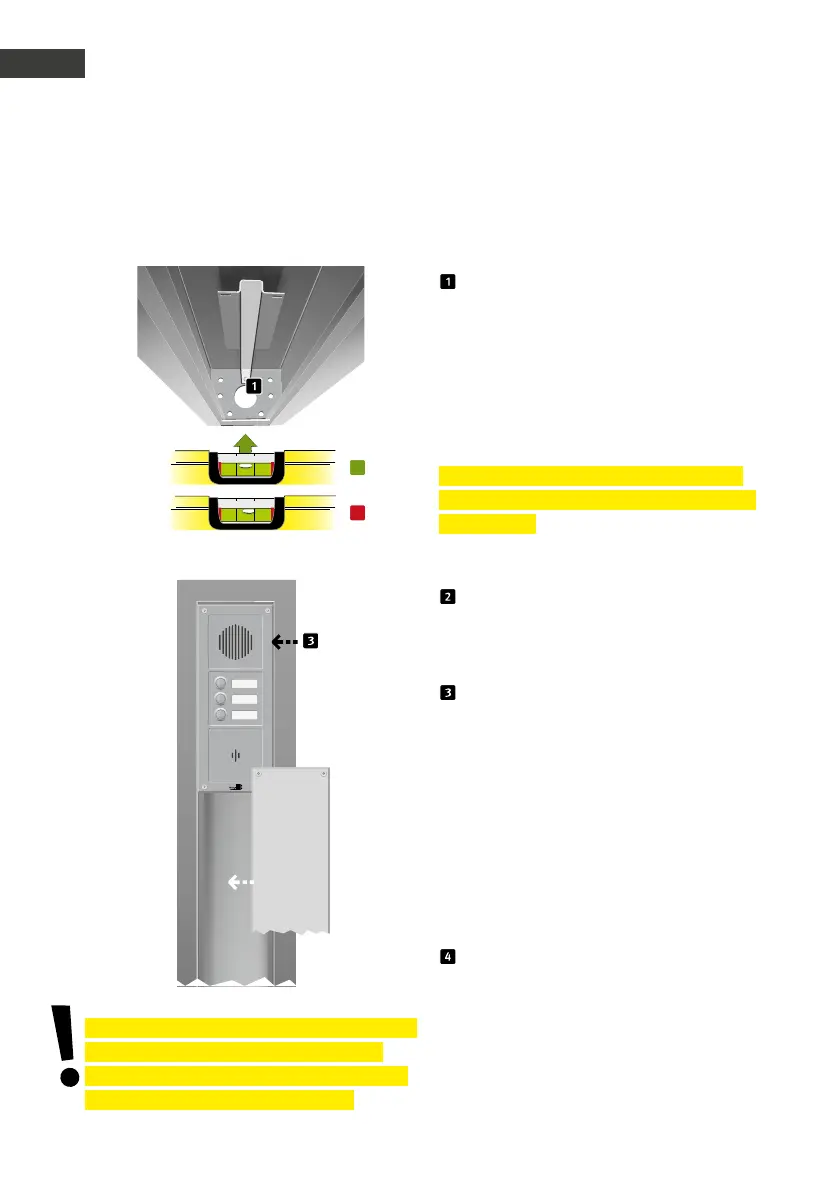
Guide the connection cables through the
column base, prior to screwing the column to
the foundation. Use hex screws and plugs, stud
bolts or stay bolts to fix the Series columns
to the concrete foundation (cf. chapter “.
Foundation sketch” on page ). We recommend
using screws etc. with a mm diameter and a
length of mm minimum.
Important! Please adhere to the torque indi-
cation for tightening as provided by the screw
manufacturer.
Please note: The fastening materials are not
included in the box.
Connect the Series / devices to the
infrastructure (cf. included user manual for the
basic electronics to be installed) and test their
functioning.
First install the door intercom station (nor-
mally from top to bottom, details See chapter
“. Assembling the columns” on page )
and then the cover panel(s) into the column.
Use clamping plates to fix them. The use of
stainless steel support columns should always
be adapted to the situation.
▸
. metres Car and wheelchair users
▸
. metres standing persons
▸
. meters Cars and vans
▸
. metres Trucks, vans and cars
Shorten the lowest closing module (closing
module without chamfer) to fit the column.
Insert the lower end into the orifice in the
column base, screw the upper part onto the
clamping plate.
* Where the installation is not level on the concrete
foundation, this may lead to the column body
being warped, which then may result in problems
concerning the columns’ waterproofness.
*

 To Next Page
 Loading...


