English - 24 -
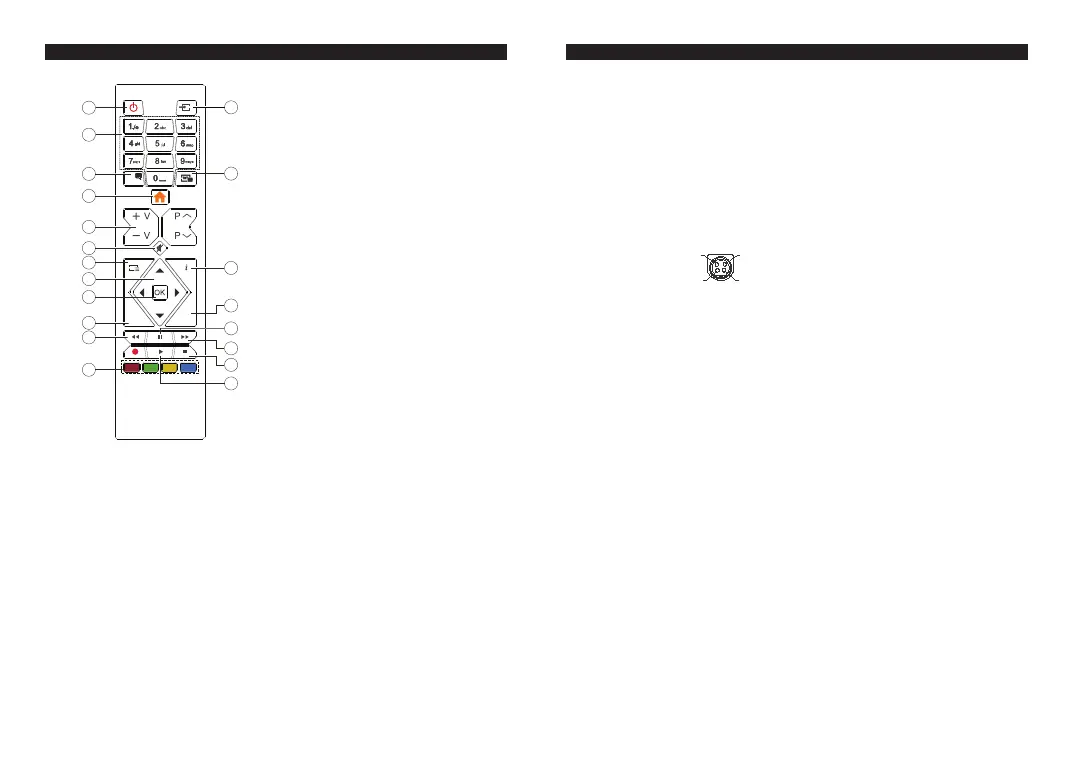
Overview of the Remote Control
%$&.
/$1*
(;,7
/$1*
'
1. Standby
2. Numeric buttons
3. Audio language selection
4. TV Menu
Volume Up / Down
Mute
7. DVD menu
8. Navigation buttons
9. OK / Select
10. Back / Previous menu
11. Rewind
12. Coloured buttons;
Red button - Zoom
Green button - Repeat
Yellow button - Root
Blue button - Title
13. Play
14. Stop
Fast forward
Pause
17. Exit
18. Time
19. Subtitle language selection
20. Source selection
English - 25 -
MOBIL TV INSTRUCTIONS
Switching the TV On Using 12 Volt
1. Connect the cigarette lighter plug cable into the cigarette lighter socket of your car.
2. Plug the other side of 12 volt cable into DC 12 socket on the back side of the TV. Then the standby LED
will light up.
3. Press the Standby button, Programme +/- buttons or a numeric button on the remote control or press the
middle of the control switch on the TV in. The TV will then switch on.
4. Adjust the antenna position for better reception or reinstall TV channels if necessary.
6ZLWFKLQJWKH792ႇ
1. Press the Standby button on the remote control or press the middle of the control switch on the TV in and
hold it down for a few seconds, so the TV will switch into standby mode.
2. Unplug cable connectors and power plugs.
ATTENTION: 12 V Input :
V+
V+
V-
V-



 To Next Page