EasyManua.ls Logo

Teletek electronics ECLIPSE 32 - Arming All Available Areas in the System; Viewing the Status of the Areas

Teletek electronics ECLIPSE 32
40 pages
Print Icon
To Next Page IconTo Next Page
To Previous Page IconTo Previous Page
Loading...
Eclipse 8/16/32/99 Series - Installation Manual
13
2.3. Zone Connection
ECLIPSE Control Panels Series Zones capability:
Control panel
Max. Zone
Connection styles
Doubling zones
ECLIPSE 8
8
5
ECLIPSE 16
16
5
ECLIPSE 32
32
9
ECLIPSE 99
99
9
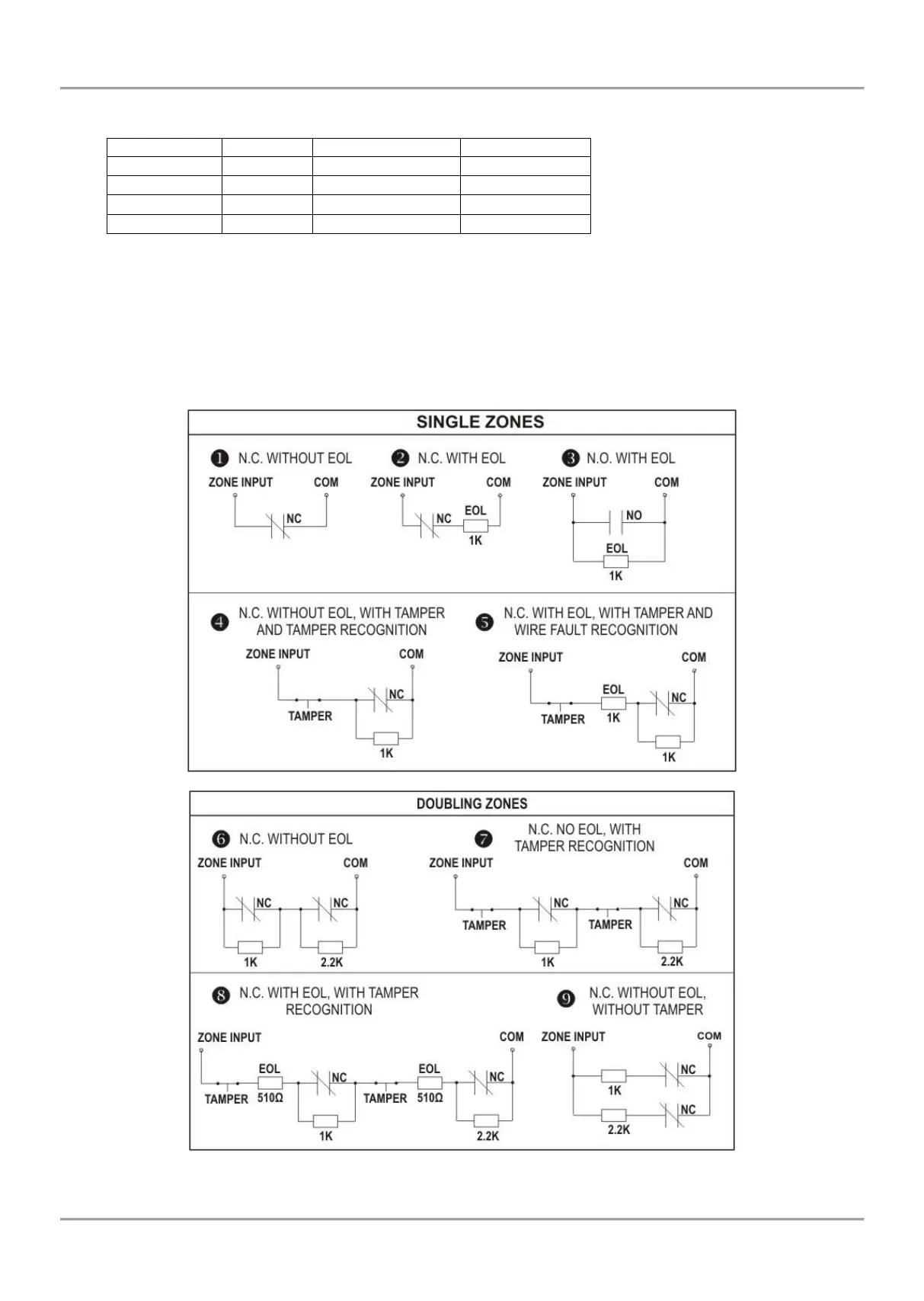
2.3.1 Connection Style Diagrams
There are different connections styles for the zones (single and doubling) in the Eclipse system. The connection style is
assigned in Menu 4. INPUTS (ADDRESS 2000 or OPERATION 200) and it is common for all zones in the system.
ATTENTION:
ECLIPSE 8/16 Control panels support only single connection in the zones.
ECLIPSE 32/99 Control panel supports both single and doubling connection in the zones.
Figure 9. Connection styles diagrams


Other manuals for Teletek electronics ECLIPSE 32

Related product manuals