10
Fire Control Panel MAG8 - Installation and Operation Manual
7. Class Change Function
To use the class change function connect the terminals of a switch with normally open
contacts to the CC (Class Change) clamps of the main module terminal. The working
mode of the sounders will be:
- when the switch is pressed - one second sounder on, one second sounder off;
- when the switch is depressed - the sounder is off.
8. Connecting of Repeater Panel
A second MAG8 can be connected to the MAG8 Fire Alarm panel as a Repeater (Slave)
panel. The function of the Repeater is to double the light and sound indication and the
button control of the rst panel at a distance up to 1000 m. For the purpose, to both of
the panels have to be assigned specic priorities: The rst re alarm panel shall be the
system Master and the second - Slave.
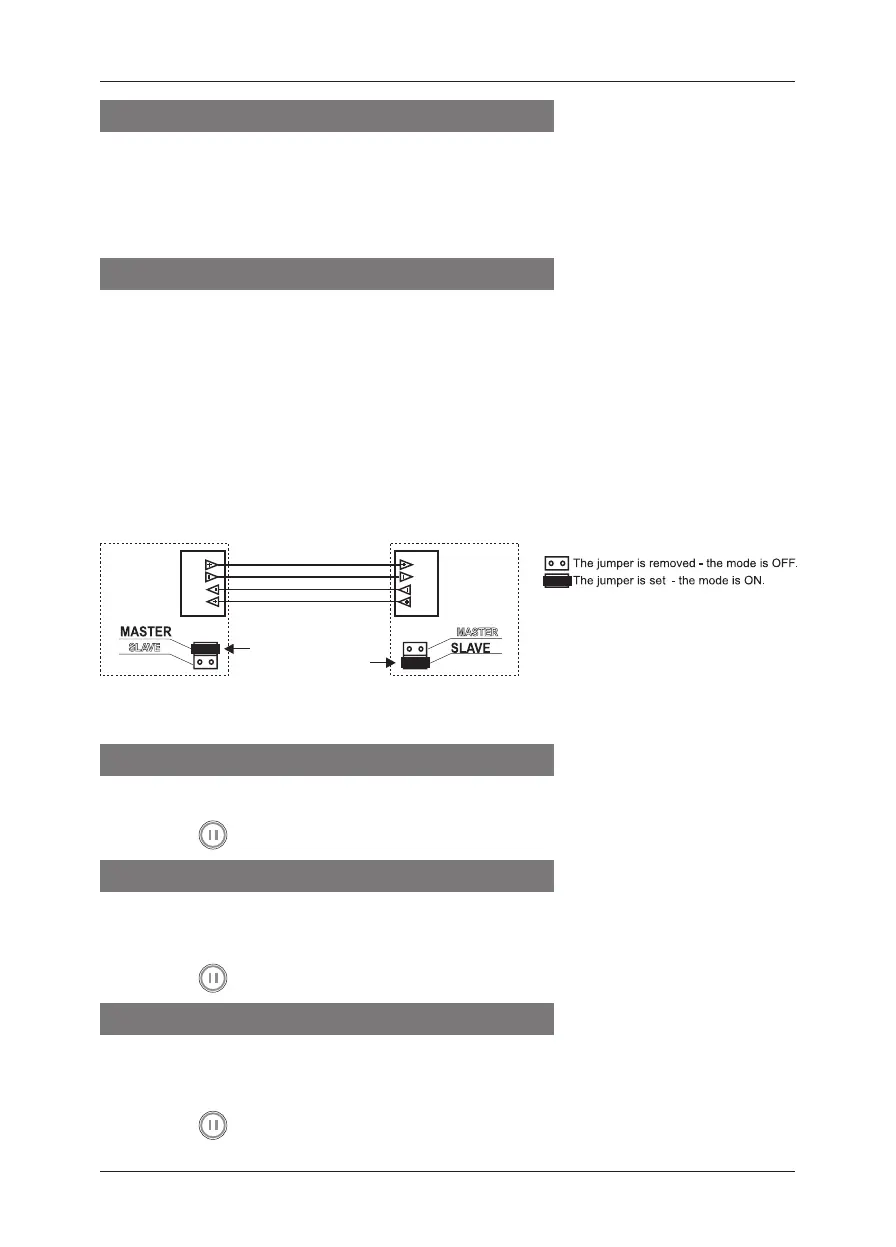
The Master panel is congured by setting a jumper on the Master position of the main
module, and the Slave - with a jumper on the Slave position (see the connection diagram
on page 16).
To add a repeater panel in the re system follow the steps:
• Turn off the main and the stand-by power supplies.
• Connect the repeater to the main MAG8 using the repeater interface:
• Turn on the main and the stand-by power supplies of the Slave panel.
• Turn on the main and the stand-by power supplies of the Master panel.
9. Programming Master Panel Mode
In order to program the Master Panel mode:
• Set a jumper on the Master position of the main module.
• Press the “
RESET” button to introduce changes.
10. Programming Repeater Panel Mode
In order to program the Repeater Panel mode:
• Set a jumper on the Slave position of the main panel module.
• Check for jumper on the Wireless terminal and remove if present.
• Press the “
RESET” button to introduce changes.
11. Programming Single Panel Mode
No jumper is set on the Master or Slave position in Single Panel Mode of the MAG8.
In order to program the Single Panel mode:
• Check whether there are jumpers set on the Master or Slave position. Remove if any.
• Press the “
RESET” button to introduce changes.
Master
panel
MAG8
Repeater
panel
MAG8
Position of the
jumper on the
panel PCB.














 To Next Page