11
Fire Control Panel MAG8 - Installation and Operation Manual
12. Programming Wireless Receiver Mode
In order to program the Wireless Receiver mode:
• Set a jumper on the Wireless position of the main module.
• Press the “
RESET” button to introduce changes.
13. Sounder Delay Mode
This is an option for setting a delay on the Sounders activation when the panel enters
FIRE mode. The indication on the front panel - the FIRE LED, however, will light up
immediately in case of a re event, regardless of whether a sounder delay has been set.
When the programmed sounder delay period expires, during which the user can possibly
nd out the cause for the alarm event, the panel enables the sounders. The sounders
can be silenced by pressing the “
SILENCE ALARM” button on the front panel.
In case of a false re alarm the user must press the “
RESET” button to return to
normal working mode.
Attention: The re alarm panel MAG8 is capable to distinguish the activation of automatic
re alarm detector and call point. In case of call point activation, the programmed sounder
time delay will be ignored and the sounders will be activated immediately.
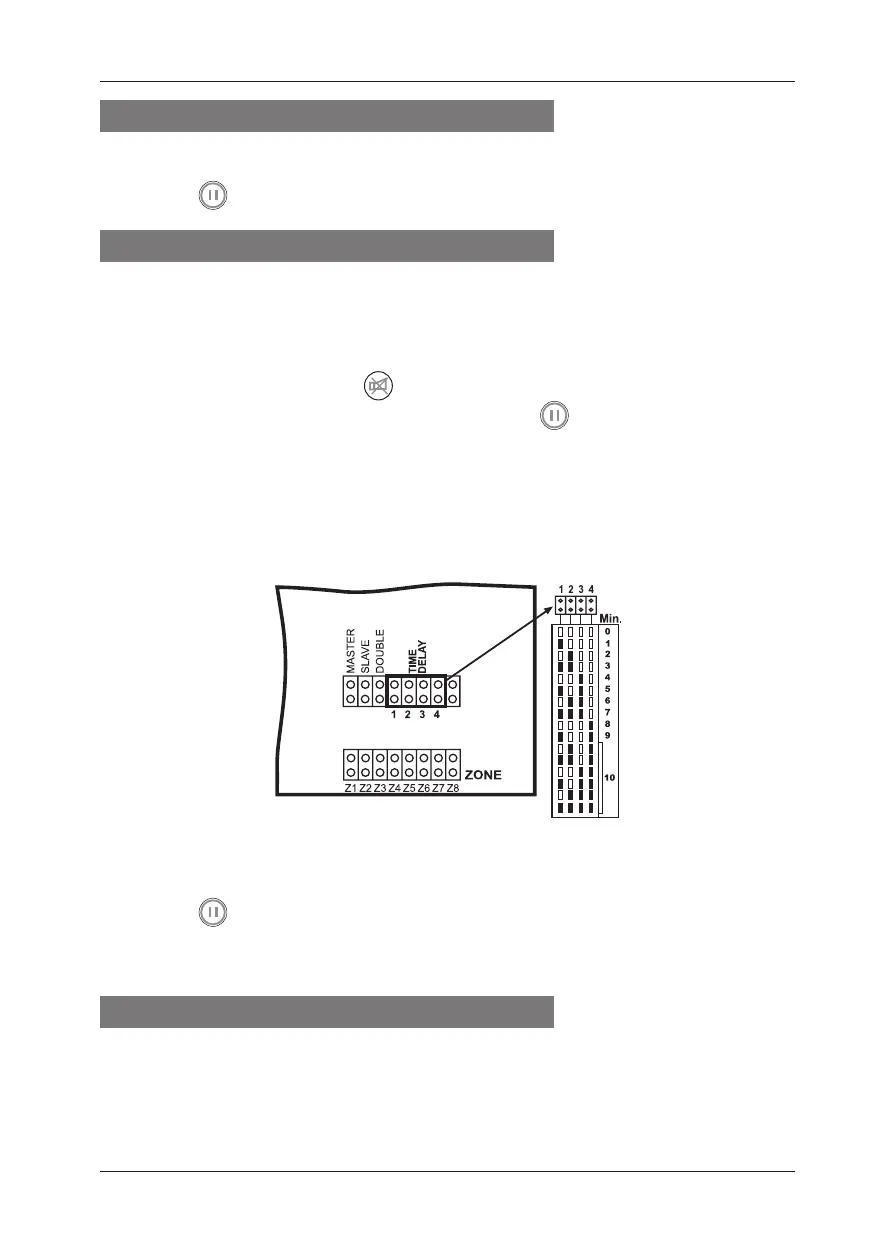
In order to program MAG8 for Sounder Delay for an interval up to 10 minutes:
• Examine the Table for Sounder Delay Programming (in minutes):
• Depending on the selected time delay, set a jumper at the TIME DELAY terminals,
marked in Figure 10 as 1, 2, 3, and 4.
• Press the “
RESET” button to introduce changes.
Example: In order to program sounder delay of 3 minutes, set jumpers on positions 1
and 2.
14. Double Action Mode
The purpose of introducing a Double Action mode is to avoid false alarms. When the
MAG8 panel has been programmed to function in this mode, in case of a re alarm
signal, the panel does not starting the sounders at once and waits for the alarm event to
be repeated within a specic time interval. The time interval has been set by default and
cannot be adjusted. For MAG8 it is 3 minutes.














 To Next Page