SIMPO Addressable Fire Alarm Panel – Maintenance Menus
17
3.5.4 Delay Т1
In this submenu the technician sets the time to Delay T1. T1 is the time delay needed for reaction of the security
personnel on the protected site. T1 provides a time delay for the personnel to go to the zone in fire alarm and to check
the situation. The operation of time delays T1 and T2 are described with the algorithm below.
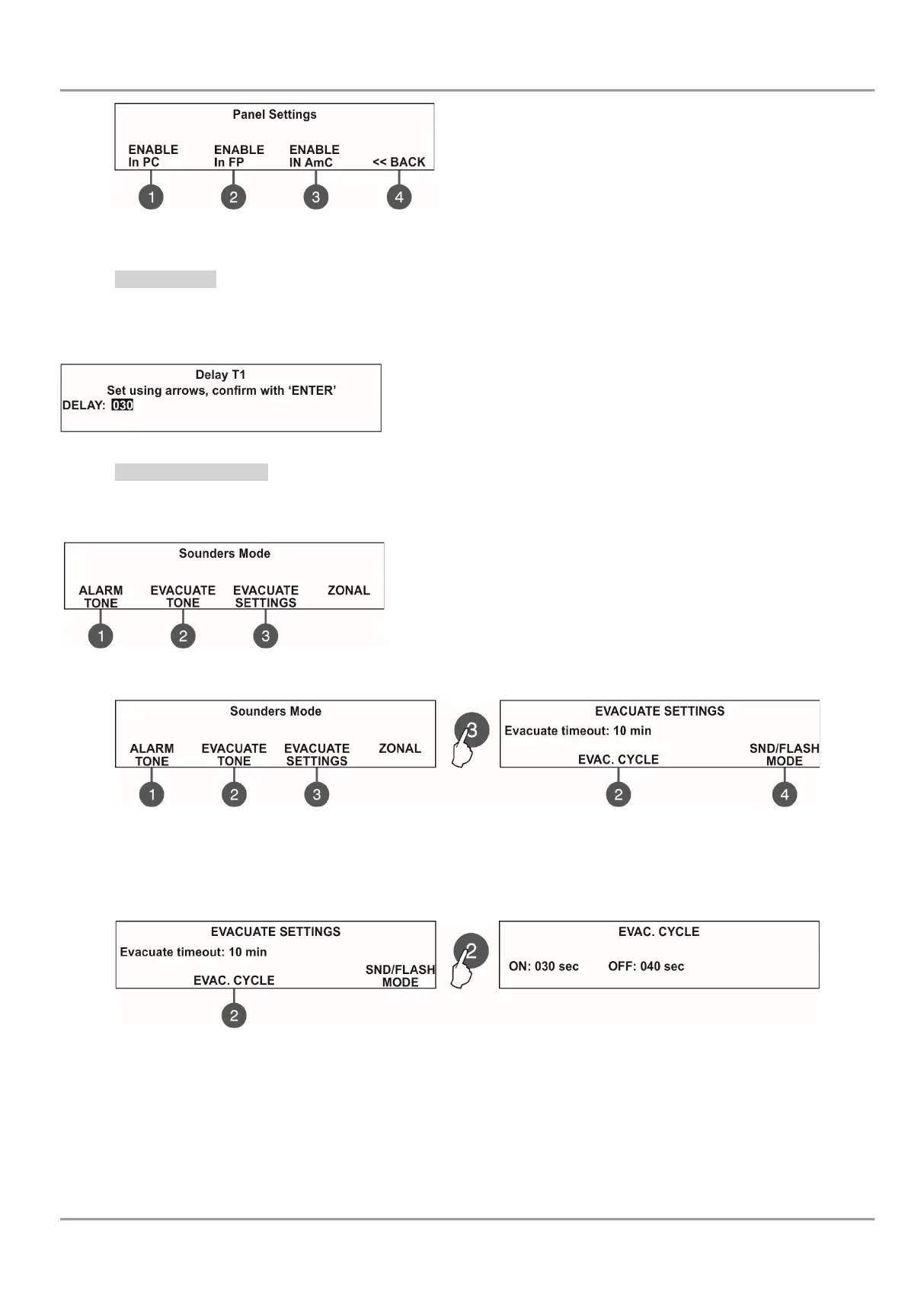
To access the DELAY T1 submenu, enter in menu - 6. GENERAL SETTING - 6.5) DELAY T1. The screen displays:
Use the up and down arrows to set the delay T1. The time interval is in
range 0 - 60 sec.
Confirm the settings with ‘ENTER’ button.
3.5.5 Sounders Mode
In this submenu the technician can review the set sounders operation mode.
To access the SOUNDERS MODE submenu, enter in the installer’s menu - 6. GENERAL SETTING - 6.6) SOUNDERS
MODE. The screen displays:
Use the functional buttons:
(1) ALARM TONE – Review the set the alarm type sound – the
reference parameters for the selected sound are listed on the last row
of the screen.
(2) EVACUATE TONE – Review the set evacuation type sound – the
reference parameters for the selected sound are listed on the last row
of the screen.
(3) EVACUATE SETTINGS – Press it to review the evacuation settings for sounders operation.
Press the (3) EVACUATE SETTINGS button to enter into the menu for reviewing a time delay - EVACUATE TIMEOUT.
The time can be changed only from Installer menus (access level 3). If a timeout time is set, in a fire situation only the
sounder of the zone(s) with alarm condition will be activated.
Use the (2) EVAC.CYCLE button to review a cycle sounding of the sounders in evacuation mode.
Two special times are defined for time intervals for sounders operation as follows:
- ON – During evacuation mode the sounders will operate with the setting of (4) MODE button described above –
for example when SND/FLASH option is set the sounders will be sounding and flashing at the same time (for the models
available).
- OFF - During evacuation mode the sounders will operate only in FLASH mode (for the models available).
After the set evacuation timeout delay is over, the sounders in the whole site are activated also, according the settings of
the (4) MODE button in this menu (set only at access level 3):
(1) In PC - Press to enable/ disable the indication for
trouble at In PC input.
(2) In FP - Press to enable/ disable the indication for
trouble at In FP input.
(3) In AmC - Press to enable/ disable the indication for
trouble at In AmC input.
(4) BACK >> - Press to return to the main screen of














 To Next Page