SIMPO Addressable Fire Alarm Panel – Maintenance Menus
4
1.3. Front Panel and Buttons
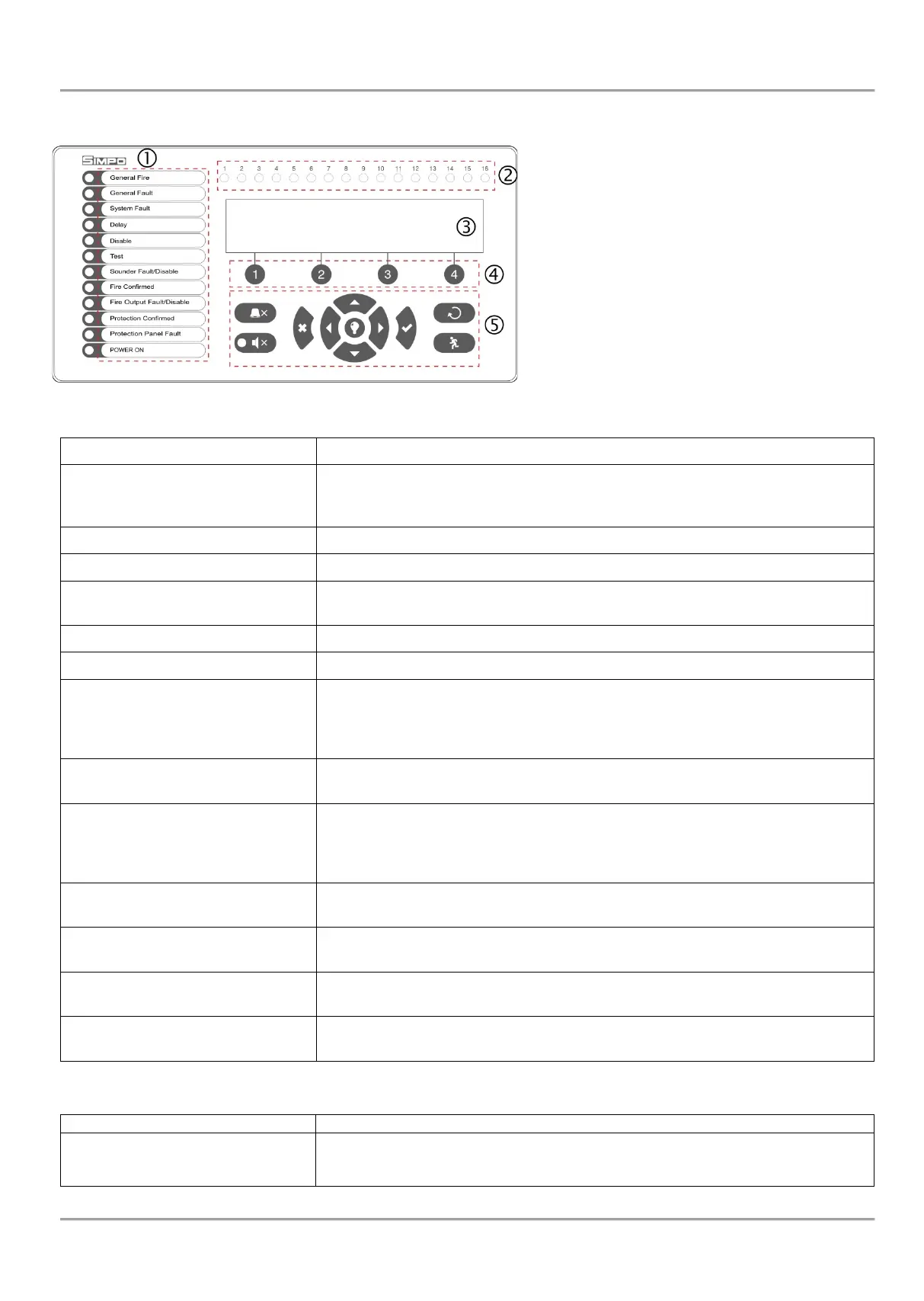
Description of the front panel elements:
1 – LED indication for the system status. The
descriptions are printed on the paper label and can
be changed if needed, including for language
change. The paper label is placed in a special
opening on the inner side of the indicator PCB,
over the flat cable for the indication.
2 – LED indication for the used zones
3 – Letters and digits LCD-module (4х40)
4 – Functional digits buttons
5 – Control and navigation buttons
1 – Description of system status LED indication:
Lights on permanently in case of fire alarm event – fire alarm signal from an
automatic or manual call point, or another auxiliary device connected to a panel
Lights on permanently in case of fault event in the system.
CPU FAULT. Lights on permanently in case of main microprocessor fault.
Lights on permanently in daytime mode and set time delay for one or several
outputs.
Light on permanently in active disablement in the system.
Light on permanently in system test mode.
(yellow)
The LED will be active in case of fault or disablement of the sounders’ circuits.
The indication is as follows:
- Blinking in case of fault event in the sounder circuits.
- Lighting on when the sounder circuits are disabled.
FIRE ALARM CONFIRMATION. Lights on permanently in activation of the
specialized “In AmC” input.
DISABLED (yellow)
The LED will be active in case of fault or disablement of the FIRE relay output.
The indication is as follows:
- Blinking in case of fault event.
- Lighting on when the output is disabled.
PROTECTION CONFIRMED
(yellow)
EXTINGUISHING STARTED CONFIRMATION. Lights on permanently in
activation of the specialized “In PC” input.
PROTECTION PANEL FAULT
(yellow)
EXTINGUISHING SYSTEM FAULT. Lights on permanently in activation of the
specialized “In FP” input.
MAIN POWER SUPPLY ON. Lights on permanently in presence of 230V main
power supply.
THE SOUNDERS ARE SILENCED. Lights on permanently when the sounders
are silenced (the LED is situated next to the button).
2 – Description of the zone LED indication:
1 - 16
FIRE IN A ZONE. Lights on permanently in case of fire alarm in zones 1-16.
Blinking when zones 1-16 are in test mode.
Note: For zones from 17 to 48 there is no LED indication.














 To Next Page