I
The Editing Key Submenu
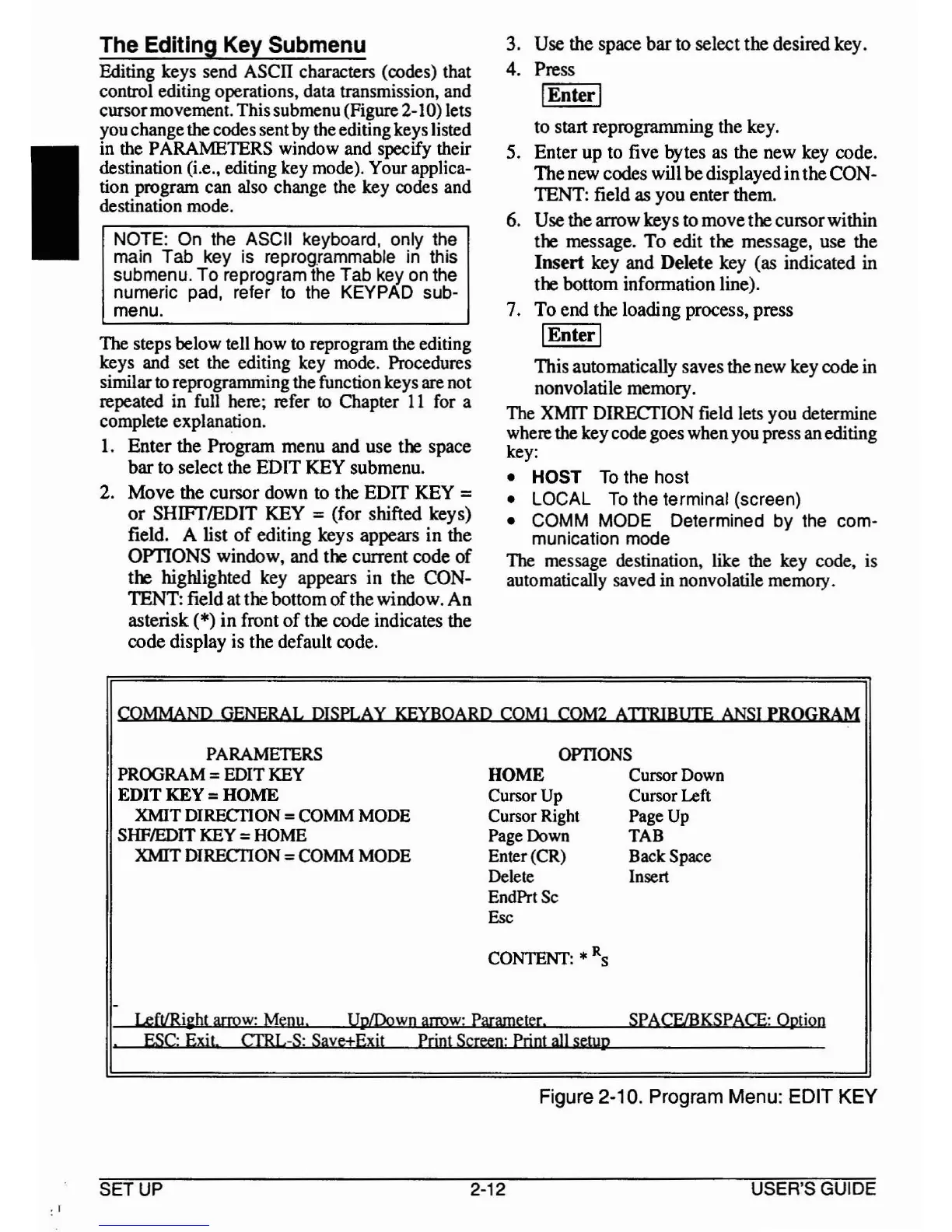
Editing keys send ASCII characters (codes) that
control editing operations, data transmission, and
cursormovement. Thissubmenu(Figure 2-10) lets
you changethe codessent
by
the editing keys listed
in the PARAMETERS window and specify their
destination (i.e., editing key mode). Your applica-
tion program can also change the key codes and
destination mode.
NOTE:
On
the ASCII keyboard, only the
main Tab key
is
reprogrammable
in
this
submenu. To reprogram
the
Tab
key
on
the
numeric pad, refer
to
the
KEYPAD sub-
menu.
The steps below tell how to reprogram the editing
keys and set the editing key mode. Procedures
similar
to reprogramming the function keys are not
repeated in full here; refer
to Chapter
11
for a
complete explanation.
1. Enter the Program menu and use the space
bar
to
select the
EDIT
KEY
submenu.
2.
Move
the cursor down to the
EDIT
KEY =
or
SHIFTIEDIT KEY =(for shifted keys)
field. A list
of
editing keys appears
in
the
OPTIONS window, and the current code
of
the highlighted key appears
in
the CON-
TENT: field atthe bottom
of
thewindow.
An
asterisk (*)
in
front
of
the code indicates the
code display is the default code.
3. Use the space
bar
to select the desired key.
4. Press
I
Enter
I
to start reprogramming the key.
5. Enter
up
to five bytes as the new key code.
Thenew codes will
be
displayed
in
theCON-
TENT: field as you enter them.
6. Use the arrow keys
to
movethe cursorwithin
the message.
To
edit the message, use the
Insert
key and
Delete
key (as indicated in
the bottom infonnation line).
7.
To
end the loading process, press
I
Enter
I
This automatically savesthe new key code in
nonvolatile memory.
The XMIT DIRECTION field lets you determine
where
the key code goes whenyou press anediting
key:
• HOST
To
the host
• LOCAL
To
the terminal (screen)
• COMM MODE Determined by the com-
munication
mode
The
message destination, like the key code, is
automatically saved in nonvolatile memory.
COMMAND GENERAL DISPLAY
KEYBOARD
COMI
COM2
ATIRIBUIE
ANSI
PROGRAM
PARAMETERS
OPTIONS
PROGRAM
=EDIT
KEY
HOME Cursor Down
EDIT KEY
=HOME Cursor
Up
Cursor Left
XMIT D1RECI10N
=
COMM
MODE
Cursor Right Page
Up
SHFIEDIT
KEY
=HOME Page Down
TAB
XMIT DIRECI10N =
COMM
MODE
Enter (CR)
BackSpace
Delete Insert
EndPrtSc
Esc
CONTENT:
*R
S
-
SPACF/BKSPACE: Option
LeftlRi~ht
arrow:
Menu.
UpLDown
arrow:
Parameter.
ESC:
Exit
CIRL-S: Save±Exjt Print
Screen:
Print
all
setup
.
Figure 2-10. Program Menu: EDIT KEY
.1
SETUP
2-12 USER'S GUIDE



 To Next Page