ClearScan™
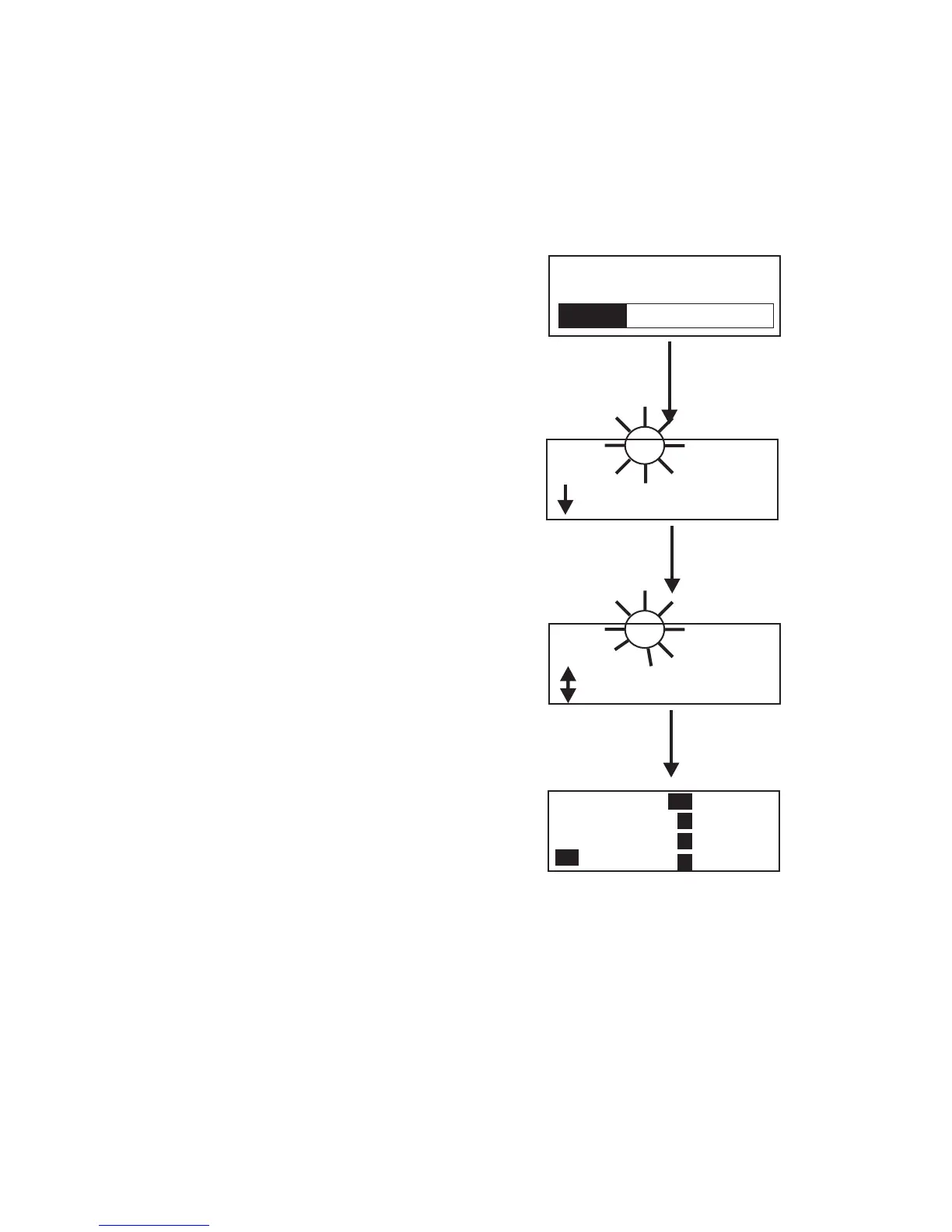
ClearScan™ performs a frequency scan of the factory-defined
and any set-up user-programmable groups in order to find the
group with the highest number of clear receive channels. After
about 20-30 seconds, the group with the highest number of
clear receive channels will be displayed. The next best group
and so forth may be accessed with the [DOWN] and [UP]
arow buttons.
•
Press [MENU] + [SET] to enter ClearScan™. The base
station will now start searching all groups for the ones
with the greatest number of receiver channels clear of in
-
terference.
•
ClearScan™ will display the group that has the most in
-
terference free receive channels. These clear channels are
displayed on the right half of the screen. Press [SET] to
place the base station on this group and return to the oper
-
ating screen. The first four receive channels displayed
will be the ones set for the group. The [UP] / [DOWN]
buttons may be used to select the next best group and so
forth.
6-9
ClearScan
TM
Group 03A
OK?=[SET]
Next
01 05
02 06
03
04 08
Group 04b 01 05
OK?=[SET]
Prev
Next
06
03
04 08
[DOWN]
[SET]
Group 04b
4
R1
On
2
3
Tx
Tx
Tx
Tx
no tx
END
ClearScan™


 To Next Page