TR-825 Menu Struc ture
ClearScan
TM
ClearScan
TM
per forms a fre quency scan of the fac tory-defined
and any set-up user-programmable groups in or der to find the
clear est group. Af ter about 30 sec onds, the clear est group is
dis played. A group is de fined by re ceive 1 and 2 fre quen cies.
The next best group and so forth may be ac cessed with the
[DOWN] and [UP] ar row but tons.
•
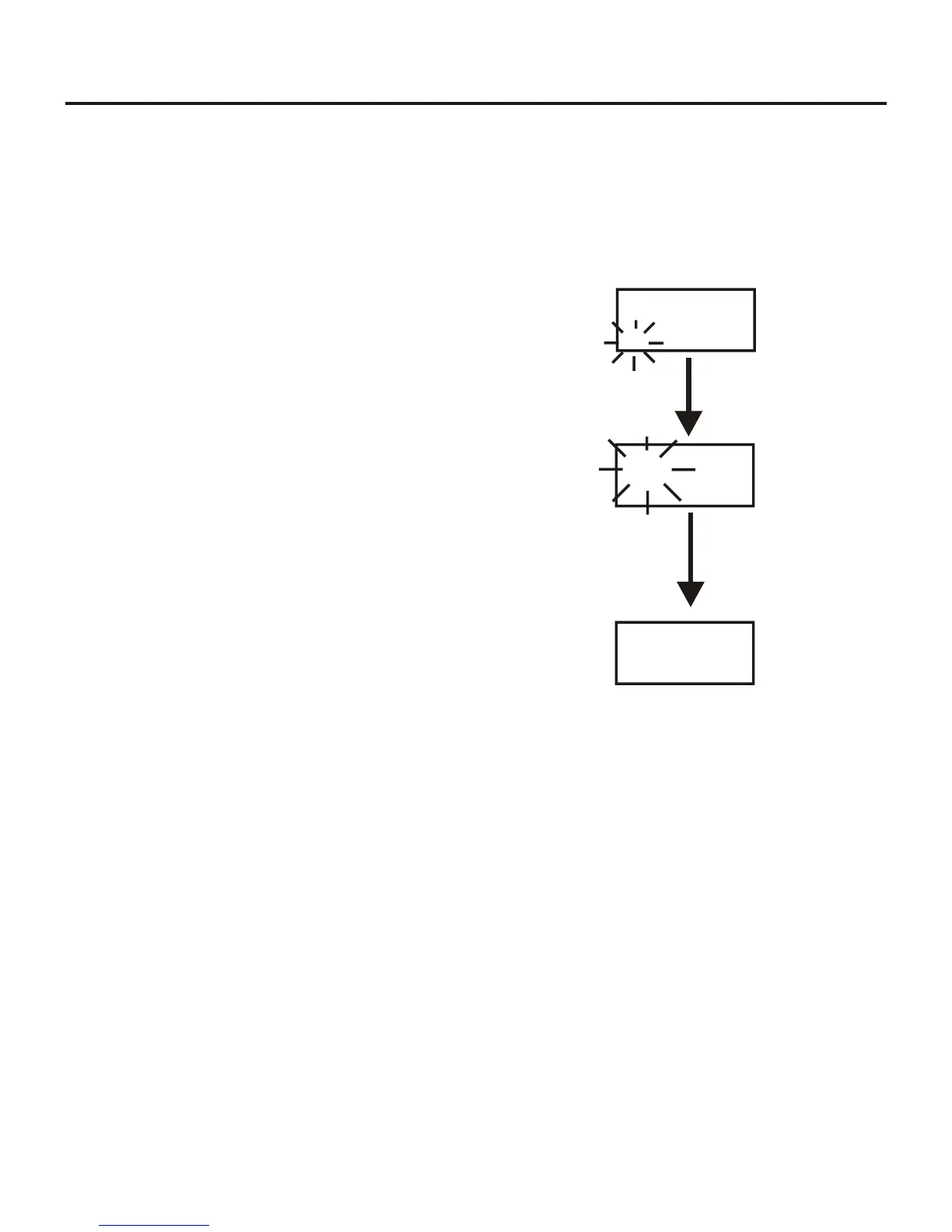
Press and hold [MENU] + [SET] for three sec onds to en -
ter ClearScan
TM
. The beltpack will now start search ing for
the clear est groups. The group sym bol will flash in di cat -
ing the beltpack is scan ning for clear groups.
•
ClearScan
TM
will scan all groups. It will then dis play the
1st group it came to that had the clear est re ceive chan nels
(low est RSSI lev els on the two fre quen cies). The [UP] /
[DOWN] but tons may be used to se lect the next best
group and so forth. Press [SET] to place the beltpack on
this group and re turn to the group/chan nel screen.
7-29
END
04b 01
GP CH
Clr Scn
GP
04b Scn
GP
[SET]
ClearScan™


 To Next Page