Telink TLSR8232 BLE SDK Developer Handbook
AN-19112700-E1 205 Ver.1.0.0
12.2 Function Description
To illustrate function of the module, conection between the module and a phone is taken
an example. The app in the phone is LightBlue, the software in PC is a serial port
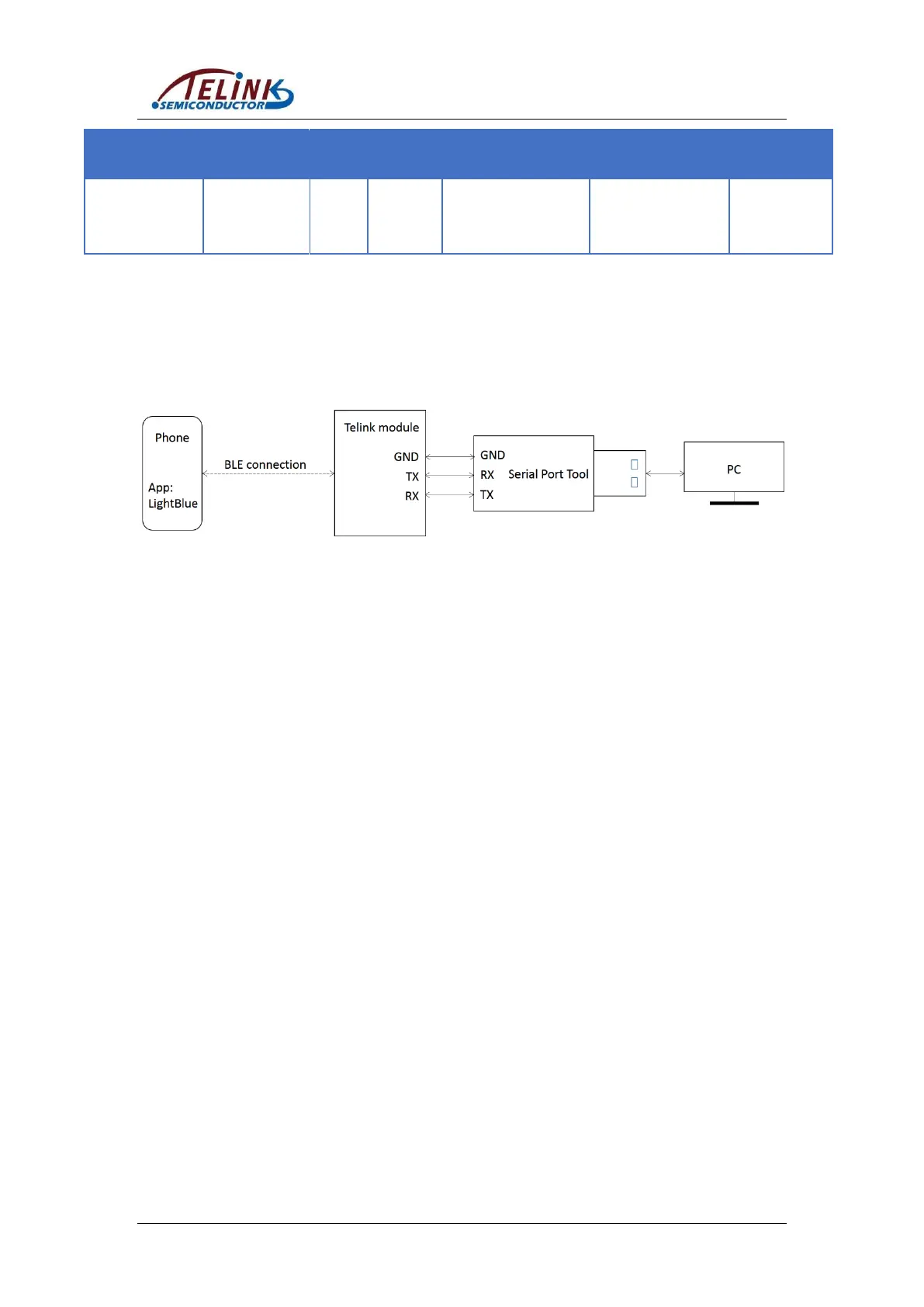
assistant. The hardware connection is as below.
Figure 12-1 Module Hardware Connection
As Figure 12-1 shows, Telink module connects serial port tool via wires, serial port tool
connects PC via USB, the serial port assistant in PC establishes soft connection with
serial port tool, thus the working environment of the module is established. Before using
the module function, the Firmware should be burned to the module. 5316 BLE SDK
provides module project, users only need to compile the module project to obtain the bin
file (Note: the bin file in this documents sets BLE_MODULE_PM_ENABLE to 0 to
disable low power, then use EVK to burn the bin file to telink module. After the
Module powers on, it sends Adv packets by default, the phone enables Bluetooth and
enters LightBlue, starts scan. The phone scans the module device (see Figure 12-2) and
establishes connection with BLE (see Figure 12-3).



 To Next Page