Bar certain types of outgoing calls (eg STD, international)
to help control your call costs. Plus choose from a number
of barring levels.
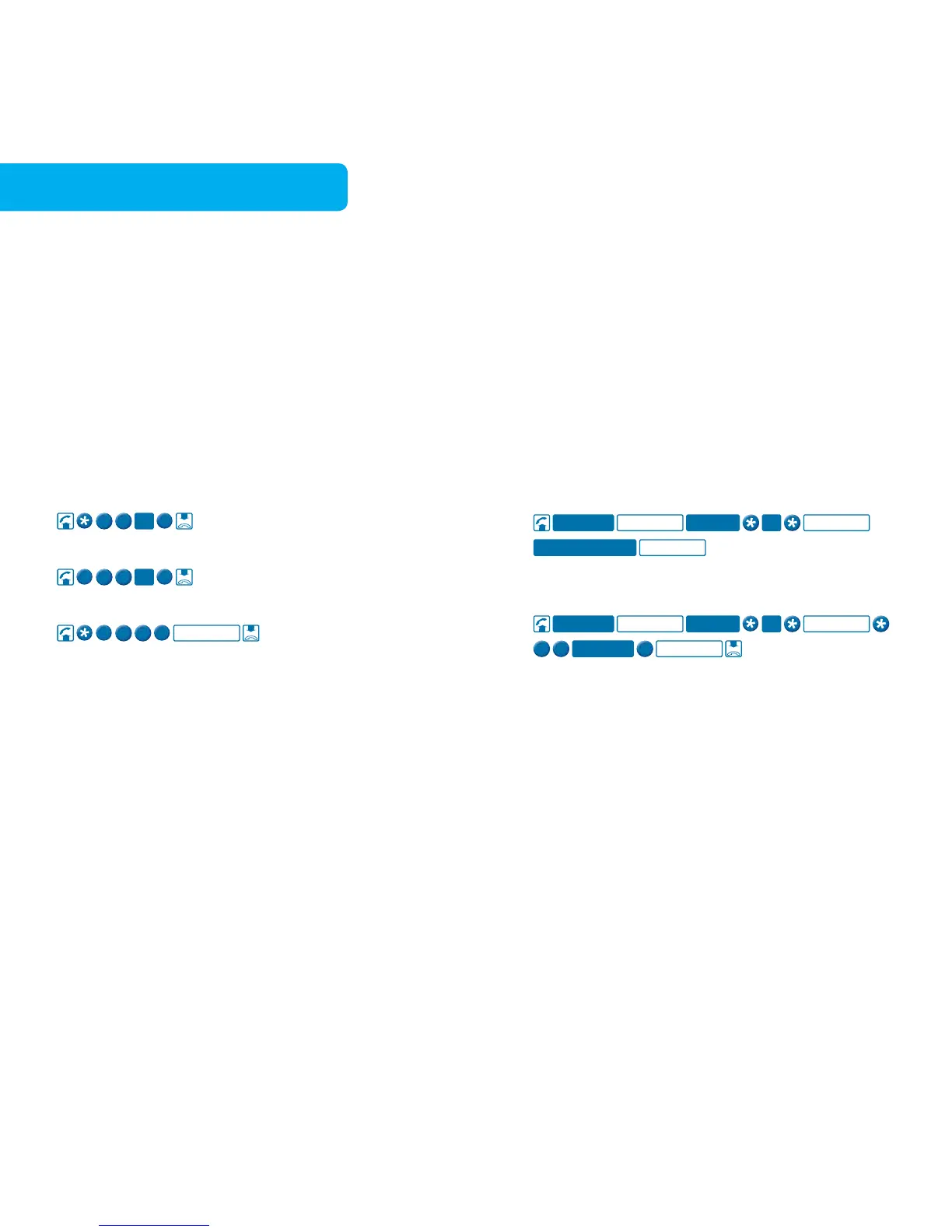
To turn Call Control on
To check if Call Control is on or off
Monthly charge applies. Reverse Charge calls can still be
accepted regardless of the level of barring. Before using
this feature you must activate your PIN on your home
phone. See page 35 for more information.
Control your Call Waiting, Call Forwarding,
Call Control, Delayed Hotline and Smart Ring
services from a remote location.
To access Remote Access
For example, to turn on Call Forward Immediate using
Remote Access
When using Remote Access, you can only make one
change per call.
To connect Call Control, Smart Ring or Delayed Hotline
call Telstra on 13 2200. Before using this feature you
must activate your PIN on your home phone.
See page 35 for more information.
Applicable call costs and monthly charge applies.



 To Next Page