Forward calls to most numbers in Australia during time
periods you specify by creating a ‘Time Period List’ with
up to 15 different time periods (days and times).
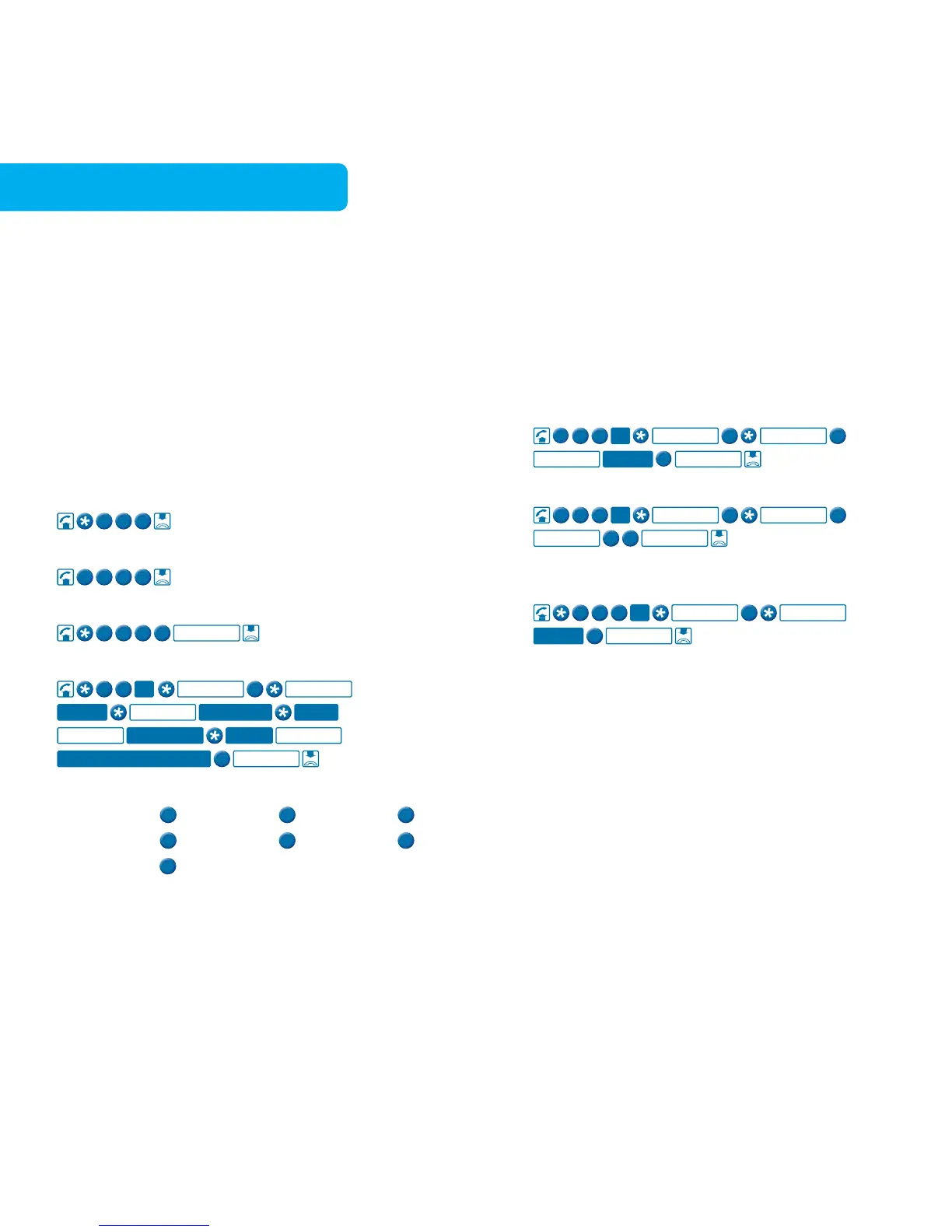
To turn Call Forward Set The Time on
To turn Call Forward Set The Time off
To check if Call Forward Set The Time is on or off
To create or modify your ‘Time Period List’
Forwarding Destination Phone Number
The day numbers are
Monday:
The time for start and finish must be in 24 hour mode,
ie 9.30am = 0930, 7.15pm = 1915, etc.
To remove a setting from your ‘Time Period List’
To remove all numbers from your ‘Time Period List’
To check which destination number and time is in one
of your ‘Time Period List’ entries
Call Forward Set The Time overrides Call Forward Busy
and No Answer. Before using this feature you must activate
your PIN on your home phone. See page 35 for more
information. Monthly charge and call charges apply.



 To Next Page