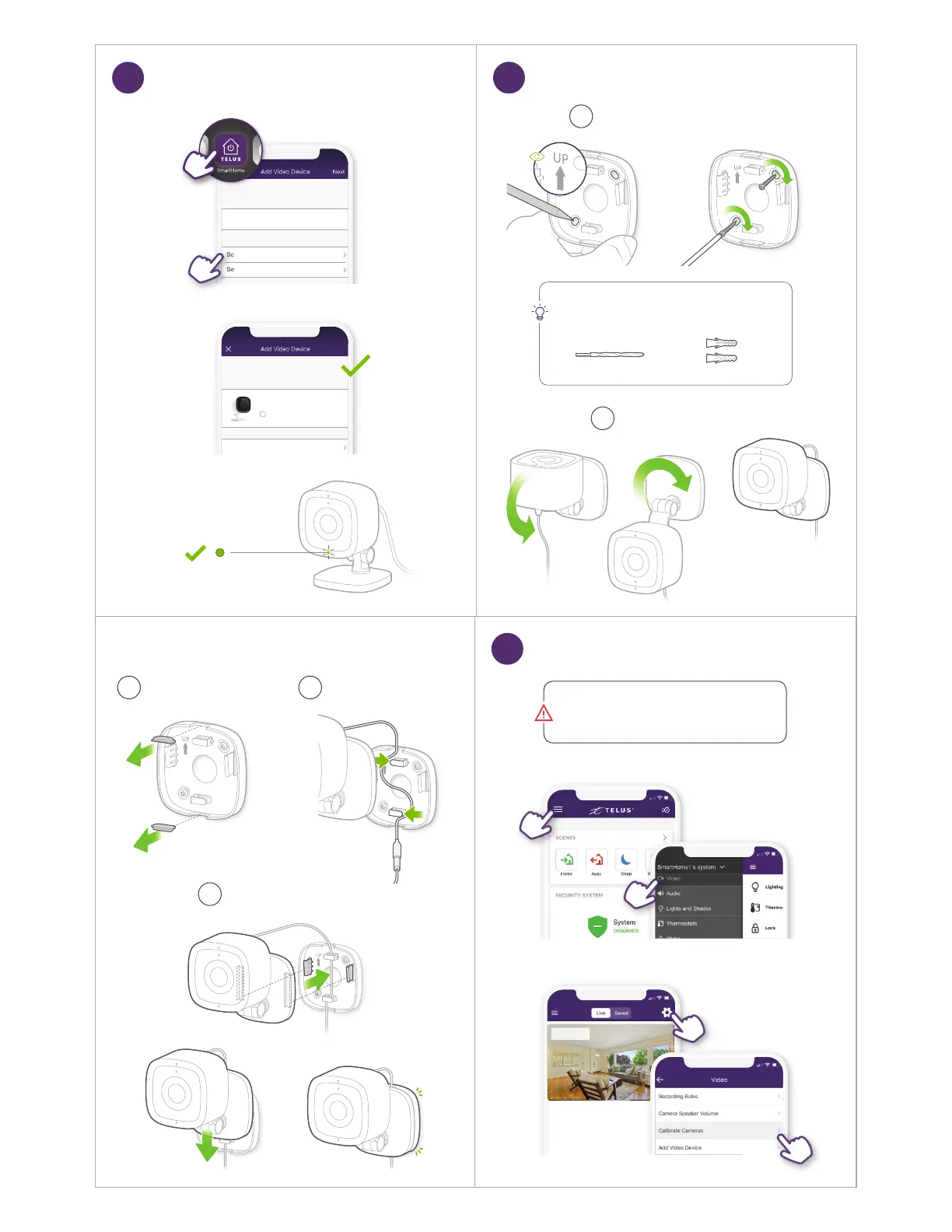
Select Network
My Wi-Fi
Scan for Networks
Setup Manually
Home
COPY NETWORK SETTINGS
OTHER NETWORKS
Select Network
My Wi-Fi
Scan for Networks
Setup Manually
Home
COPY NETWORK SETTINGS
OTHER NETWORKS
Installing...
Living Room
Install Another Video Device
This process may take a few minutes
Installing...
Living Room
Install Another Video Device
This process may take a few minutes
Waiting for camera
to connect...
Optional: Wall Mount Installation
8
Attach Mounting Bracket
1
TIP
You can also attach the mounting bracket by drilling
holes and using the drywall anchors provided.
Drywall Anchors
6mm (1/4 inch) Drill Bit
Adjust Camera
2
Solid
Follow Steps in App
7
IMPORTANT
Without completing this step, the Indoor Camera
will not function properly.
SmartHome1’s system
Driveway
Living Room
Driveway
Living Room
Calibrate Camera
9
Remove Inserts
3
Route Cable
4
Attach Camera
5


 To Next Page