TEMPUR-PEDIC ACTIVEBREEZE® USER MANUAL | 9
Personalized all-night cooling
All night, active cooling allows
you to select both the level of
cooling from low, medium, or
high, and the cooling program,
Temp-Curve or Constant
Mode.
Temp-Curve Mode: The preset
automated program, with
low, medium, or high setting,
will gradually decrease and
increase airflow to mimic the
body's natural temperature
rhythm through the night.
Constant Mode: Set your
cooling at one of three preset
levels – low, medium, or
high – for up to 10 hours of
consistent, all-night cooling.
You can use the remote to
select your preferred cooling
level and program, or you can
also use the Sleeptracker-AI®
app to program your all-night
cooling before bedtime, at
bedtime, and in the morning as
you wake up.
Bed warming
TEMPUR-ActiveBreeze®
also includes an active bed
warming feature that can be
used on either one or both
sides of the bed, for up to 60
minutes. You can select bed
warming on your remote, or
you can use the Sleeptracker-
AI® app to pre-warm your bed
before bedtime and in the
morning, as you wake up.
Warming can be used
alternatingly with cooling,
meaning you can pre-warm
your mattress before bedtime,
and then cool the bed
throughout the night, and then
warm the bed before waking
up again.
With the easy-to-use
ProSmart® Air remote and
Sleeptracker-AI® app, each
sleeper can personalize their
individual side of the bed or
sync the two sides
to function together.
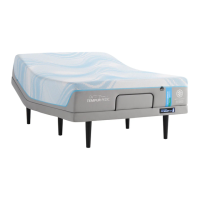
The TEMPUR-ActiveBreeze®
smart bed features a dual-
zone climate control system
that allows each partner
the ability to independently
control and personalize their
own sleep temperature on
their side of the bed.
Personalize
your
sleep
temperature.
SLEEP TEMPERATURE
CONTROL



 To Next Page