EasyManua.ls Logo

Ten-Tec JUPITER - Page 14

Ten-Tec JUPITER
92 pages
Print Icon
To Next Page IconTo Next Page
To Previous Page IconTo Previous Page
Loading...
1.4.4.
RX
LED
The
green
RX
LED
is
lit
JUPITER's
receiver
is
operational.
1.4.5.
TX
LED
The
red
TX
LED
is
lit
when
JUPITER
is
transmitting.
1.4.6.
AUTOMATIC
LEVEL
CONTROL
LED
The
red
ALC
LED
lights
when
transmit
power
peaks
reach
the
proper
level.
Use
it
for
adjustment
of
MIC
gain.
The
LED
will
flash
when
JUPITER
is
transmitting
at
proper
ALC
level
for
CW
or
SSB.
when
1.5.
REAR
PANEL
CONNECTIONS
There
are
several
rear
panel
connections
on
JUPITER,
to
interface
other
station
equipment
with
the
transceiver.
15,1.
50-ОНМ
АМТЕММА
This
50-239
jack
connects
to
a
suitable
(SWR
<
2:1)
50-ohm
coax-fed
antenna.
1.5.2.
GROUND
А
wing
nut
connector
provides
Ше
means
to
connect
JUPITER
to
your
station
ground.
A
good
ground
system
is
essential
for
optimum
operation
of
any
transmitter.
The
best
solution
is
to
connect
all
the
station
equipment
chassis
together
using
a
heavy
flat
ground
braid.
Use
another
length
of
braid
to
connect
to
a
ground
rod.
Keep
all
connections
as
short
as
possible.
If
you
are
not
using
a
linear
amplifier
a
less
ideal
ground
will
suffice.
A
short
ground
connection
to
the
copper
cold
water
plumbing
pipe
is
usually
acceptable.
Antenna
type
and
proximity
to
the
station
are
also
factors
іп
choosing
ground
methods.
With
good
resonant
antennas
located
away
from
the
station,
the
AC
ground
in
your
house
wiring
may
be
adequate.
74269
Second
Printing
Model
538
JUPITER
30
August,
2001
1.5.3.
DC
POWER
This
is
a
2-pin
MOLEX™
connector
for
connection
of
a
suitable
13.8
VDC
power
supply
with
20-ampere
capacity.
See
paragraph
1.1
for
details.
Please
observe
correct
polarity
when
using
this
jack
or
damage
will
result.
1.5.4,
FUSE
A
25-ampere
blade
fuse
protects
JUPITER’s
transceiver
wiring
if
an
internal
fault
should
occur.
JUPITER’s
packing
kit
includes
a
spare
fuse
(#27074).
These
fuses
are
commonly
available
at
automotive
supply
stores.
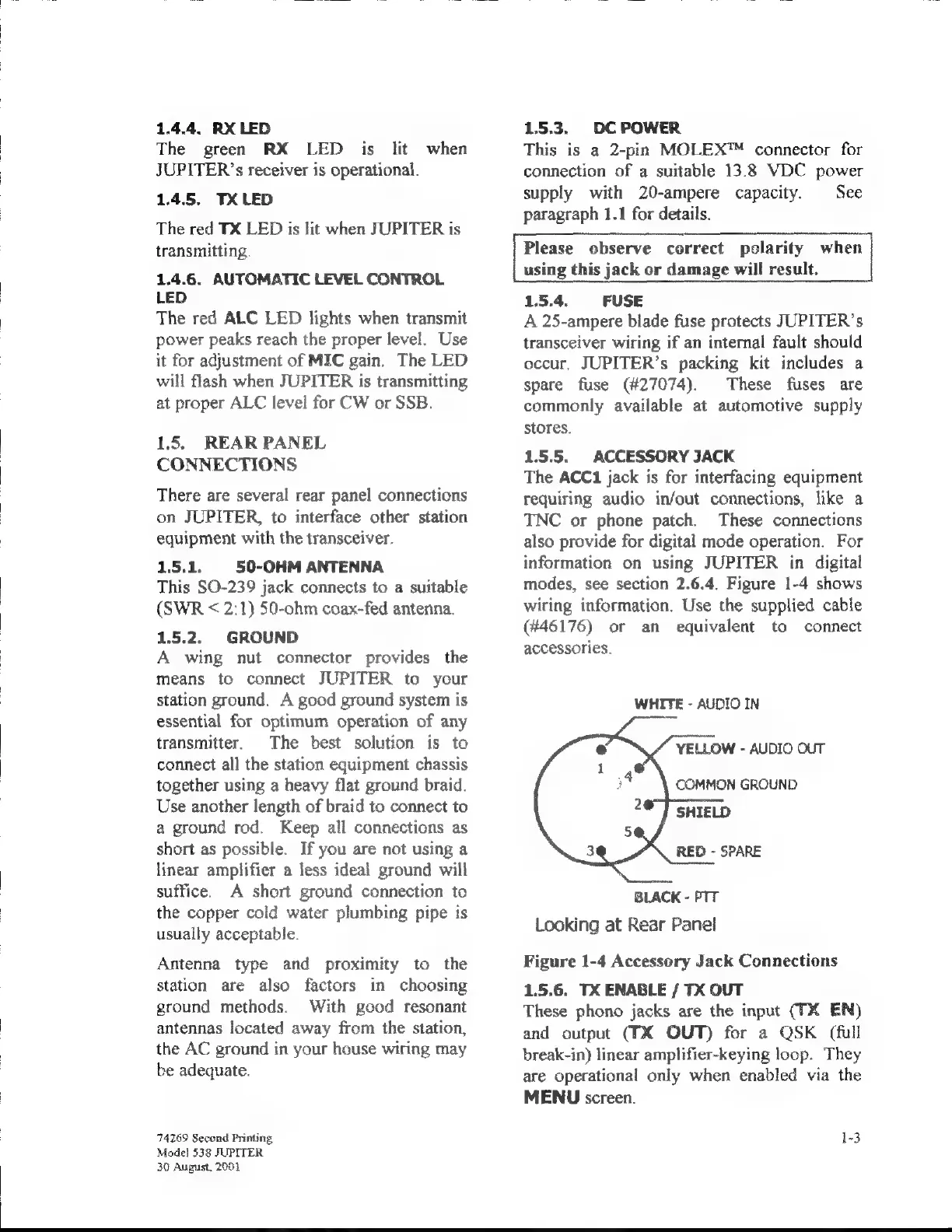
1.5.5.
ACCESSORY
JACK
The
ACCi
jack
is
for
interfacing
equipment
requiring
audio
in/out
connections,
like
a
TNC
or
phone
patch.
These
connections
also
provide
for
digital
mode
operation.
For
information
on
using
JUPITER
in
digital
modes,
see
section
2.6.4.
Figure
1-4
shows
wiring
information.
Use
the
supplied
cable
(#46176)
or
an
equivalent
to
connect
accessories.
WHITE
-
AUDIO
IN
YELLOW
-
AUDIO
OUT
COMMON
GROUND
]
SHIELD
RED
-
SPARE
BLACK
-
PTT
Looking
at
Rear
Panel
Figure
1-4
Accessory
Jack
Connections
1.5.6.
TX
ENABLE
/
TX
OUT
These
phono
jacks
are
the
input
(TX
EN)
and
output
(TX
OUT)
for
а
QSK
(full
break-in)
linear
amplifier-keying
loop.
They
are
operational
only
when
enabled
via
the
MENU
screen.
1-3
2

Related product manuals