EasyManua.ls Logo

Ten-Tec JUPITER - Page 13

Ten-Tec JUPITER
92 pages
Print Icon
To Next Page IconTo Next Page
To Previous Page IconTo Previous Page
Loading...
Be
sure
to
keep
both
speaker
leads
ungrounded
if
you
connect
them
to
any
station
accessories.
1.4.
FRONT
PANEL
CONNECTORS
AND
INDICATORS
Three
front
panel
jacks
connect
the
operator’s
microphone,
key
or
keyer,
and
headphones
to
the
transceiver.
Four
LEDs
provide
the
operator
with
transceiver
status
information.
1.4.1.
PHONES
This
is
a
standard
jack
used
for
connecting
8-ohm
stereo
or
mono
headphones.
However,
because
dropping
resistors
reduce
the
output
to
headphone
level
at
this
jack,
it
cannot
provide
sufficient
audio
level
to
drive
an
external
speaker.
Use
the
rear
panel
EXT
SPEAKER
jack
for
that
purpose.
1.4.2.
KEY
Two
methods
are
available
for
keying
the
transceiver
in
CW
mode.
The
front
panel
KEY
jack
provides
CW
with
a
straight
key,
bug,
or
external
keyer.
To
use
JUPITER's
internal
keyer
with
your
iambic
or
single
lever
paddle,
refer
to
Figure
3
and
use
the
1/4"
stereo
plug
(#35017)
supplied
in
the
packing
kit.
A
front
panel
MENU
function
allows
the
operator
to
configure
the
jack
to
accept
either
a
monaural
(2-circuit
*mono"
input
(like
a
straight
key,
bug,
or
external
keyer),
or
a
"stereo"
paddle
input.
The
factory
value
on
power-up
(or
RESET)
is
to
accept
a
*mono"
input.
Older
Ten-Tec
keyers
with
a
phono
plug
output
will
work
with
JUPITER
via
a
RadioShack™
рай
#274-320
(ог
equivalent)
male
phono
plug
to
1/4"
mono
male
adapter.
Refer
to
paragraph
3.2
for
more
information
оп
MENU
functions.
12
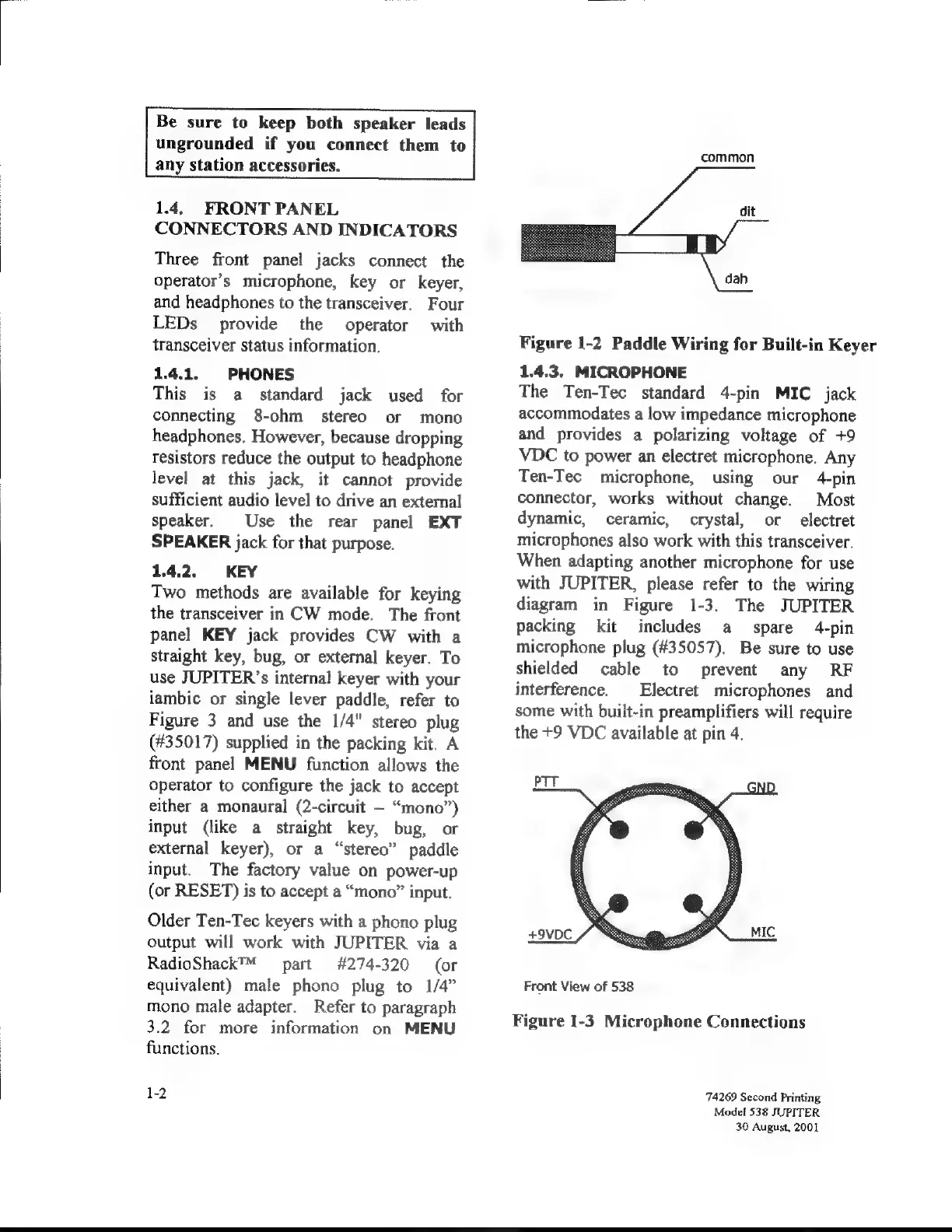
common
Figure
1-2
Paddle
Wiring
for
Built-in
Keyer
1.4.3.
MICROPHONE
The
Ten-Tec
standard
4-pin
MIC
jack
accommodates
a
low
impedance
microphone
and
provides
a
polarizing
voltage
of
+9
VDC
to
power
an
electret
microphone.
Any
Ten-Tec
microphone,
using
our
4-ріп
connector,
works
without
change.
Most
dynamic,
ceramic,
crystal,
or
electret
microphones
also
work
with
this
transceiver.
When
adapting
another
microphone
for
use
with
JUPITER,
please
refer
to
the
wiring
diagram
in
Figure
1-3.
The
JUPITER
packing
kit
includes
а
spare
4-ріп
microphone
plug
(#35057).
Be
sure
to
use
shielded
са
е
to
prevent
апу
КЕ
interference.
Electret
microphones
and
some
with
built-in
preamplifiers
will
require
the
*9
VDC
available
at
pin
4.
PTT
Front
View
of
538
Figure
1-3
Microphone
Connections
74269
Second
Printing
Моде!
538
JUPITER
30
August,
2001

Related product manuals