EasyManua.ls Logo

Ten-Tec JUPITER - Page 28

Ten-Tec JUPITER
92 pages
Print Icon
To Next Page IconTo Next Page
To Previous Page IconTo Previous Page
Loading...
3.
DETAILED
OPERATING
INSTRUCTIONS
3.1.
INTRODUCTION
Chapter
2
of
this
manual
describes
many
of
JUPITER’
в
basic
transmit
and
receive
functions
in
sufficient
detail
to
get
started
quickly.
This
chapter
provides
more
detailed
operating
instructions
to
permit
taking
full
advantage
of
the
transceiver's
capabilities.
Customize
these
settings
to
your
operating
preferences.
JUPITER
will
retain
them
in
non-volatile
memory
if
you
wait
approximately
five
seconds
without
adjusting
апу
controls
before
you
remove
power
from
the
radio.
When
you
next
turn
on
the
radio
your
custom
settings
will
remain
until
you
change
them.
3.2.
АМ
OPERATION
Double-sideband-AM-with-carrier
was
once
the
predominant
mode
of
voice
modulation
in
amateur
radio.
Because
АМ
remains
popular
with
some
of
our
customers,
Ten-Tec
has
added
DSP
firmware
to
JUPITER
to
enable
that
mode.
Two
of
JUPITER's
controls
operate
differently
when
AM
is
the
selected
mode.
The
TUNE
control
activates
the
AM-AUTO-SET
function.
Pushing
that
key
with
the
MODE
іп
AM
causes
JUPITER
to
automatically
adjust
carrier
power
to
25
watts
in
order
to
keep
the
peak
modulated
RF
output
to
100
watts.
CAUTION:
the
RF
output
will
pulse
to
100
watts
during
this
operation.
Be
certain
that
no
amplifier
is
inline
and
active.
We
recommend
using
a
dummy
load
rather
than
an
antenna
for
setting
up
AM.
74269
Second
Printing
Model
538
JUPITER
30
August,
2001
The
PWR
control
becomes
an
AM
DRIVE
control
to
permit
reducing
the
carrier
level
after
the
АМ-АШТО
БЕТ
function
has
done
its
work.
Adjust
this
control
for
25
watts
or
less
of
carrier.
3.3.
JUPITER°s
MENU
SCREEN
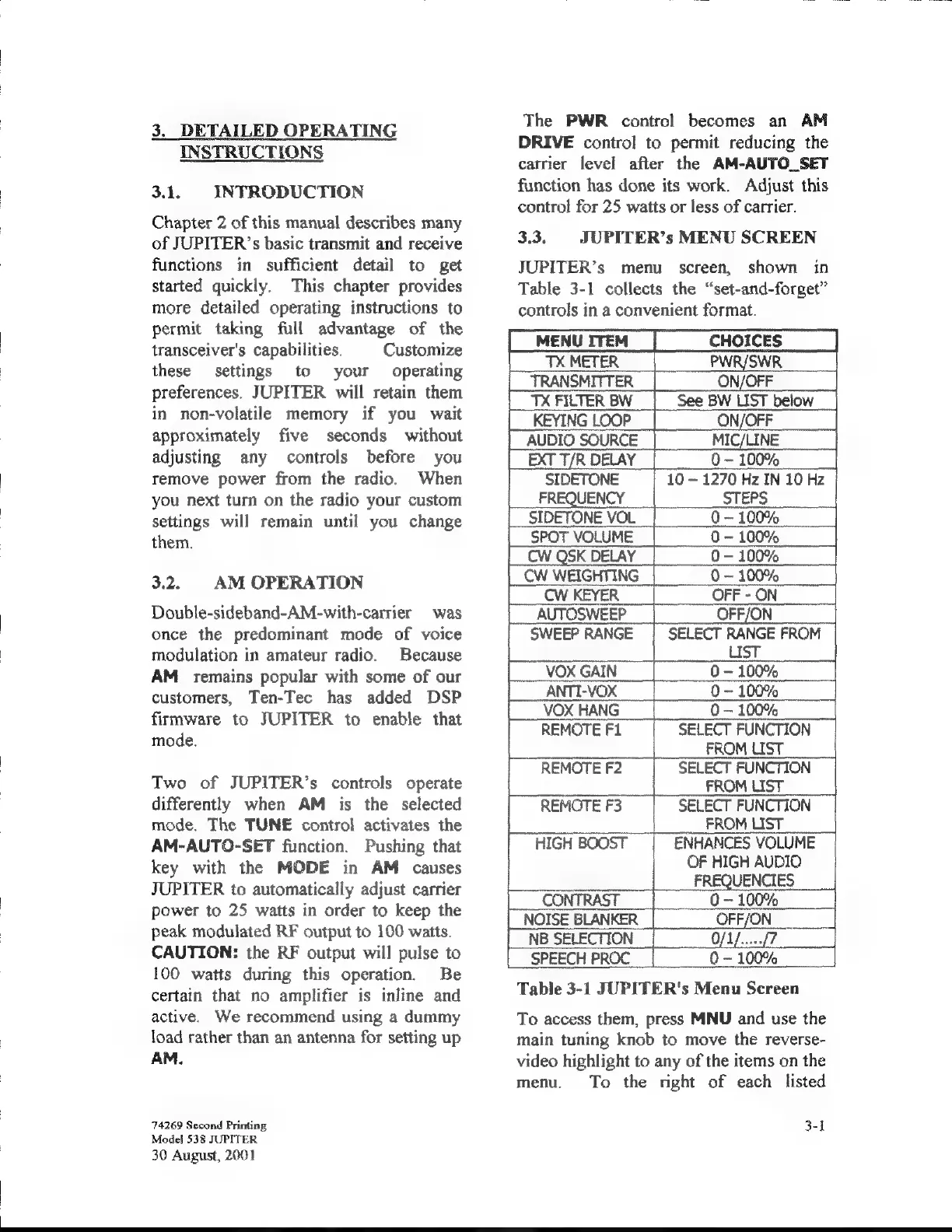
JUPITER’s
menu
screen,
shown
in
Table
3-1
collects
the
“set-and-forget”
controls
in
a
convenient
format.
EXT
T/R
DELAY
0
~
100%
|
MENUITEM
|
CHOICES
|
PWR/SWR
TRANSMITTER
ON/OFF
TX
FILTER
BW
See
BW
LIST
below
KEYING
LOOP
ON/OFF
AUDIO
SOURCE
MIC/LINE
SIDETONE
10
1270
Hz
IN
10
Hz
FREQUENCY
STEPS
Q
~
100%
|
CW
QSK
DELAY
|
0-
10096
CW
WEIGHTING
0
10096
CW
KEYER
OFF
-
ON
OFF/ON
LIST
VOX
GAIN
_0-
100%
0
-
100%
0-
100%
REMOTE
F1
SELECT
FUNCTION
FROMUST
.
|
REMOTE
F2
SELECT
FUNCTION
_
|
FROM
LIST
REMOTE
F3
SELECT
FUNCTION
|
FROM
LIST
HIGH
BOOST
ENHANCES
VOLUME
OF
HIGH
AUDIO
|
FREQUENCIES
CONTRAST
____0–
100%
|
NOISE
BLANKER
|
OFF/ON
_
|
NB
SELECTION
0/1/..../7
SPEECH
PROC
|
0
~
100%
|
Table
3-1
JUPITER's
Menu
Screen
To
access
them,
press
MNU
and
use
the
main
tuning
knob
10
move
the
reverse-
video
highlight
to
any
of
the
items
on
the
menu.
To
the
right
of
each
listed
3-1

Related product manuals