EasyManua.ls Logo

Ten-Tec JUPITER - Page 27

Ten-Tec JUPITER
92 pages
Print Icon
To Next Page IconTo Next Page
To Previous Page IconTo Previous Page
Loading...
MARKED
DESCRIPTION
ACTION
PRESENCE
COMMENT
V»M
Store
VFO
Push
&
Continuous
Select
128
to
Memory
MULTIPLE
Memory
Channels
with
MULTI
M»V
Recall
Memory
Continuous
See
above
to
VFO
STEP
Select
Tuning
Push
to
Rate
select
tuning
Continuous
302J
option
adds
step
on
soft
more
tuning
key
menu
step
tone
Cw
BAND
Push
to
step
10/12/15/17/20
Select
Band
through
Continuous
/30/40/80/160M
amateur
А
bands
Stores
last
frequency
used
|
SPLIT
Tx
on
Alternate
Continuous
Receive
on
VFOB
action
VFOA
REV
Monitor
with
Continuous
See
Detailed
VFOB
Instructions
contents
to
B
on
screen
2
па
Contents
on
screen
Knob
action
Indicator
RIT
RIT
Alternate
Continuous
Setting
Enable/Disable
action
Displayed
On
Screen
ХІТ
XIT
Alternate
Continuous
Setting
Enable/Disable
action
Displayed
On
Screen
RIT/XIT
Incremental
Enable
with
RIT
or
Setting
|
Offset
Tuning:
Rotary
XIT
Key
Displayed
Receiver
OR
On
Screen
Transmitter
2-12
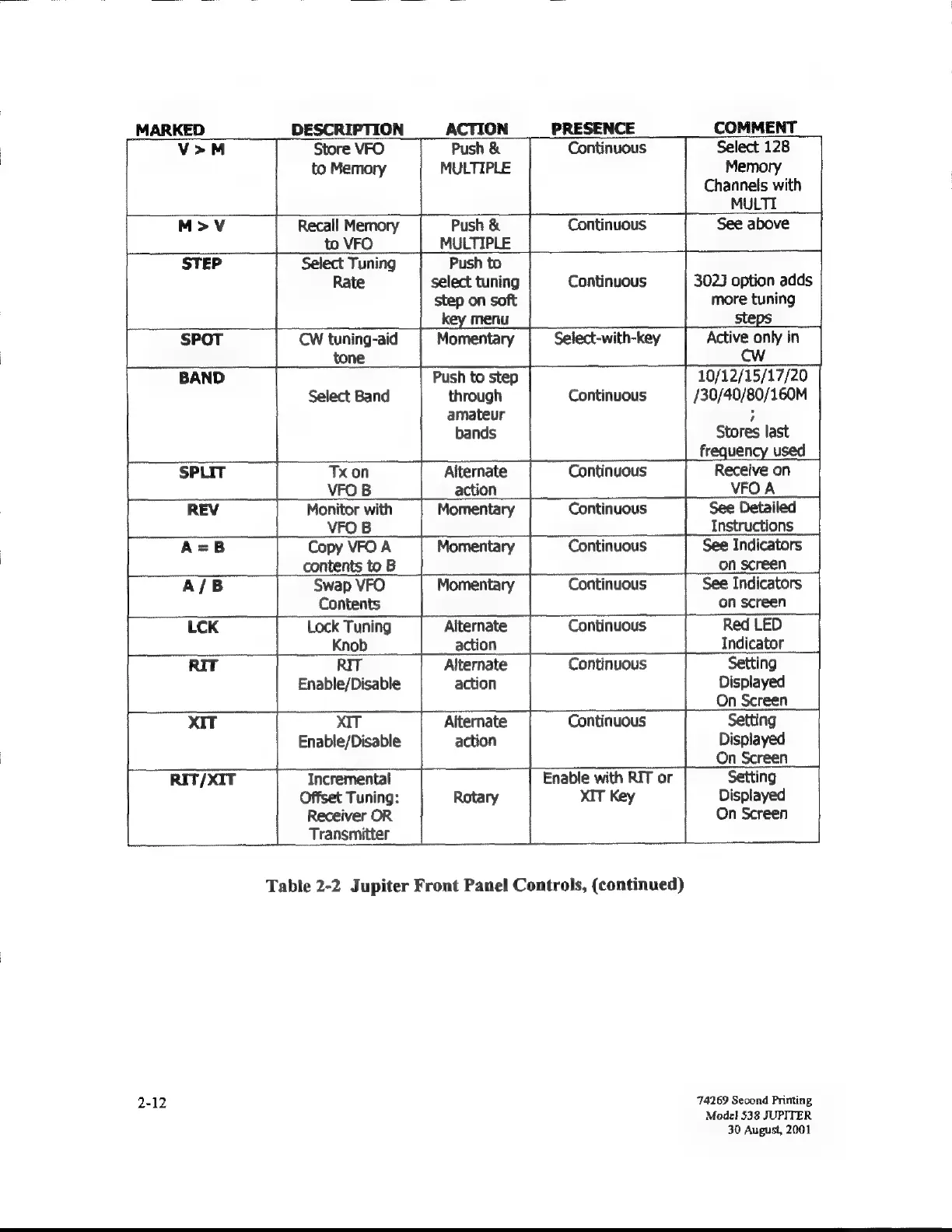
Table
2-2
Jupiter
Front
Panel
Controls,
(continued)
74269
Second
Priming
Model
538
JUPITER
30
August,
2001

Related product manuals