EasyManua.ls Logo

Ten-Tec JUPITER - Page 26

Ten-Tec JUPITER
92 pages
Print Icon
To Next Page IconTo Next Page
To Previous Page IconTo Previous Page
Loading...
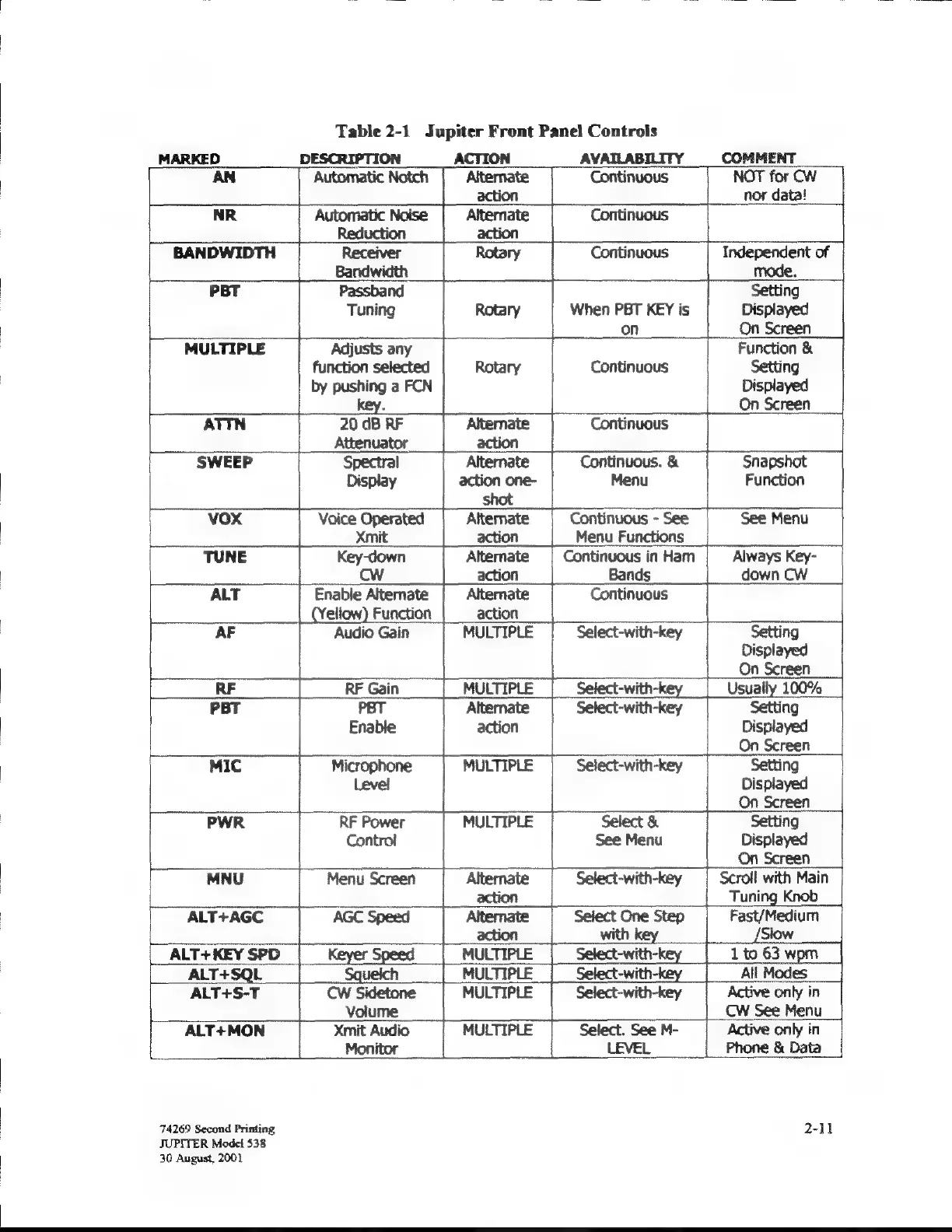
Table
2-1
Jupiter
Front
Panel
Controls
MARKED
DESCRIPTION
ACTION
AVAILABILITY
COMMENT
AN
Automatic
Notch
Alternate
Continuous
NOT
for
СМ
action
nor
data!
NR
Automatic
Noise
Alternate
Continuous
Reduction
action
BANDWIDTH
Receiver
Rotary
Continuous
Independent
of
Bandwidth
mode.
PBT
Passband
Setting
Tuning
Rotary
When
PBT KEY
is
Displayed
on
|
On
Screen
MULTIPLE
Adjusts
any
Function
&
function
selected
Rotary
Continuous
Setting
by
pushing
а
РОМ
Displayed
ву.
Оп
Screen
АТТМ
20
dB
КЕ
Alternate
Continuous
Attenuator
action
SWEEP
Spectral
Alternate
Continuous.
&
Snapshot
Display
action
one-
Menu
Function
shot
vox
Voice
Operated
Continuous
-
See
See
Menu
Xmit
action
Menu
Functions
TUNE
Key-down
Continuous
in
Ham
Always
Key-
Cw
action
Bands
down
CW
ALT
Enable
Alternate
Continuous
ellow)
Function
action
AF
Audio
Gain
MULTIPLE
Select-with-key
Setting
Displayed
On
Screen
RF
RF
Gain
PBT РЕТ
Alternate
Select-with-key
Setting
Enable
action
Displayed
On
Screen
MIC
Microphone
MULTIPLE
Select-with-key
Setting
Level
Displayed
On
Screen
Г
PWR
RF
Power
MULTIPLE
Select
&
Setting
Contro!
See
Menu
Displayed
|
On
Screen
MNU
Menu
Screen
Alternate
Select-with-key
Scroll
with
Main
action
Tuning
Knob
ALT+AGC
AGC
Speed
Alternate
Select
One
Step
ALT+KEY
SPD
Keyer
Speed
MULTIPLE
Select:
ALT+SQL
Squeich
MULTIPLE
Se
ALT+S-T
CW
Sidetone
MULTIPLE
Select-with-key
Volume
CW
See
Menu
ALT+MON
Xmit
Audio
MULTIPLE
Select.
See
M-
Active
only
in
Monitor
LEVEL
Phone
&
Data
74269
Second
Printing
2-11
JUPITER
Model
538
30
August,
2001

Related product manuals