8
SILENT MODE SELECTION
• You can enable silent mode while the tester is in standby mode.
• After holding the torch button the tester will beep and the LCD will display the
“mute” symbol (72-3575/72-3580) when it is in silent mode.
• In silent mode all functions are the same as those in normal mode with the
exception of the silent buzzer.
• To disable silent mode, hold the torch button and after it beeps, the “mute” symbol
will disappear from the LCD indicating that silent mode has been deactivated.
TORCH FUNCTION
• Press the torch button to switch on the lamp on the top of the tester.
• To turn the lamp off, simply press the torch button again.
BACKLIGHT FUNCTION (72-3580)
• The backlight can be turned on by pressing and holding the HOLD button for one
second.
• Similarly, to turn off the backlight press and hold the HOLD button again for around
one second.
• If the tester enters standby mode while the backlight is on, the light will remain
illuminated when the tester is turned back on.
• The backlight cannot be turned off unless holding HOLD for about one second.
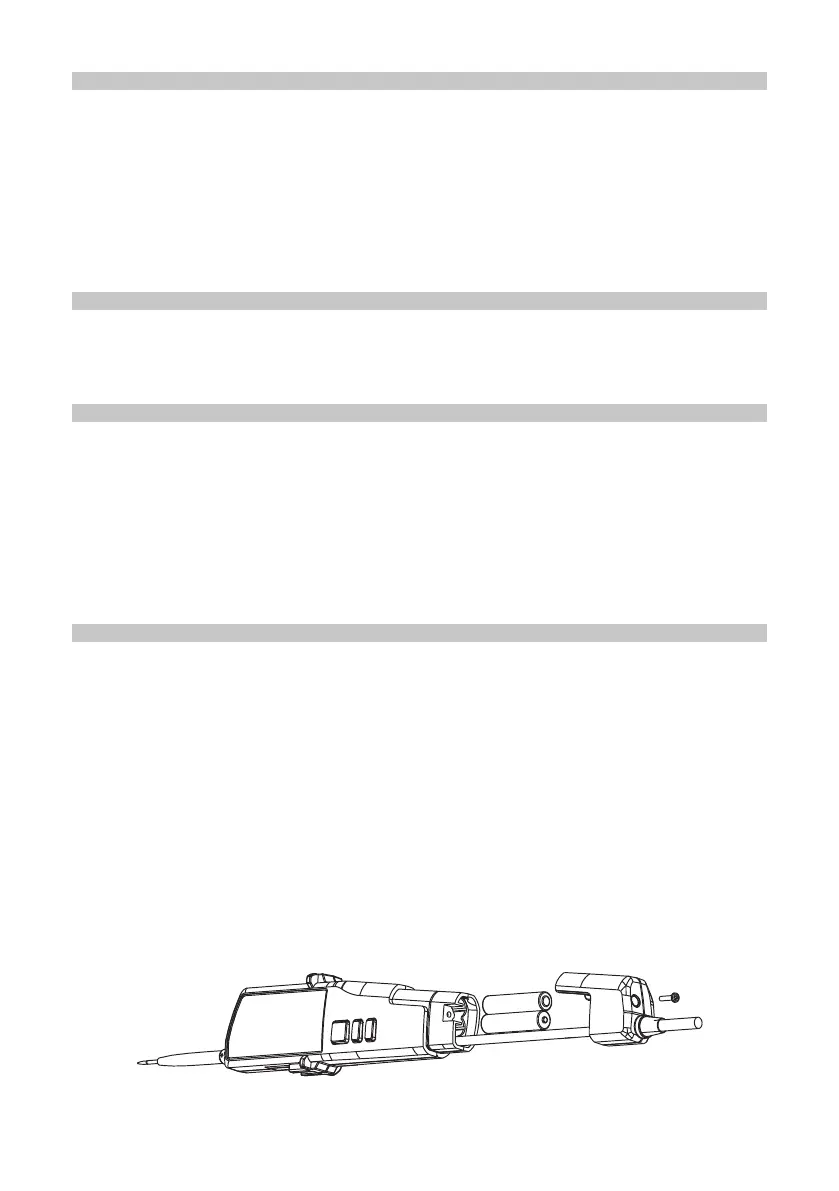
REPLACING THE BATTERIES
A continuously ashing negative LED (72-3570) or a low-voltage symbol on the LCD
(72-3575/72-3580) during use of the tester, indicates low battery.
Once it is indicated that the batteries are low, replace them immediately, following the
below instructions:
• Stop measurement and disconnect the two test pens from the object being
measured.
• Using a screwdriver, remove the screws securing the battery cover.
• Remove the battery cover.
• Remove the batteries to be replaced.
• Install the new batteries according to the battery symbol and direction indicated on
the panel.
• Put the battery cover back in position and return the screws using a screwdriver.


 To Next Page