Telephoning with convenience
35
Storing call numbers
Storing individual call numbers
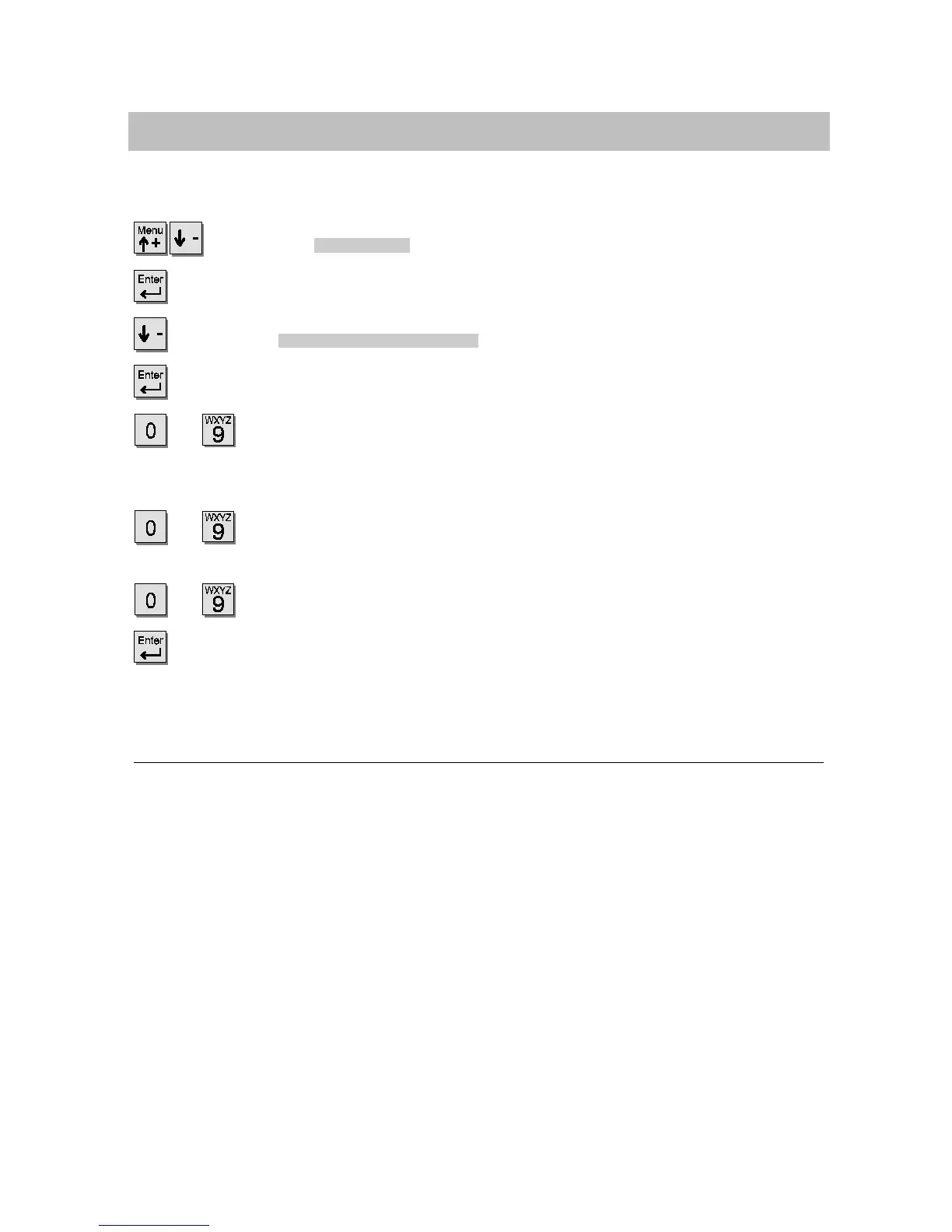
Scroll to the
Programming
menu item.
Confirm your selection.
Scroll to the
Individual destinations
menu item.
Confirm your selection.
...
Enter the number that of the subscriber whose call number you wish to
store. If the call number to be stored is only to be available from your telephone
then you must also enter your subscriber number.
...
Enter the number of a free individual code dialing destination under
which the entry should be stored (900 to max. 999).
...
Enter the call number to be stored.
Confirm the number and if desired, store further individual call numbers or
leave the menu with the release key.
i
x
According to how your system is configured you c an store up to 100 individual
call numbers. If the system has been configured so that you can store up to 10
call numbers, entries are possible for destination numbers 900 -- 909. Should
questions arise, please ask your Tenovis Service.
x
Instead of entering the destination numbers for individual code dialing destina-
tions directly, you can automatically assign it to the next code dailing destination
using the “Next destination” menu item.
x
Individual code dialing destinations can be deleted with the “Delete” menu item.
You can enter internal call numbers using the “Internal destination” menu item.
Using the “Pause” menu item, you can s elect a dial pause when entering the call
numbers.
Select the “Earth button/flash” menu item if you are connected to another system
which requires a flash key for external access.
x
You can connect a DSS module to your telephone. This means that you can also
enter the name after the call number (see Page. 79).



 To Next Page