TX-1 Series Instrument www.tensitron.com pg. 8
• Quick Start Instructions
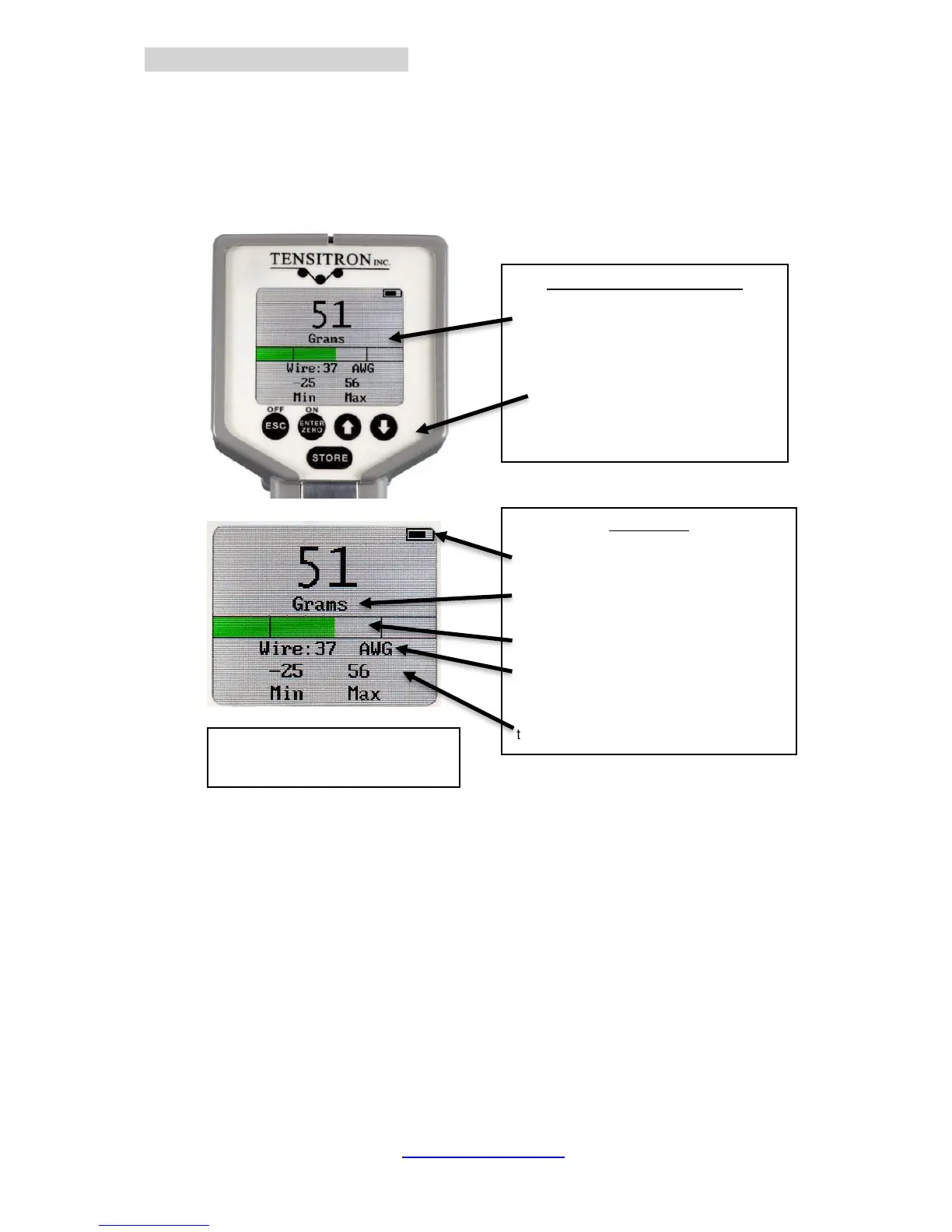
1. Power the unit on by pressing ON button. Main display will indicate: Tension,
Material, Min and Max tension readings. (See Figure 3.)
2. Select a screen:
a. Move between screens by using the up (↑) and down (↓) buttons.
b. Make or enter a selection by pressing the Enter/Zero button.
c. Exit a setting by pressing the Escape (ESC) button.
3. Log Data:
a. Press the STORE button to store tension readings along with the
Minimum and Maximum of these values.
b. Clear the data displayed on the Main Screen by pressing and
holding the STORE button, or power the instrument off.
c. For additional information on logging and viewing data, refer to Sec
6 - Display Screens - Data Logging.
4. Read Tension: Variations in materials affect tension readings. It is essential
to select the correct material and size before use, or tension values may be
incorrect.
5. Select Tension Units:
a. Using the up or down arrows, scroll to TENSION UNITS, then press
ENTER.
Main Display
Battery Charge Level
Selectable Units in grams, lbs, Newtons or
cN (TX-125 only).
Set Point Display
Select material Size – Instrument
automatically adjusts calibration
Store and Display up to 5 separate
tension measurements and their Average.



 To Next Page