TX-1 Series Instrument www.tensitron.com pg. 9
b. Next, select from: Grams, Newtons, or LBS, and then press ENTER.
6. Select material:
a. Using the up or down arrows, scroll to SELECT MATERIAL, then
press ENTER.
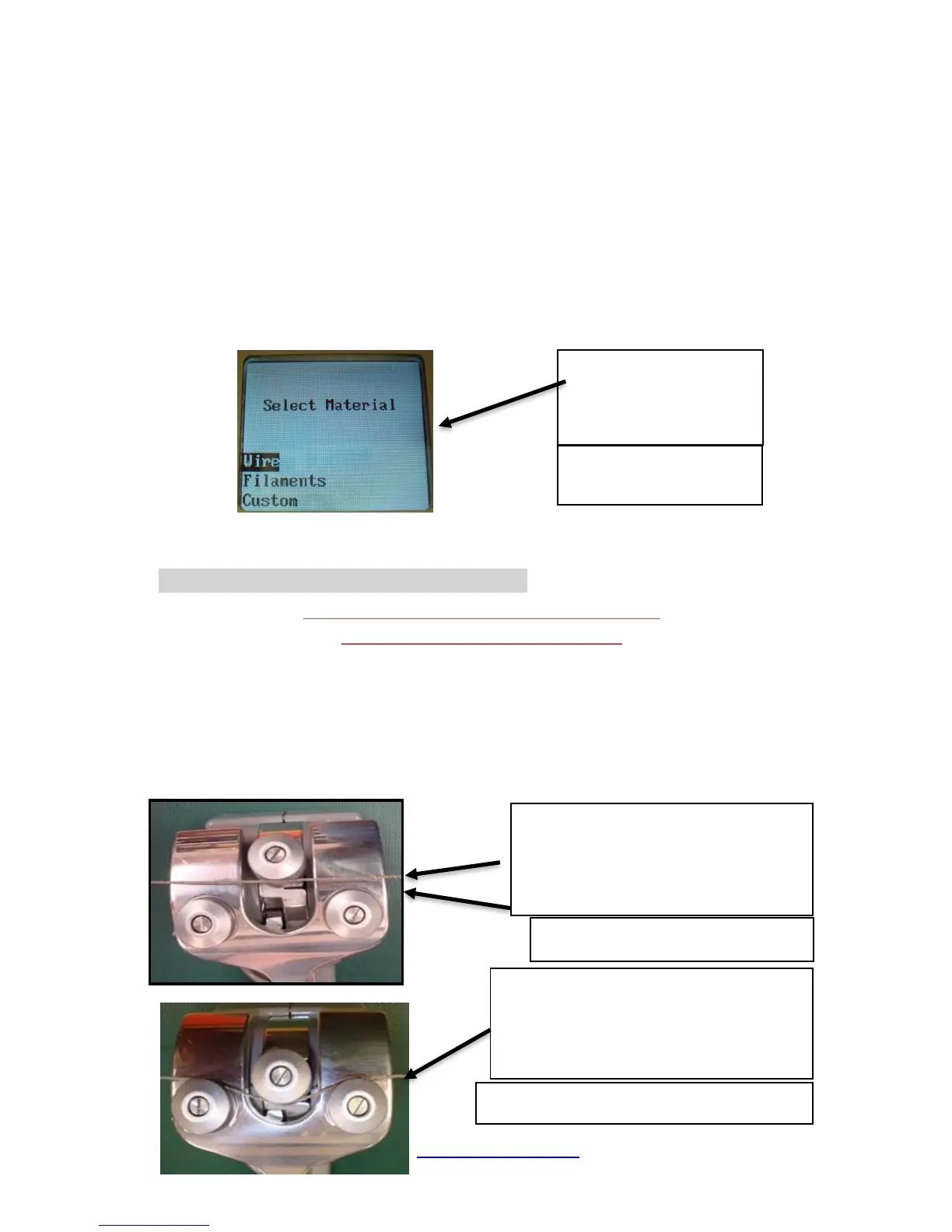
b. Next select your material from: Wire, Filaments or Custom and
press ENTER. Next select your material size (diameter) in AWG
(for wires), Inches, mm or description for Custom entries and then
ENTER your selection. (See Figure 4.)
c. If your specific material is not listed, add it to the menu by following
the calibration instructions included at the end of these instructions.
Or, send a 15’ sample of your material and the instrument to
Tensitron and ask to have it added to the menu.
7. Zero Instrument: Hold the instrument in the attitude your reading will be taken
before you engage it to the tensioned material. Then, press ZERO.
• Engaging Instrument onto material
WARNING: DO NOT EXCEED THE MAXIMUM TENSION RANGE
OF THE INSTRUMENT OR DAMAGE WILL OCCUR.
▪ Engage the Instrument onto the tensioned material by separating the
rollers (squeeze the trigger assembly) and inserting your material
between the fixed roller and the two rollers on the trigger assembly.
(See Figure 5.)
▪ Once the material is in line with the three rollers, slowly release the
trigger until it makes a full stop. Note tension reading (See Figure 6.)



 To Next Page