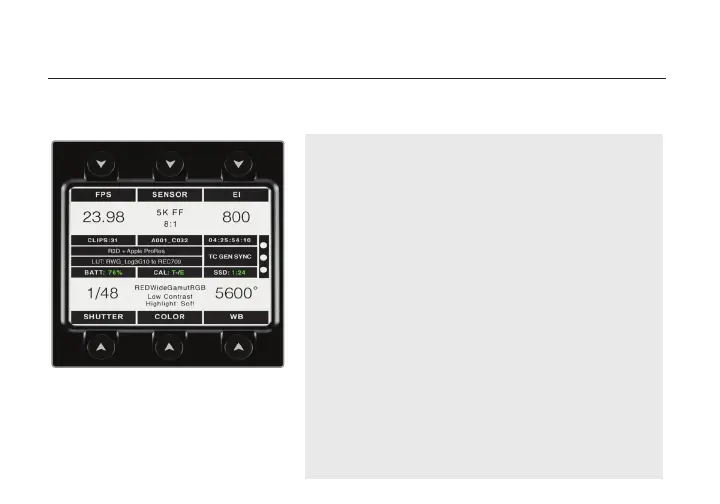
HOME SCREEN OPERATION
The Home screen allows the user to access and congure the most critical camera parameters. Press
any of the six arrow buttons to display its corresponding menu, then use the jog wheel to select and
congure the settings.
Home Screen Buttons
FPS (Frame Rate): Congure the number of frames
per second being recorded.
SENSOR: Adjust the recording resolution along with
the REDCODE compression setting.
EI (Exposure Index/ISO): Manage the light
sensitivity of the sensor.
SHUTTER: Adjust the shutter speed.
COLOR: Manage color space, 3D LUTs, and
Gamma curve settings.
WB (White Balance): Adjust the color temperature
based on current lighting conditions.
Status Display
The center of the display shows critical camera
parameters, number of recorded clips, media and
power status, recording format, timecode/genlock/
sync indicators, sensor calibration meter and RGB
channel clipping indicators.
5


 To Next Page