LAUNCHPAD APP
Use the Launchpad App to pair your Spark 4K devices, upgrade
the Bluetooth rmware (iOS only), and monitor every parameter
of Spark 4K.
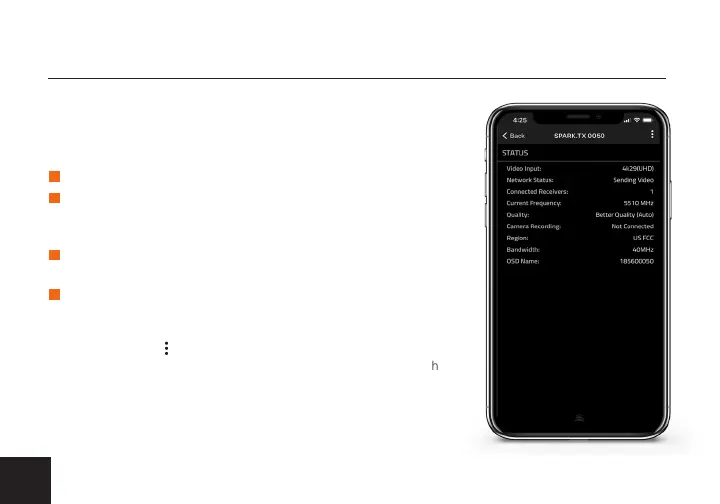
• Status- Displays the current Input resolution, Network status,
Connected Receivers, Current Frequency, Quality, Camera
Recording, Region, Bandwidth, OSD Name.
• Settings - Tap the button at the top of the display to monitor
and/or customize the transmitter’s settings, perform a Bluetooth
(BLE) rmware upgrade, or register your Spark 4K.
TRANSMITTER STATUS DISPLAY
CONNECT VIA BLUETOOTH
Download Launchpad from the App Store.
Open Launchpad from your iOS device, then tap the
Status/Conguartion or Pairing button.
Press the Bluetooth button (E) on the back of both the
transmitter and receiver. The transmitter’s OLED will
indicate if Bluetooth is enabled.
Select the device(s) you want to pair and/or monitor.
2
1
3
4
4


 To Next Page