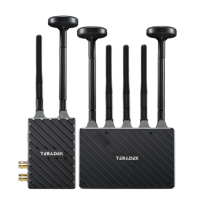
Spark 4K sets (TX and RX), are paired by default, requiring no additional conguration. Spark 4K
devices purchased separately need to be paired using Launchpad, or the Launchpad App.
PAIRING
PAIRING VIA LAUNCHPAD (DESKTOP)
Open Launchpad, click the Pairing tab, then tap the Wired Pairing button.
Select the devices you want to pair, then click the Pair Devices button. Launchpad will indicate whether
or not Pairing is successful.
PAIRING VIA THE LAUNCHPAD APP
Select the transmitter you wish to pair, then tap the Next button.
Select the receiver(s) you wish to pair with the transmitter, then tap the Pair! button. The Launchpad
App will indicate when the pairing process is completed.
Connect both the transmitter and receiver(s) to your computer (Windows/Mac) via USB.
Open the Launchpad App from your iOS or Android device, then tap the Pairing button.
2
1
3
2
1
3
NOTE: Before starting any pairing process, ensure that both the transmitter and receiver have the
same rmware version and have Bluetooth enabled.
116


 To Next Page