15
EN
Remote Control
The MOA Blue has a built-in and continu-
ously acve Bluetooth Low Energy commu-
nicaon module for remote control of the
heang element, using popular mobile de-
vices – smartphones and tablets, both with
Android or IOS operang systems. The heat-
ing element is visible by other Bluetooth de-
vices and appears as MOA Blue Terma. You
may need to enter a default authorizaon
code: 123456.
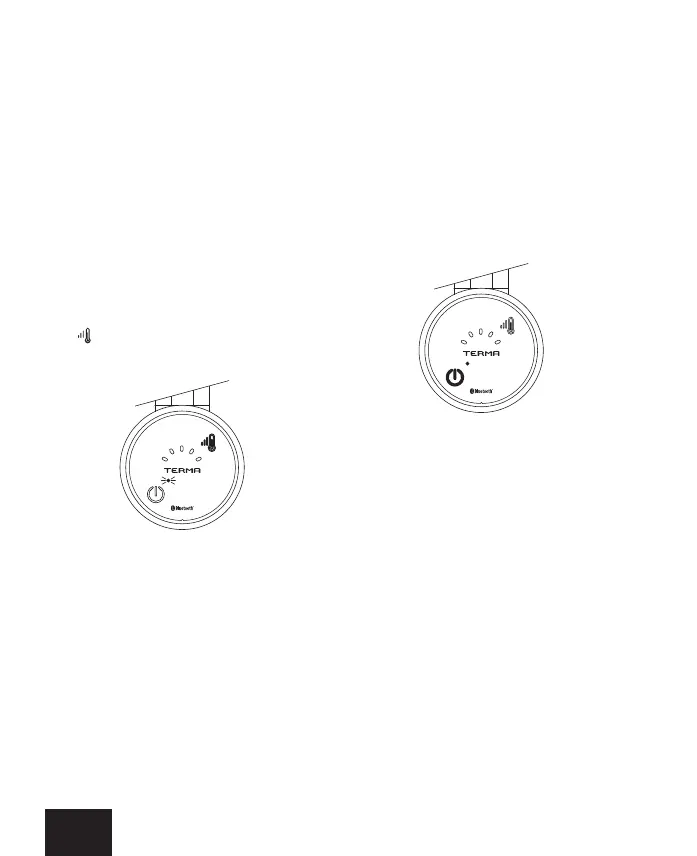
To start the pairing mode in MOA, press and
hold for approx. 5 sec. Pairing mode is in-
dicated by a ashing single, blue RGB LED.
Pairing mode, when activated, lasts 30
seconds.
The blue RGB LED will light up each me an
acve exchange of informaon between the
heang element and an external control de-
vice, takes place.
TIMER mode
The control applicaon allows the Timer to
be set for a period of 1 ... 240 minutes in
the full range of temperatures supported by
the heang element and any temperature
measurement method – either internal ra-
diator temperature or external room tem-
perature. Acvaon of the TIMER funcon
is indicated by a red RGB LED.
Automac heang program
schedule
The control applicaon allows you to program
many dierent 7-day work schedules and to
upload any of the programmed schedules
to the memory of any Blue heang element
paired with the mobile device (see Tutorial
in the control applicaon). When uploading
a schedule to the heang element’s mem-
ory, a message confirming the action ap-
pears on the portable device screen, but
does not yet indicate a change in the heat-
ing element’s operang mode.


 To Next Page