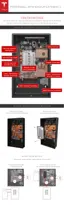
STEP 16 - ATTACH THE SIDE COVERS
Caution: Failure to install the side covers using the proper steps might result in permanent
damage to the covers.
1. Remove the side covers and the bag of enclosed fasteners from the shipping box.
2. Position the first side cover to the side of Powerwall that matches its curve.
3. Angle the back edge (side closest to the wall) in toward Powerwall.
4. Insert the top edge of the cover, then push in to fasten the top spring clip.
5. Fasten the bottom spring clip second, for easiest
fit.
6. Fasten the middle spring clip. Verify that the entire length of the side cover is tucked
completely under the edge of the front cover.
7. Repeat the installation steps on the opposite side for the other side cover.
Step-by-Step Installation Instructions
24 Powerwall Installation Manual



 To Next Page
 Loading...