10
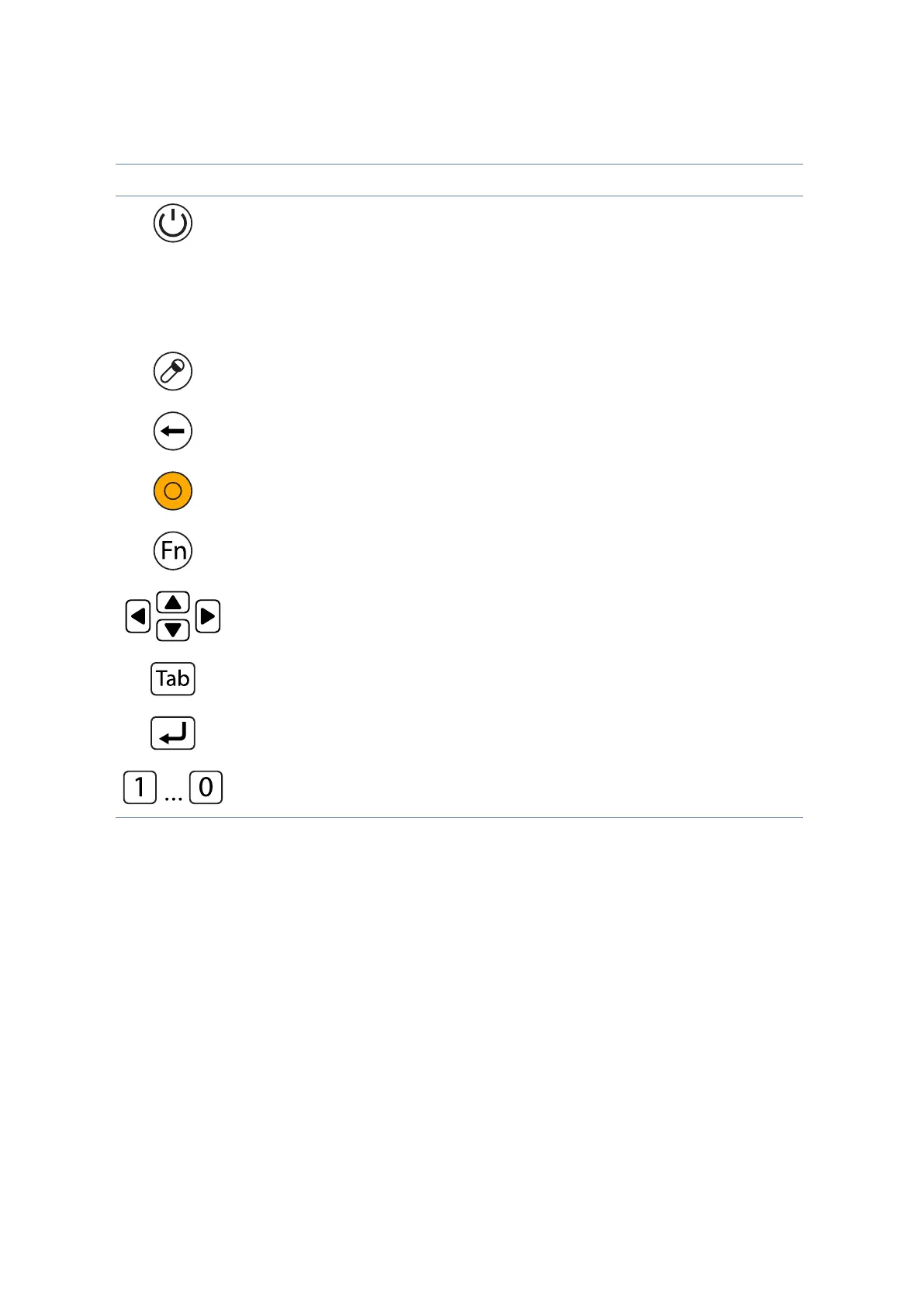
Icon Name Description
Power Button The power button turns system on and goes into
standby automatically. If the unit has been sitting
unused for a while. Press momentarily to turn on
the system or to exit from standby. Press and
hold for at least 3–4 seconds to turn o the
system. These settings can be changed.
Security Button Similar function as pressing Ctrl+Alt+Delete on a
standard keyboard.
Backspace Button Same function as on a standard keyboard.
Quick-Launch Button Can be assigned to launch specic windows base
program as a quick-launcher.
Function Button Access to secondary operation of some buttons
on the front bezel. (See table below)
Cursor Control Acts in the same way as the cursor keys on a
standard keyboard
Tab Button Same function as on a standard keyboard
Enter Button Same function as on a standard keyboard
Numeric Keys Same function as on a standard keyboard
Table 4.2 Front view buttons


 To Next Page