16
C
Toggles between automatic and manual circle measurements
7.2 Pairing
The pairing procedure will set up the receiver to be controlled by a specic remote. In
the environment with multiple RSWA units and remotes, this allows the user to choose
specically which remote controls which RSWA.
To pair the remote control with the receiver:
• Make sure the receiver is plugged into the RSWA and that RSWA is running
• Bring the remote within a few inches from the receiver located above the screen, push
and hold any button on the remote for 5 seconds. The LED on the remote will ash
rapidly during the pairing procedure;
• Release the button and test the remote with RSWA applications.
If you need to pair a remote to a dierent RSWA, remove the battery from the remote for
about 1 minute. This will reset it to the original unpaired state. Then put the battery back
and repeat the pairing procedure with the dierent receiver.
7.3 Replacing the Battery
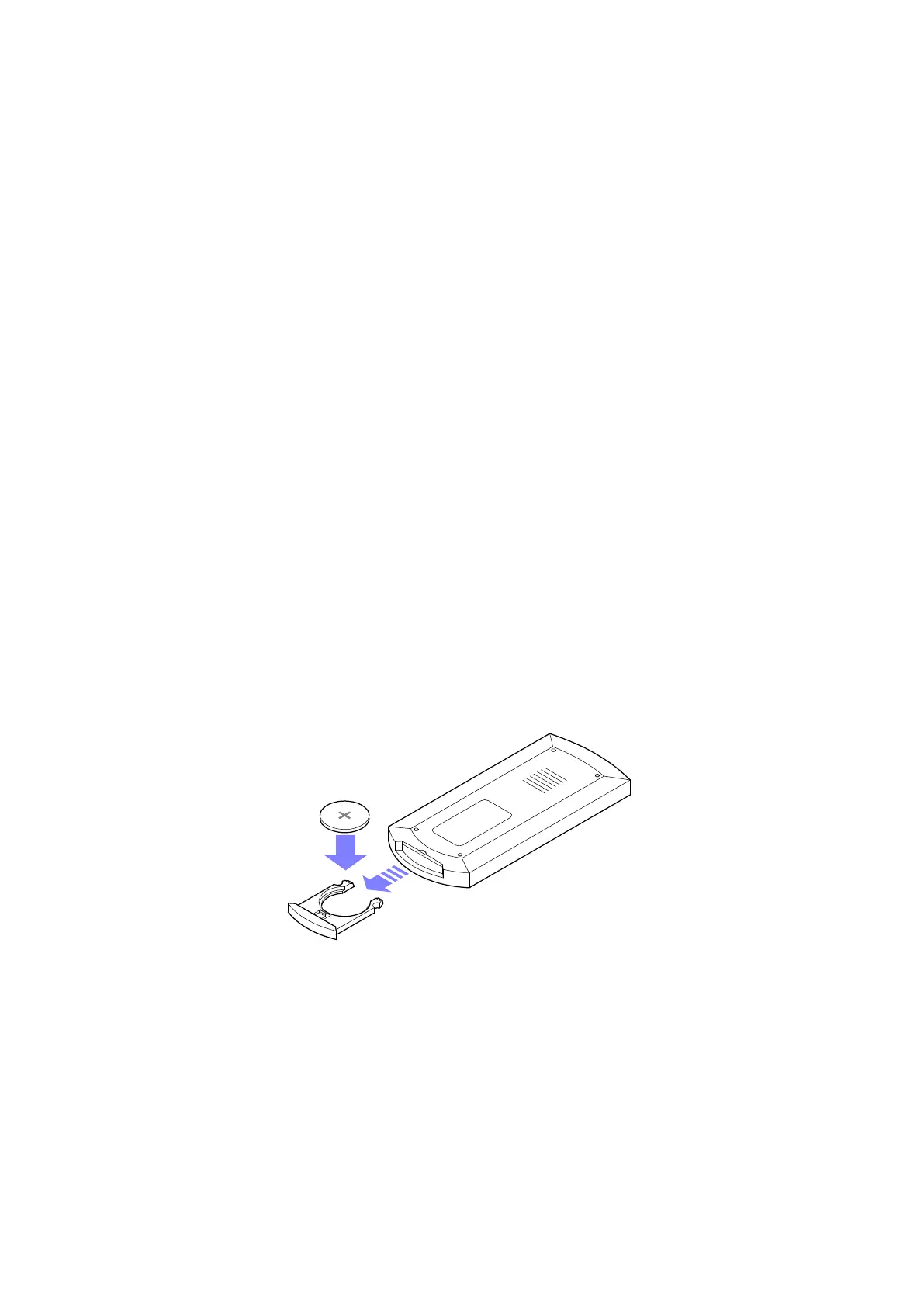
This remote needs a battery to operate. Replace the battery when needed with CR2025
battery.
To replace the battery:
• Pull the battery compartment out and remove the old battery
• Insert the replacement battery with the positive side facing up
• Close the battery compartment
• If necessary, perform the pairing procedure


 To Next Page