6. Measurement data
35
5
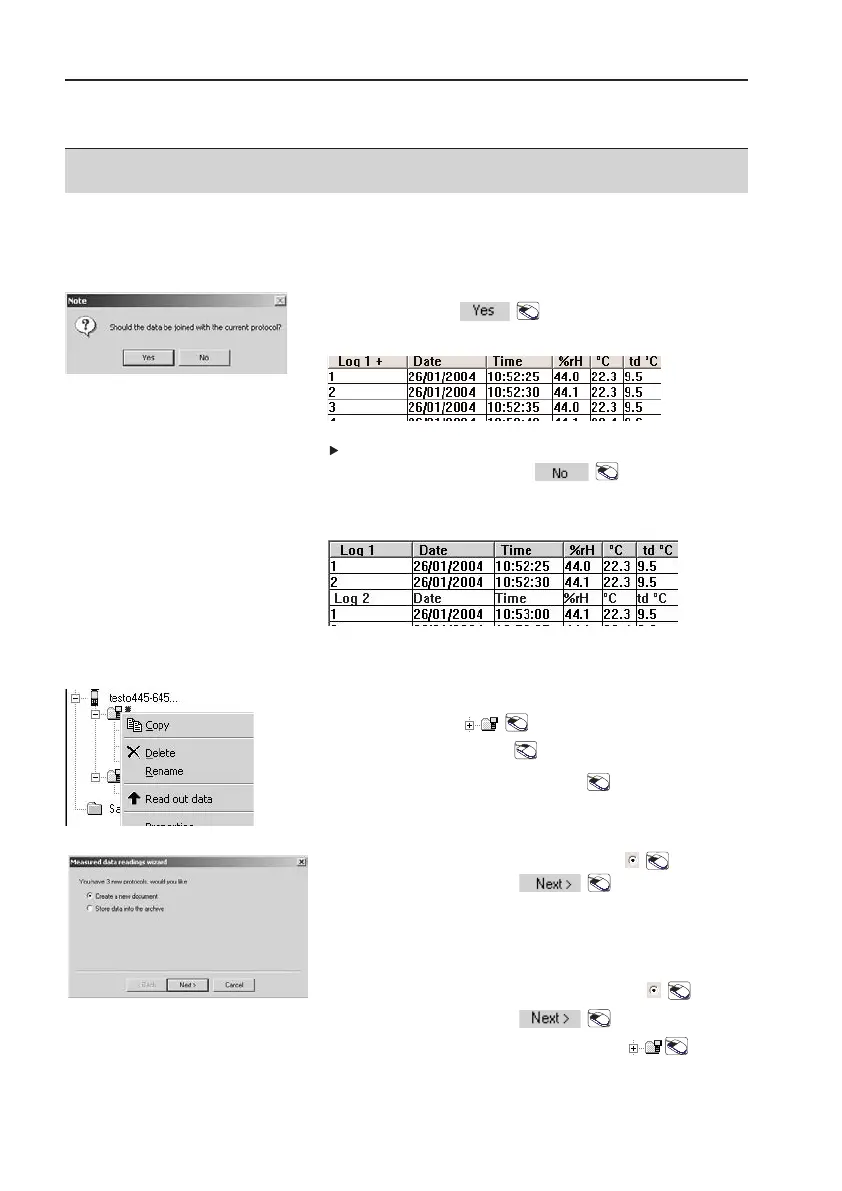
Note: Confirm
Should the data be joined with the
current log?
: .
-
All logs are joined to make one.
Should the data be joined with the current log?
query is not confirmed: .
- Logs remain unjoined. They are separated from
one another by headings.
6.2 Sites
Read out data
1
Highlight site: .
2
Open context menu: .
3
Read out sites:
Read oout ddata
.
-
Readings wizard appears.
Read out sites:
4
Select
Create aa nnew ddocument
: .
5
Confirm selection: .
-
Measurement logs are shown
unjoined in a table.
Filing measurement data
4
Select
Store ddata iinto tthe aarchive
: .
5
Confirm selection: .
6
Highlight target folders in menu: .



 To Next Page