SEASIDE
21
EN
POSTPONING THE DISINFECTION CYCLE
Display showing
Disinfection prompt
S T A R T
D I S I N F E C T I O N ?
To postpone the disinfection cycle, press the “O/I” button;
the system shuts off and the display reverts to STAND-BY.
Turn the handle of the pop-up waste to empty the tub.
Display in STAND-BY mode
2 0 : 3 0
AUTOMATIC SHUTOFF:
If there is no response within 5 seconds when the display prompts START DISINFECTION?, the system shuts off and
the display reverts to STAND-BY. DISINFECTION of the system is not carried out.
Use ONLY disinfectant solution supplied by Teuco.
DISINFECTION DOES NOT START!!!
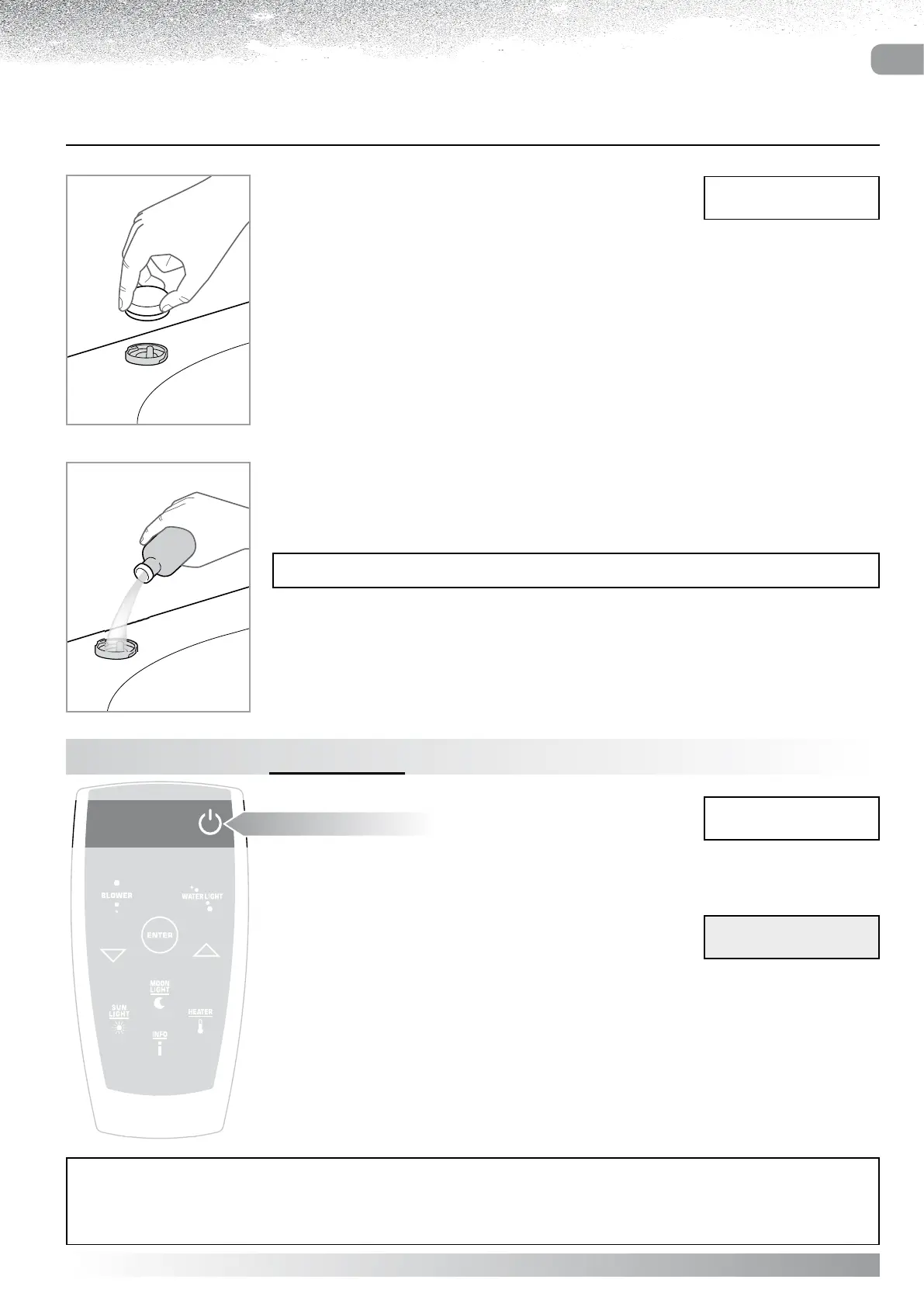
If the message “ADD DISINFECTANT” is displayed, replenish
the dispenser with liquid so that the Disinfection cycle is able
to start.
Remove the Disinfectant dispenser cap, turning anticlockwise.
Fill the container with Disinfectant so that the function can start.
Replace and secure the dispenser cap.
Display in
DIAGNOSTICS mode
A D D
S A N I T I Z E R



 To Next Page