Need help?
Do you have a question about the Teufel boomster xl and is the answer not in the manual?
Document policy and reproduction rights.
List of registered trademarks and symbols.
Requirements for product returns.
Information needed for customer complaints.
Customer service contact details and website.
Defines intended use and potential misuse consequences.
Description of device safety and insulation symbols.
Explains warning levels (WARNING, CAUTION, NOTICE).
Covers mains connection, damage, cord, housing, repairs, accessories, and wet environments.
Addresses setup location, heat, explosion risk, and Bluetooth usage environments.
Covers risks related to children, battery acid, and battery explosions.
Advice on avoiding hearing damage from loud sound pressure.
Caution against using the carrying strap as a climbing aid.
Instructions for unboxing and identifying included items and accessories.
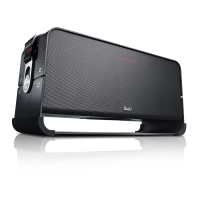
Details on all buttons, jacks, and indicators on the BOOMSTER XL.
Discusses mains, rechargeable battery, and external 12V sources.
Steps for connecting to mains power.
Warnings related to rechargeable batteries.
Information on charging, deep discharge protection, and battery status indicators.
How to connect to a 12V power source.
Instructions for securing the carrying strap.
Warning about potential hearing loss from high volumes.
Advisory regarding condensation after temperature changes.
Procedures for turning the device on/off and using the battery switch.
Explanation of automatic power-off and LED light patterns.
How to switch between Bluetooth, AUX, and FM radio.
Method for controlling the overall volume level.
Instructions for adjusting the bass response of the subwoofer.
Instructions for adjusting the treble response.
Description of the three factory-set sound profiles.
Process for saving personalized audio settings.
How to find and select radio stations.
Method for storing favorite stations.
Steps for connecting external audio devices and playback.
Introduction to Bluetooth features and pairing methods.
Detailed guide for manual pairing via Bluetooth.
Instructions for pairing using Near Field Communication.
Notes on controlling playback and volume from the source device.
How to disconnect from a paired Bluetooth device.
Information on using the USB port to charge external devices.
Steps to connect the remote control to the BOOMSTER XL.
Description of remote buttons for power, source, volume, and mute.
Instructions for changing batteries in the remote.
Guidance on how to clean the device safely and effectively.
Addresses issues like no sound, poor Bluetooth connection, and noisy playback.
Guidelines for environmentally friendly disposal of old devices and batteries.
Lists relevant EU directives and harmonized standards.
 General
| AUX in | Yes |
|---|---|
| Bluetooth range | 10 m |
| Bluetooth version | 4.0 |
| Connectivity technology | Wired & Wireless |
| Battery type | Built-in |
| Power source type | Battery |
| Battery life (max) | 18 h |
| Battery recharge time | 3 h |
| Speaker type | 3-way |
| Woofer diameter | 160 mm |
| Number of drivers | 5 |
| Number of speakers | 1 |
| Audio output channels | 2.1 channels |
| Product type | 2.1 portable speaker system |
| Product color | Black |
| Recommended usage | Universal |
| Impedance | - Ω |
| Frequency range | 44 - 20000 Hz |
| RMS rated power | - W |
 Weight and Dimensions
| Depth | 200 mm |
|---|---|
| Width | 510 mm |
| Height | 260 mm |
| Weight | 9950 g |

 To Next Page