EasyManua.ls Logo

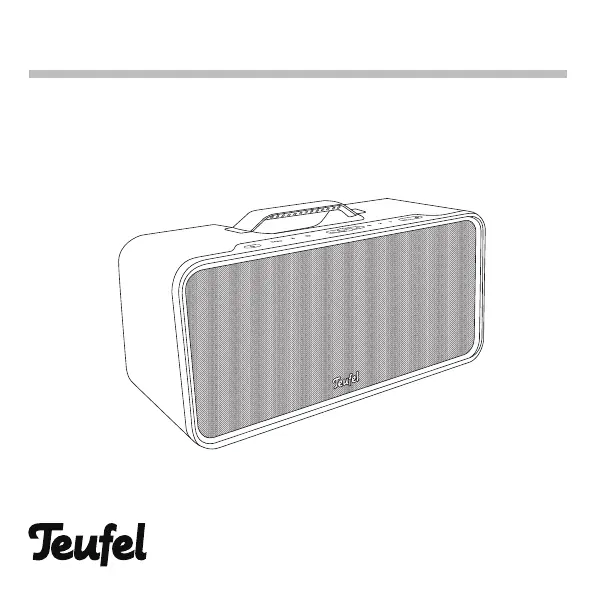
Teufel Boomster - User Manual

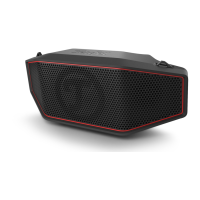
Teufel Boomster
38 pages
Print Icon
To Next Page IconTo Next Page
Loading...
User Manual
BOOMSTER
Active Bluetooth® speaker with integrated DAB+ and FM radio

Other manuals for Teufel Boomster

Questions and Answers

Summary

General Notes and Information

Notice and Copyright

Information about document changes, reproduction limitations, copyright, and version.

Trademarks

Lists trademarks like Bluetooth® and aptX®, and their owners.

Original Packaging and Returns

Instructions for returning the product, emphasizing the need for original packaging.

Complaint Information

Information required for processing complaints, including invoice and serial numbers.

Contact Details

Provides customer service contact details, address, phone, fax, and online support links.

For Your Safety

Proper Use and Liability

Defines the intended use of the speaker and the manufacturer's liability for misuse.

Signal Terms and Warnings

Explains safety signal terms like WARNING, CAUTION, NOTICE and general safety notes.

Electrical Safety and Handling

Covers handling live parts, mains connection, damage checks, and authorized repairs.

Environmental and Location Safety

Addresses operating in wet rooms, modifications, wet hands, and unsuitable setup locations.

Child, Battery, and Hearing Safety

Details risks for children, battery handling, potential explosions, and hearing loss from high volumes.

Unpacking

Package Contents

Details the items included in the BOOMSTER package and the unpacking process.

Optional Accessories

Introduces the IR Remote Control and advises on handling and packaging retention.

Operational Controls and Connections

Top Panel Buttons

Explains the functions of buttons on the top of the BOOMSTER, including Power, Bass, Bluetooth, etc.

Bluetooth and Volume Operations

Explains Bluetooth pairing procedures and detailed volume/bass adjustments.

Top Panel Ports

Describes the input/output ports on the top of the BOOMSTER, such as AUX In, DC In, USB ports.

Preparation

Antenna and Power Setup

Covers antenna positioning for reception and the two power supply options: 12V DC and rechargeable battery.

Rechargeable Battery Charging

Explains how to charge the integrated Li-Ion battery, charging indicators, and playback time.

Operation

Power, Auto Off, and Source Selection

Instructions for powering the device, auto-off, and switching input sources.

Volume and Bass Control

Details how to adjust volume and bass levels, including mute functionality.

Radio Operation and Tuning

Explains radio features, tuning, scanning, and saving favorite stations.

AUX Input and Bluetooth Connectivity

Guides on connecting AUX and Bluetooth, pairing, and managing connections.

Call Functionality and USB Charging

Details hands-free call features and USB charging capabilities.

IR Remote Control

Button Functionality

Details the functionality of each button on the IR remote control.

Remote Control Operations

Continues detailing remote control functions for DAB, FM, Favorites, BT, and AUX sources.

Care And Cleaning

Device Protection and Cleaning

Advises on protecting the device from external influences, proper cleaning methods, and suitable cleaning agents.

Troubleshooting

Common Problems and Solutions

Provides solutions for common issues like no sound, no Bluetooth, and poor radio reception.

Factory Reset Procedure

Explains how to reset the device to factory default settings and the implications of this action.

Technical Data

Radio Frequency and Temperature Specifications

Lists radio frequency bands, transmission power, operating, and storage temperature ranges.

Boomster NG Specifications

Details power supply, dimensions, weight, and battery specifications for the BOOMSTER NG.

External AC Mains Adapter Specs

Provides detailed technical specifications for the external AC mains adapter, including type, manufacturer, and power ratings.

Declaration Of Conformity

EU Compliance Statement

States that the product complies with EU directives and provides a link to the full text of the declaration.

Summary

General Notes and Information

Notice and Copyright

Information about document changes, reproduction limitations, copyright, and version.

Trademarks

Lists trademarks like Bluetooth® and aptX®, and their owners.

Original Packaging and Returns

Instructions for returning the product, emphasizing the need for original packaging.

Complaint Information

Information required for processing complaints, including invoice and serial numbers.

Contact Details

Provides customer service contact details, address, phone, fax, and online support links.

For Your Safety

Proper Use and Liability

Defines the intended use of the speaker and the manufacturer's liability for misuse.

Signal Terms and Warnings

Explains safety signal terms like WARNING, CAUTION, NOTICE and general safety notes.

Electrical Safety and Handling

Covers handling live parts, mains connection, damage checks, and authorized repairs.

Environmental and Location Safety

Addresses operating in wet rooms, modifications, wet hands, and unsuitable setup locations.

Child, Battery, and Hearing Safety

Details risks for children, battery handling, potential explosions, and hearing loss from high volumes.

Unpacking

Package Contents

Details the items included in the BOOMSTER package and the unpacking process.

Optional Accessories

Introduces the IR Remote Control and advises on handling and packaging retention.

Operational Controls and Connections

Top Panel Buttons

Explains the functions of buttons on the top of the BOOMSTER, including Power, Bass, Bluetooth, etc.

Bluetooth and Volume Operations

Explains Bluetooth pairing procedures and detailed volume/bass adjustments.

Top Panel Ports

Describes the input/output ports on the top of the BOOMSTER, such as AUX In, DC In, USB ports.

Preparation

Antenna and Power Setup

Covers antenna positioning for reception and the two power supply options: 12V DC and rechargeable battery.

Rechargeable Battery Charging

Explains how to charge the integrated Li-Ion battery, charging indicators, and playback time.

Operation

Power, Auto Off, and Source Selection

Instructions for powering the device, auto-off, and switching input sources.

Volume and Bass Control

Details how to adjust volume and bass levels, including mute functionality.

Radio Operation and Tuning

Explains radio features, tuning, scanning, and saving favorite stations.

AUX Input and Bluetooth Connectivity

Guides on connecting AUX and Bluetooth, pairing, and managing connections.

Call Functionality and USB Charging

Details hands-free call features and USB charging capabilities.

IR Remote Control

Button Functionality

Details the functionality of each button on the IR remote control.

Remote Control Operations

Continues detailing remote control functions for DAB, FM, Favorites, BT, and AUX sources.

Care And Cleaning

Device Protection and Cleaning

Advises on protecting the device from external influences, proper cleaning methods, and suitable cleaning agents.

Troubleshooting

Common Problems and Solutions

Provides solutions for common issues like no sound, no Bluetooth, and poor radio reception.

Factory Reset Procedure

Explains how to reset the device to factory default settings and the implications of this action.

Technical Data

Radio Frequency and Temperature Specifications

Lists radio frequency bands, transmission power, operating, and storage temperature ranges.

Boomster NG Specifications

Details power supply, dimensions, weight, and battery specifications for the BOOMSTER NG.

External AC Mains Adapter Specs

Provides detailed technical specifications for the external AC mains adapter, including type, manufacturer, and power ratings.

Declaration Of Conformity

EU Compliance Statement

States that the product complies with EU directives and provides a link to the full text of the declaration.

Teufel Boomster Specifications

General IconGeneral
TypePortable Bluetooth Speaker
Water ResistanceIPX5
Inputs3.5 mm AUX, USB
Power SourceRechargeable battery
FeaturesFM radio
Bluetooth Version4.0
Battery LifeUp to 18 hours

Related product manuals