How to improve the sound quality of my Teufel Speaker System?
- IIsabella WeberAug 15, 2025
If the sound from your Teufel Speaker System isn't ideal, the settings might be incorrect. Adjust the settings for bass and treble to correct this.
How to improve the sound quality of my Teufel Speaker System?
If the sound from your Teufel Speaker System isn't ideal, the settings might be incorrect. Adjust the settings for bass and treble to correct this.
Why is the playback noisy on my Teufel cinebar 11?
To address noisy playback on your Teufel Speaker System, ensure that the source is sending a clear signal to the Cinebar 11.
Why is there no sound during TV playback via HDMI on my Teufel cinebar 11 Speaker System?
If you're not getting any sound from your Teufel Speaker System during TV playback via HDMI, it could be due to several reasons. First, ensure that you are using the HDMI jack on your TV that supports the ARC function. Also, check if the ARC/CEC function is activated in your TV's settings menu. Finally, verify that the audio format selected on your TV is set to “PCM”.
What to do if my Teufel cinebar 11 device doesn’t emit any sound?
If your Teufel Speaker System isn't producing any sound, there are a few things you can check: * Make sure you've selected the correct source. * Increase the volume, as it might be set to “0”. * Also, check the volume level on your external player and carefully increase it.
What to do if there is no sound in Bluetooth mode on Teufel cinebar 11?
If you're experiencing a lack of sound in Bluetooth mode on your Teufel Speaker System, consider these potential causes: * First, ensure that a Bluetooth connection is established. * Secondly, verify that “Teufel CINEBAR 11” is selected as the Bluetooth output device on your external player. * Lastly, Bluetooth connection might be impaired by another radio system. Try setting up the CINEBAR and/or external player in another location or room.
What to do if my Teufel cinebar 11 doesn't emit any sound?
If your Teufel Speaker System isn't producing sound, the issue might be due to several reasons. First, check if the correct source is selected. Second, verify that the device isn't muted by pushing the button or adjusting the volume. Finally, ensure the volume isn't set to “0” and increase it if necessary.
Why does my Teufel cinebar 11 subwoofer hum?
If your Teufel Speaker System subwoofer is humming, it could be due to a few reasons. It might be connected to a different power circuit than the Cinebar; if so, connect them to the same circuit. The hum could also be due to line disturbance, in which case you should buy a mains filter and connect both devices to it. Also, the humming may be caused by a multiple socket strip. Try using a different multiple socket strip or connect the subwoofer directly to the wall socket. Inserting the mains plug in the socket the other way around may also help.
What to do if my Teufel cinebar 11 subwoofer isn’t working?
If your Teufel Speaker System subwoofer isn’t working, there are a couple of things to check. First, make sure the subwoofer is switched on with the STAND-BY button and that the mains cable and socket are working correctly. Second, verify that there is a connection to the Cinebar 11. If not, establish a connection.
What to do if my Teufel Speaker System subwoofer is not connecting to the Cinebar 11?
If your Teufel Speaker System subwoofer isn't connecting to the Cinebar 11, there may be interference. Try placing the subwoofer and Cinebar closer to each other.
Defines intended use and explains safety signal terms like WARNING, CAUTION.
Essential safety notes and warnings related to electrical connections.
Safety warnings concerning children and battery hazards.
Safety advice on volume, device placement, and battery risks.
Step-by-step guide for physically mounting the device securely.
Instructions for activating and deactivating the device.
How to choose between different audio input sources.
How to control the volume level and mute the sound.
General instructions for using the device's menu system.
Adjusting tone frequencies and selecting equalizer presets.
Settings for distance, pairing, and levels of soundbar and rear speakers.
Settings for external wireless subwoofer distance, pairing, and level.
Steps to connect external devices via Bluetooth for audio playback.
Controlling media playback (play, pause, skip) from a connected device.
Step-by-step guide for downloading and installing new software.
Instructions for completing the software update via a PC connection.
Common problems, their possible causes, and suggested solutions.
| Audio decoders | Dolby Digital, DTS |
|---|---|
| RMS rated power | - W |
| Audio output channels | 2.1 channels |
| Peak Music Power Output (PMPO) | 50 W |
| Woofer diameter | 165 mm |
| Tweeter diameter | 20 mm |
| Crossover frequency | 3000 Hz |
| Number of woofer drivers | 1 |
| Mid-range driver diameter | 44 mm |
| Number of tweeter drivers | 2 |
| Soundbar speaker RMS power | 40 W |
| Number of mid-range drivers | 6 |
| Frequency range | 200 - 20000 Hz |
| Magnetically shielded | Yes |
| Apple docking compatibility | Not supported |
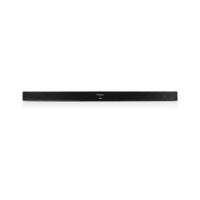
| Soundbar dimensions (WxDxH) | 950 x 70 x 54 mm |
| Subwoofer dimensions (WxDxH) | 184 x 320 x 420 mm |
| Receiver included | No |
| Product color | Black |
| Wall mountable | - |
| Connectivity technology | Wired |
| Soundbar weight | 1780 g |
|---|---|
| Subwoofer weight | 6750 g |