Home
Tevion
Scanner
FS 5000
Page 14
Tevion FS 5000 - Page 14
28 pages
Manual
Save Page as PDF
To Next Page
To Next Page
To Previous Page
To Previous Page
Loading...
12
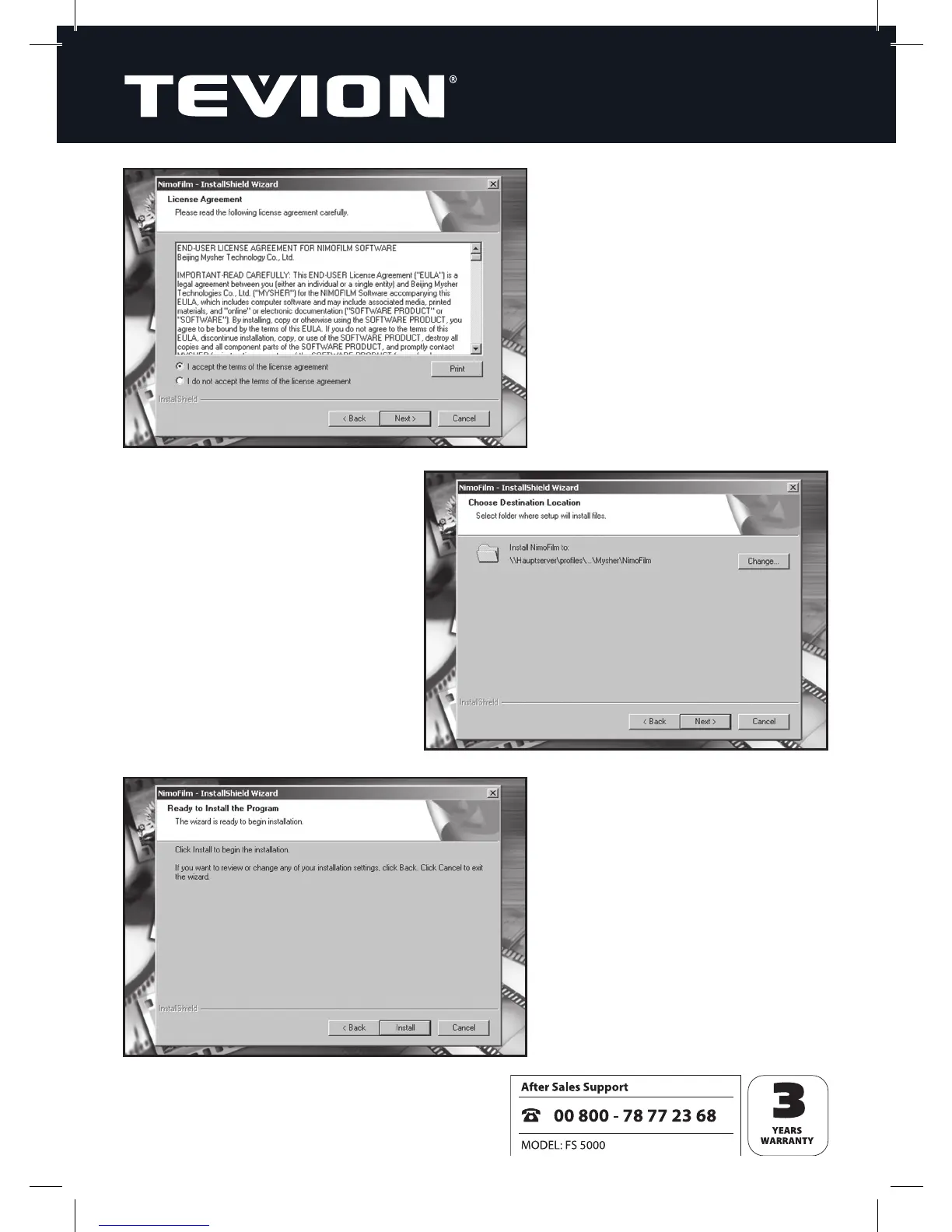
5.
Choose the folder in which the
program should be installed, then
click
“Next
”
.
6.
Click
“Install
”
to install the
pr
ogram.
4.
R
ead the license agr
eement
befor
e saying whether or not
you ar
e in agreement with it.
Then click
“Next
”
.
13
15
Table of Contents
Main Page
Contents of Box
3
Table of Contents
4
Safety Instructions
5
Overview of Device
7
Inserting Negatives
8
Inserting Slides
9
Removing Dust from Scanner Optics
11
Installing the Software
12
Connecting the Film Scanner to Your Computer
16
Using the Film Scanner
17
Film Types
19
Cleaning the Device
22
Disposal
22
Warranty and Service
23
System Requirements
23
Technical Data
24
Glossary
25
Related product manuals
Tevion Film Strip Scanner
29 pages


 To Next Page