ALARM SETTING:
To set alarm:
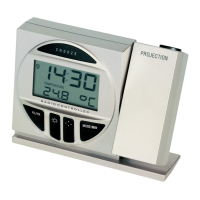
1. Press and hold the AL/HR button, the ((())) icon will appears and the AL icon on the LCD starts
flashing.
2. Set the hours and minutes of the desired alarm time by use of the AL/HR (hours) or the MODE/MIN
(minutes) buttons respectively.
3. Once the alarm time is set, press the SNOOZE button to confirm and exit or wait approximately 10
seconds for automatic timeout.
TO ACTIVATE / DEACTIVATE THE ALARM:
Press the AL/HR button. The alarm icon ((())) will appear/disappear indicating that it is ON or OFF.
Note: the maximum duration of the alarm ringing is 86 seconds.
SNOOZE SETTING:
To use the snooze feature, simply press the SNOOZE button when the alarm is sounding and the alarm will
snooze for 5 minutes before automatically sounding again. When the alarm is snoozing, the alarm icon ((()))
will start flashing indicating that the alarm is active but is in Snooze mode.


 To Next Page