11
Safety devices will keep monitoring the operation status of appliance. If a fault occurs, a fault code will
be displayed on the temperature display. Please quote the code displayed when contacting customer
service.
In general cases, fault may be eliminated by turning off and then turning on the hot water tap again. If
the fault cannot be eliminated, try to turn off the power supply and wait for 10 seconds before turning on
the appliance again. If the fault still persists, please contact Towngas Customer Service Hotline on
2880 6988.
In cold and humid weather, cloudy mist may occasionally emerge from the flue terminal. The white mist
is the condensate of water vapour in flue gases. This is a normal phenomenon.
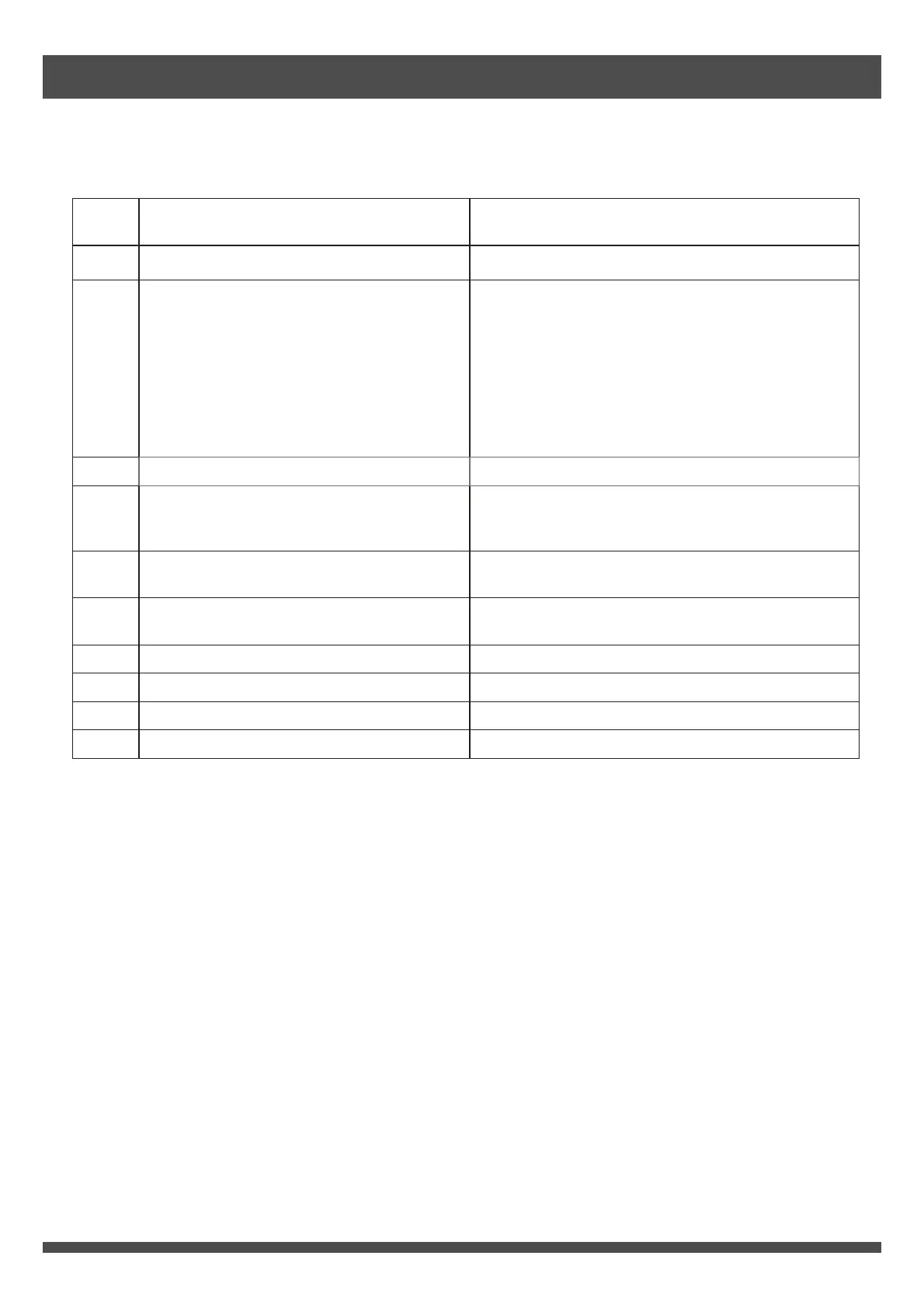
Fault
Code
Reasons of Failure Remedy
10 Abnormal air supply and flue exhaust Please contact customer service.
11 Ignition failure
After turning off the front panel control or
remote control (if applicable), check the gas
meter valve and/or gas supply valve of
appliance is fully turned on. Confirm the gas
supply is normal without suspension. Turn on
control again after confirmation. Turn on and
then turn off the hot water tap for several times.
Wait for 10 seconds each time. If the fault still
persists, please contact customer service.
12 Flame failure device activated Please contact customer service.
14
Remaining flame safety device
activated or heat exchanger overheat
protection device activated
Please contact customer service.
16 Over boiling protection device activated Please contact customer service.
32
Problem with hot water temperature
sensor
Please contact customer service.
34 Problem with temperature control unit Please contact customer service.
61 Problem with combustion fan Please contact customer service.
71 Problem with operating controls Please contact customer service.
72 Problem with operating controls Please contact customer service.
Troubleshooting


 To Next Page