— E11 —
Operation
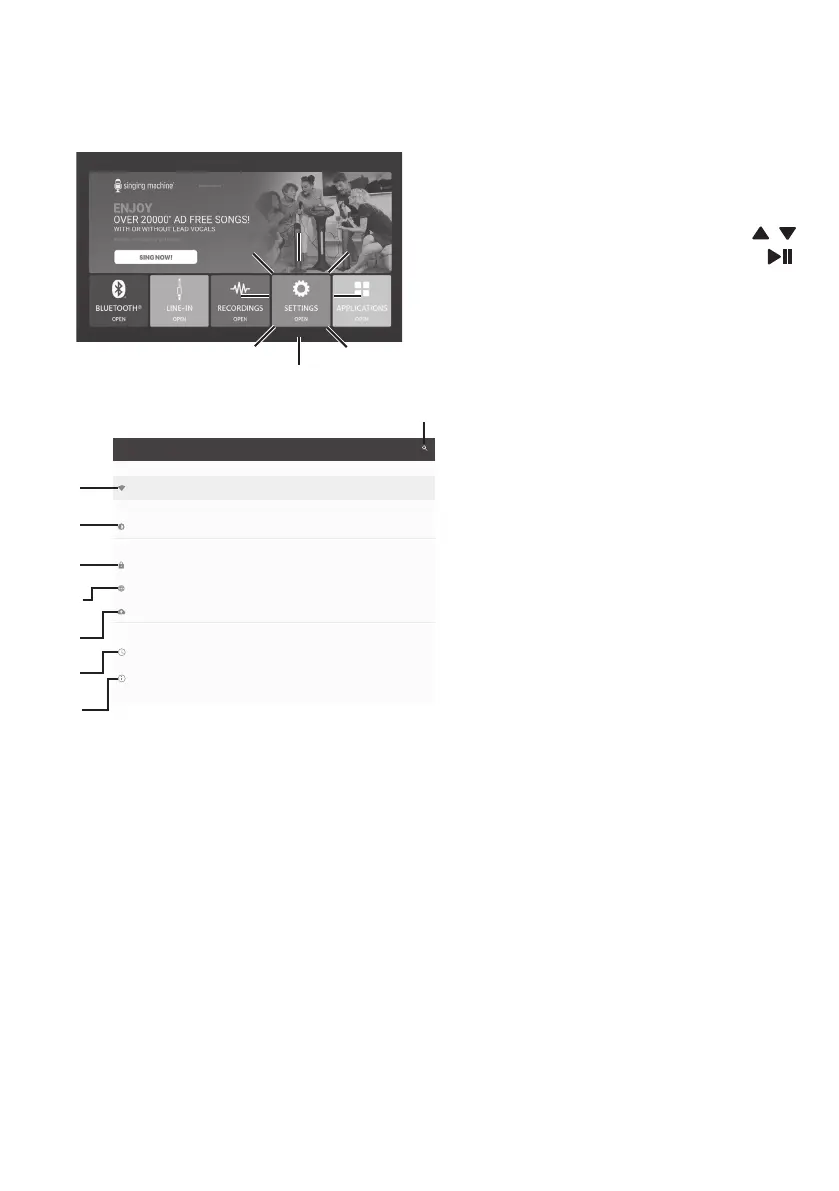
Wi-Fi & Settings
6
You can always change the Wi-Fi
network, by selecting the Wi-Fi
& SETTINGS icon on the touch
screen or by using the /
navigation buttons then press
(PLAY/PAUSE/ENTER) button
on the control panel to enter Wi-Fi
settings mode.
7
Select Wi-Fi and connect as
previously described, if you want
to connect to another network.
8
To adjust the brightness, sleep
time, font size, display size of
touch screen, and HDMI, select
Display.
9
This unit has a setting to block
installing unknown apps, you can
turn it on or off from Security.
10
Select LANGUAGES & INPUT to
change the Languages & Input.
11
Select Back up & Reset to reset
this unit to factory settings.
12
Select Date & Time to set the date
and time.
13
Select About Tablet to check the
current version.
14
Select to search the settings.
Backup & reset
Languages & input
English
Display
Adaptive brightness is OFF
Date & time
GMT+00:00
System
Security
Personal
Device
Wireless & networks
Settings
About tablet
Android 7.1.2
Wi-Fi
MyHome
V
W
X
at
ak
al
am
an



 To Next Page