— E12 —
Operation
Accessing the Singing Machine Karaoke Catalog
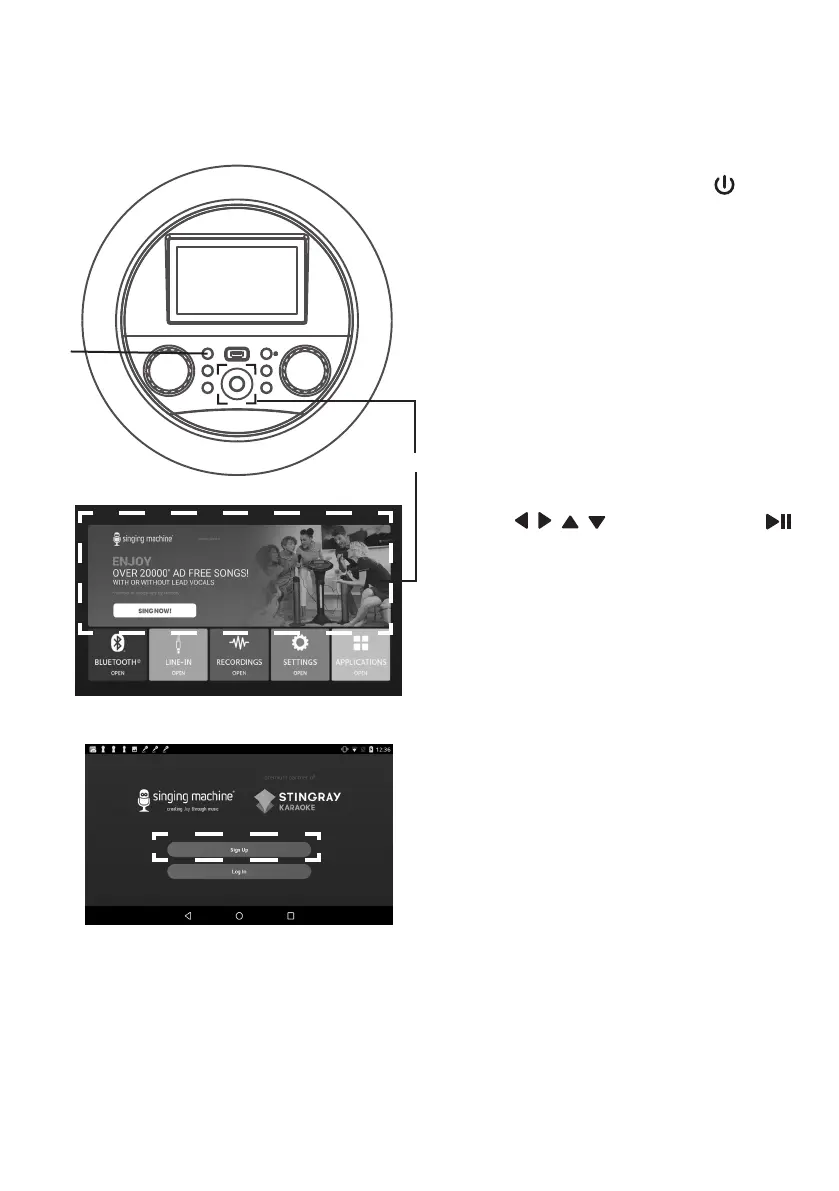
1
Connect the unit as described
previously. Press the (ON/
STANDBY) button to turn the unit
on. The function indicator will light
up.
2
Select Singing Machine Karaoke
icon using the touch screen or
/ / / Navigation and
(PLAY/PAUSE/ENTER) buttons
to enter Singing Machine Karaoke
Store page.
3
Select “Sign up” and follow the
on screen instructions to register
your machine.
4
After signing up, select "Log In"
to log into your account. Select
Singing Machine Karaoke icon at
home screen to go to the Singing
Machine Karaoke Store home
screen directly.
5
Select your favorite songs using
the touch screen to playback.
u
v


 To Next Page