— E18 —
Using a Bluetooth Device (Continued)
Operation
9
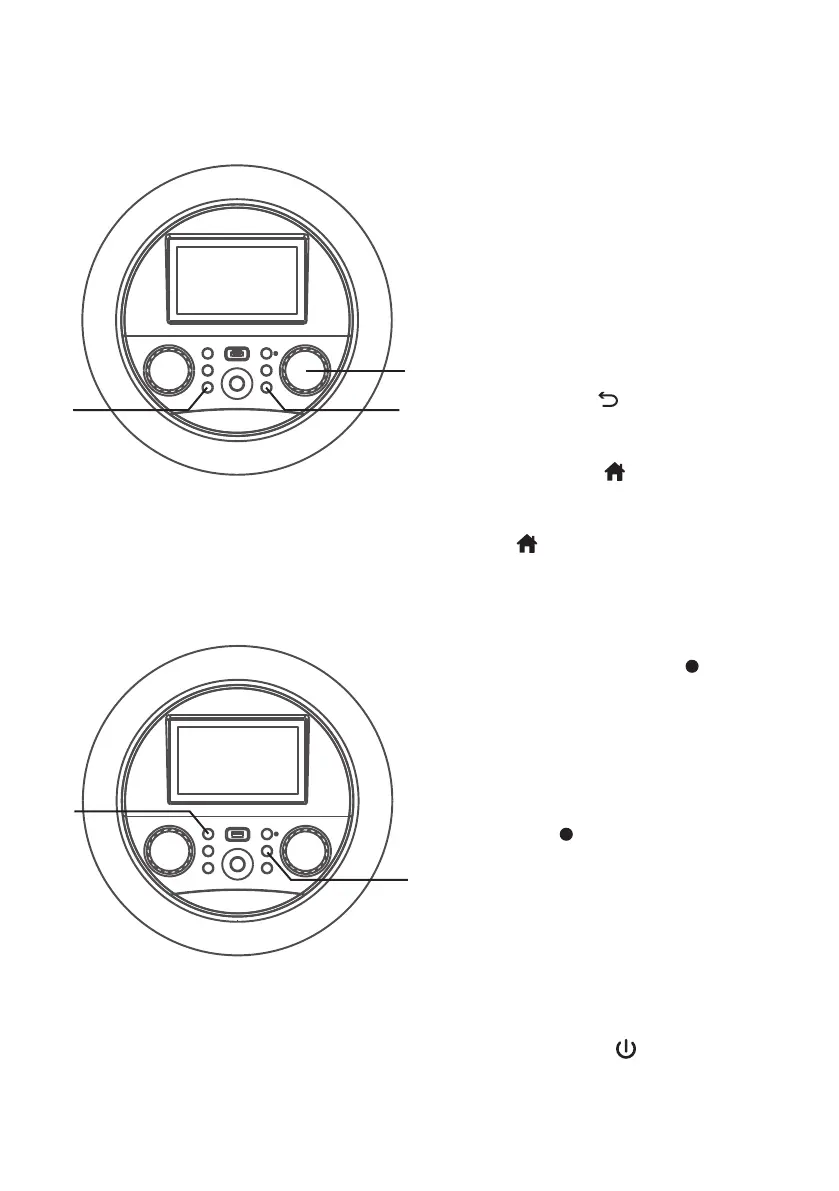
Adjust the MIC VOLUME/ECHO
control as desired. Increasing this
control will increase the volume of
both microphones.
Press then rotate the MIC
VOLUME/ECHO control as
desired to add an echo effect to
your voice. Rotate towards MAX
to increase the echo.
10
Press the (RETURN) button to
go back to the previous screen.
11
Press the (HOME) button to
go to the home screen from any
mode or screen. Press and hold the
(HOME) button to go to menu.
RECORD YOUR VOCAL PERFORMANCE:
12
To record your singing as well as
the music, press the (RECORD)
button. Recording will begin
and the recording indicator will
begin flashing red on-screen and
the function indicator will begin
flashing red.
When done recording, press
the (RECORD) button again;
the function indicator will stop
flashing.
Notes:
• You cannot start recording until the USB
drive is inserted.
• Insert the USB flash drive into the USB
slot on the unit.
13
Press the (ON/STANDBY)
button to turn off the unit. The
function indicator will turn off.
ak at
X
am
al


 To Next Page