— E17 —
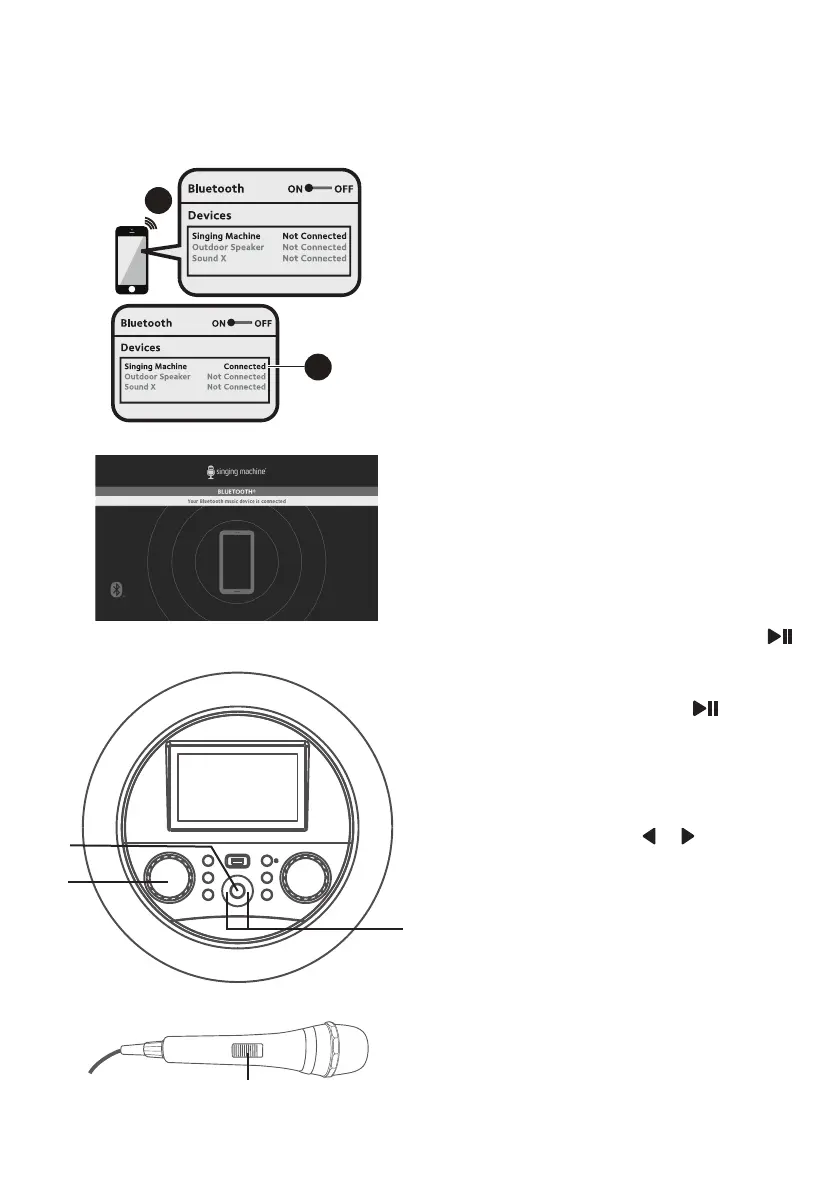
Please connect your Music Device
Your Music Device is connected
3
4
Please connect your Music Device
Your Music Device is connected
Operation
Using a Bluetooth Device (Continued)
4
The screen will show that your
Bluetooth device is connected
successfully followed by a paired
sound.
Notes:
• If your Bluetooth prompts you for a
passcode during the pairing process,
please enter “0000” to connect.
• On some Bluetooth devices, once pairing
is complete, select your Bluetooth device
as “Use as Audio Device” or similar.
• If connection is lost after successful
pairing, check to make sure the distance
between speaker and Bluetooth enabled
device does not exceed 30 feet/10
meters.
5
To control your Bluetooth device
from this unit, press the
(PLAY/PAUSE/ENTER) button
to start playback (music app must
be open). Press the (PLAY/
PAUSE/ENTER) button during
playback to pause the song.
6
SKIP:
Advance or go back one track
by pressing the or (Navigation)
button.
7
Adjust the MUSIC VOLUME
control as desired.
8
Connect microphone(s) and
slide the ON/OFF switch on the
microphone to the ON position.
W
U
V
y


 To Next Page