— E16 —
Operation
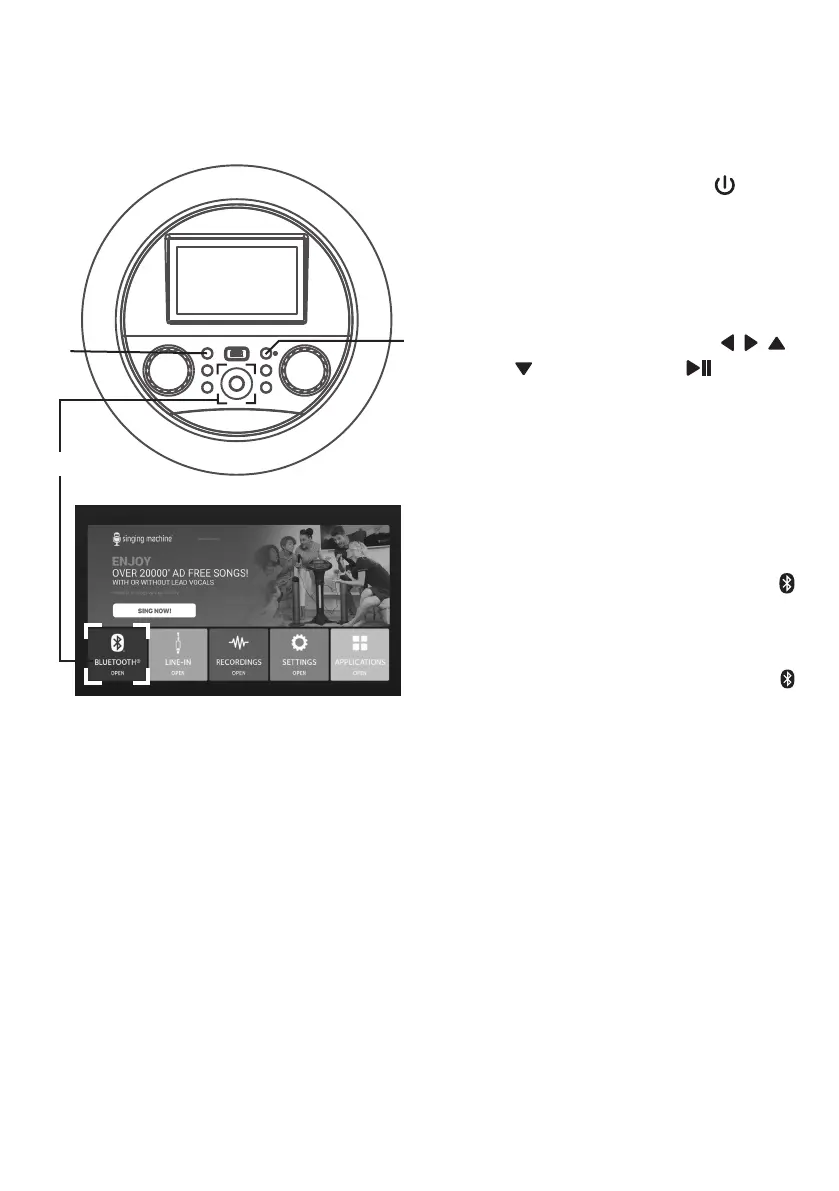
Using a Bluetooth Device
1
Connect the unit as described
previously. Press the (ON/
STANDBY) button to turn the
unit on. The function indicator will
light up.
2
Select BLUETOOTH icon using
the touch screen or / / /
navigation and (PLAY/
PAUSE/ENTER) buttons to enter
the bluetooth mode.
The unit automatically searches
for and pairs a previously paired
Bluetooth device (if previously
paired). If no previously paired
devices are present and/or
you want to connect a new
device, press and hold the
button; the indicator will flash
alternatively blue and red for 60
seconds.
Note: You can also press and hold the
button to disconnect any paired devices in
order to pair another device.
3
Turn on your device’s Bluetooth
option in settings to search for
a discoverable device with a
Bluetooth signal. Select “Singing
Machine” from the device results
on the Bluetooth menu.
Note: Also refer to the user manual of your
Bluetooth device for detailed instructions.
u
v
v


 To Next Page