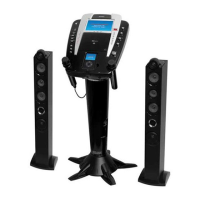
Your DVD / Compact Disc+Graphics Karaoke System It can let you be
the “star” as you sing along with your favorite recordings and hear your voice with the music through the system’s
speakers.
For your easy reference, listed here are some of the main features of this karaoke system:
- displays the lyrics with the tempo of music when playing CD+G discs.
- lets you replace the original singer's voice with your own voice when any
prerecorded, multiplex karaoke disc is played. To activate, just rotate Mic Volume to a comfortable listening level,
andAuto Voice Control for the best balance between playback and microphone levels.
- lets you adjust the balance between the prerecorded original singer's voice and the music if you
use a multiplex karaoke disc.
- lets you add an echo to enrich your voice for a concert hall effect.
- it plays DVD, , CD, MP3, Kodak picture CD and cassette
tapes.
- lets you share the music with your family and or friends.
- lets you connect another audio output component, such as an equalizer or a PA system.
Next, go to the section for the specific
operation you wish to perform.
- lets you turn the volume control clockwise or counter-clockwise until desired volume level
is obtained.
CD+Graphics discs
- lets you connect the headphones instead of using the built-in speakers.
Lyrics on TV Screen
Auto Voice Control (A.V.C.)
Balance Control
Echo Control
Multiple Karaoke Music Center
Built-In Speakers
Auxiliary Output Jacks
Master Volume Control
Headphone Jack
will provide you with fun and entertainment.
Before you attempt to use your unit, please read this manual thoroughly to familiarize yourself with all the features
available and the sections of the manual that describe their operation.
INTRODUCTION
8











 To Next Page