2
Operating instructions
YES
Confirmation
Press
OK
NO
Modify/
Change
Press
t u
1. Read text line
text/symbol
represents query
2. Make a decision
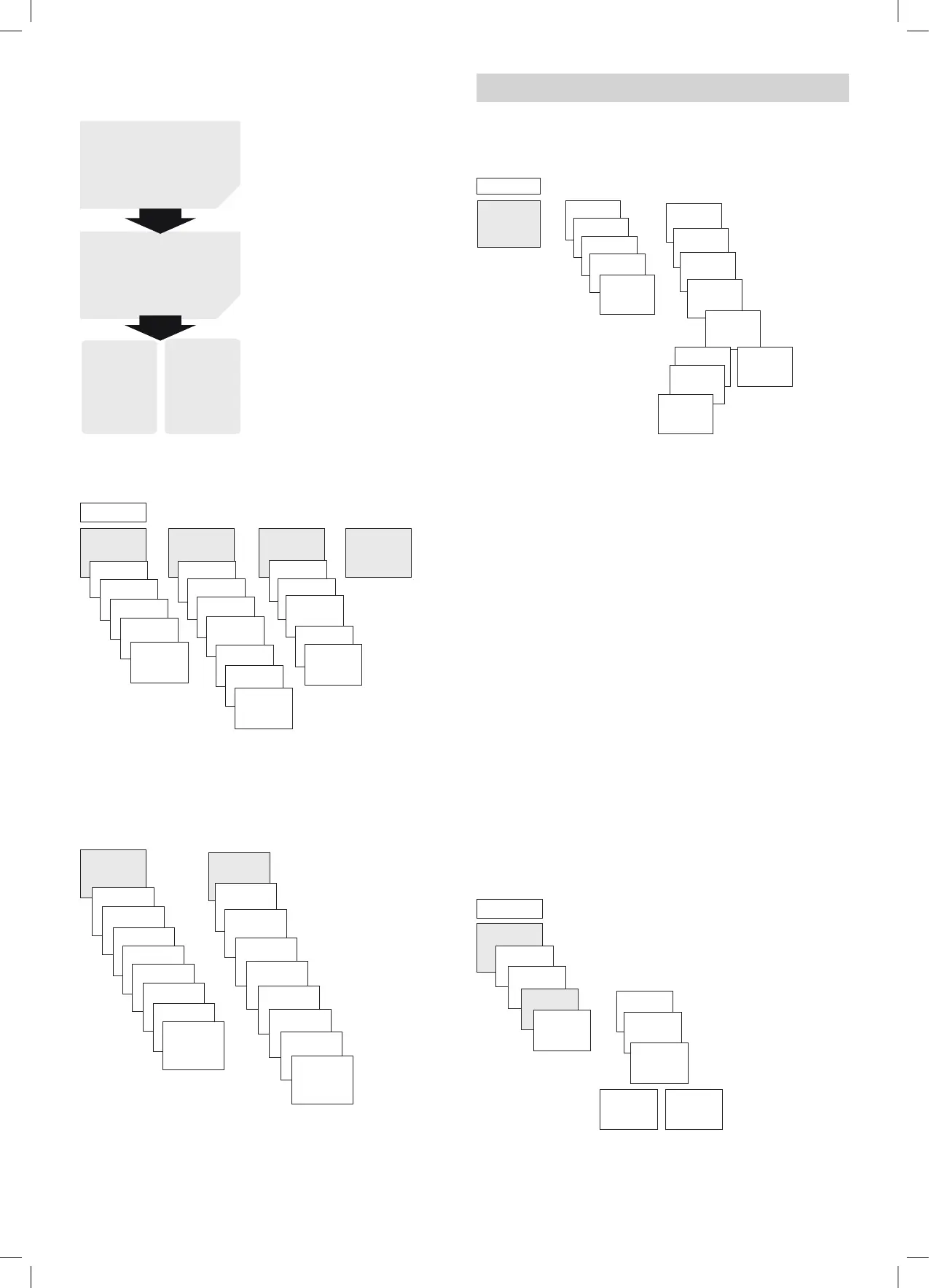
Overview of navigation menu
PROGRAM TIME/DATE OPTIONS END
TIME
SET DATE
SU--WI
WEEK
DAY
FORM DATE
FORM TIME
END
LANGUAGE
PIN
FACTORY
SETTINGS
INFO
END
MENU
u u u
NEW
CHECK
MODIFY
DELETE
END
Initial operation
L The device must be connected to the power supply so that
the time and date can be set.
ENGLISH
ESPANOL
ITALIANO
NORSK
SUOMI
SVENSKA
русский
HEBREW
u
DEUTSCH
FORM DATE
YEAR
MONTH
DAY
FORM TIME
HOUR
MINUTE
SU-WI EUROPE
24 02 20
off
9:40
46
Set language, date, time as well as summer/winter time
(SU-WI)
Press any button and display follows on screen (see gure)
5. Settings and functions
Set switching time
same switching
time for
several days =
block
Switching
time for
one day
PROGRAM
MENU
NEW
CHECK
MODIFY
DELETE
END
MEM FREE
42
ON
HOUR
MINUTE
MONDAY
SAVE
COPY
ADD
TUESDAY
u
u
SAVE
u
u
L A switching time always consists of a start time and an
end time
L There are 42 memory cells available
Example: Switch on sports hall lighting from Mon–Fri, 7:30 to
12:00 hrs
Press MENU
Select PROGRAM and press OK to conrm
Select NEW and press OK to conrm
Select ON (for turn-on time) or OFF (for turn-off time),
conrm with OK
Set required turn-on time (Mo–Fr, 7:30), conrm with OK
Select COPY, conrm with OK
ADD TUESDAY is displayed, conrm by pressing OK and also
conrm the days We, Th, Fr by pressing OK.
Continue with u until SAVE is displayed.
Conrm by pressing OK.
Repeat all steps for the turn-off time, however instead of
selecting ON with u select OFF and enter 12:00 for hour and
minute.
Change switching times
MENU
PROGRAM
u
MONDAY
MODIFY
HOUR
MODIFY
MINUTE
MODIFY
SINGLE
DAY
MODIFY
BLOCK
NEW
CHECK
MODIFY
DELETE
u
u
L You can either change or delete a block, i.e. a switching
time copied for several days (e.g. Mon-Fri) or a single
switching time







 To Next Page