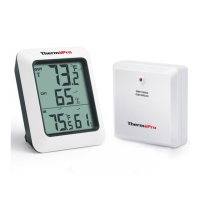
1.
2.
3.
4.
5.
Outdoor temperature
Outdoor humidity
Indoor temperature
Indoor humidity
Stand
6. Channel/SYNC
7. °C/°F/All time/24
8. MAX/MIN/Clear
9. Battery Compartment
1. LCD display: Displays the current outdoor humidity/
temperature and indoor humidity/temperature.
2. Battery Compartment: Holds 2 AAA batteries to
power the unit.
3. Tabletop and wall-mounted design.
4. Indoor Temperature range: -4°F~158°F(-20°C~70°C).
5. Humidity range: 10% ~ 99%.
6. Temperature display unit: °C and °F selectable.
7. Temperature Resolution: 0.1 °C/°F.
8. Humidity Resolution:1%.
9. Low battery indication.
Buttons
CHANNEL/SYNC: Press once to display the temperature
humidity readings from up to 3 outdoor remote sensors;
Press and hold this button to enter the synchronization mode.
and
MAX/MIN/CLEAR: Press once to display the maximum
minimum temperature and humidity; Press and hold to clear
the history data.
or
° display
in ºC or ºF; When the display shows the maxi-mum or
minimum temperature and humidity, press this button once
to set the maximum and minimum data record time interval
between ALL TIME or 24 hours. Note: Both ALL TIME and 24
hours represent the time since you last time manually
cleared the history data or installed a new battery.
F/°C/ALL-TIME/24: Press to select the temperature
-8-
-9-
ENEN


 To Next Page