
 Need help?
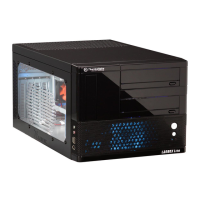
Do you have a question about the Thermaltake Lanbox Lite VF6000BWS and is the answer not in the manual?
Provides detailed specifications for the VF6000BWS and VF6000BNS models.
Instructions for accessing the internal components of the case by opening the top panel.
Guide for installing 5.25-inch devices like optical drives into the case bays.
Procedures for installing Hard Disk Drives (HDDs) into the case.
Steps for installing 3.5-inch devices, likely floppy drives or card readers.
Instructions on how to mount and connect the power supply unit.
Guidance on installing expansion cards like graphics cards and PCI devices.
Steps for installing coolant tubes for liquid cooling systems.
Instructions for installing an optional 60mm fan.
Steps to open and access the front panel of the computer case.
Guide for correctly installing the motherboard into the case, including standoff placement.
Instructions for connecting case LEDs and switches to the motherboard.
Guidance on connecting USB 2.0 and IEEE 1394 Firewire ports to the motherboard.
Instructions for connecting front panel audio jacks (HD Audio/AC'97) to the motherboard.
Features and specifications of recommended power supply and CPU cooler products.
 General
| Brand | Thermaltake |
|---|---|
| Model | Lanbox Lite VF6000BWS |
| Category | Computer Accessories |
| Language | English |

 To Next Page